
Special Offers

- 2,700 K Warm Light- Set off a cozy and comfortable vibe for your home or any other public space
- 1~100% Dimmable - Dim to any brightness you desire for constantly-changing needs.
- High Lumen - Emits 350 lm light that is bright enough to shed light on any object
- GU10 Lamp Base - Compatible with any GU10 fixtures well. No extra burden for your first attempt.
- Grouping - Control all the Tapo Smart Spotlights by just one click on App
- Energy Saving - Reduce energy use by operating energy savingly, without losing brightness or quality.
- Remote Control - Instantly turn the spotlight on/off wherever you are via the Tapo App.
- Schedule - Preset a fixed schedule to manage your smart devices automatically.
- Timer - Create countdown timer lists for more precise time control.
- Voice Control - Manage your Smart Spotlights with voice commands via Amazon Alexa or Google Assistant.
- Easy Setup & Use - No hub required, set up quickly and manage easily through the free App.
Specifications
- Wi-Fi Protocol: IEEE 802.11 b/g/n
- Wi-Fi Frequency: 2.4 GHz
GENERAL
- Lamp Base: GU10 fitting
- Product Dimensions: D50 x 55.2 mm
- Operating Temperature: 0 ºC~ 40 ºC
- Operating Humidity: 10%~90%RH, Non-condensing
- Weight: 51 g (package included)
- Certifications: CE, ERP, RoHS, RCM
TECHNICAL SPECIFICATIONS
- Form Factor: GU10
- Brightness: 350 Lumens (50 W Equivalent)
- Dimmable: Yes (via app and voice only)
- Light Beam Angle: 40°
- SDCM: < 6
- Switching Cycles: 15,000
- Lifetime: 15,000 Hrs
- Weighted Energy Consumption: 3 kWh/1,000 h
- Energy Class: D
- Voltage: 220-240 V, 50/60 Hz
- Colour Temperature: 2,700 K
- Warm-up Time up to 95%: ≤1 s
- Colour Rendering Index: ≥ 80
- Wattage: 2.9 W
- Standby Power: 0.2 W

Features
- 8× 10/100/1000 Mbps RJ45 ports.
- 4× PoE+ ports transfer data and power on individual cables.
- Works with IEEE 802.3af/at compliant PDs.
- Plug and Play, no configuration and installation required.
- 802.1p/DSCP QoS enable smooth latency-sensitive traffic.
- Supports PoE power up to 30 W for each PoE port.
- Supports PoE power up to 64 W for all PoE ports*.
- Up to 250m data and power transmitting range under Extend Mode**
- PoE Auto Recovery guarantees stable operation of PoE devices by automatically rebooting the dropped or unresponsive PD devices
Learn more about TP-Link PoE technology >
| HARDWARE FEATURES | |
|---|---|
| Interface | • 8× 10/100/1000 Mbps RJ45 Ports • AUTO Negotiation • AUTO MDI/MDIX |
| Network Media | • 10BASE-T: UTP category 3, 4, 5 cable (maximum 100m) • EIA/TIA-568 100Ω STP (maximum 100m) • 100BASE-TX: UTP category 5, 5e cable (maximum 100m) • EIA/TIA-568 100Ω STP (maximum 100m) • 1000BASE-T: UTP category 5, 5e, 6 or above cable (maximum 100m) • EIA/TIA-568 100Ω STP (maximum 100m) |
| Fan Quantity | Fanless |
| Physical Security Lock | Yes |
| External Power Supply | External Power Adapter(Output: 53.5VDC / 1.31A) |
| Packet Forwarding Rate | 11.904 Mpps |
| PoE Ports (RJ45) | • Standard: 802.3 af/at compliant • PoE Ports: Ports 1–4 • Power Supply: 64 W |
| Mac Address Table | 4K |
| Jumbo Frame | 16 KB |
| Switching Capacity | 16 Gbps |
| Dimensions ( W x D x H ) | 6.7×3.9×1.1 in (171×98×27 mm) |
| Max Power Consumption | • 4.7 W (220/50 Hz no PD connected) • 74.39 W (220/50 Hz with 64 W PD connected) |
| Max Heat Dissipation | • 16.03 BTU/h (no PD connected) • 253.67 BTU/h (with 64 W PD connected) |
| SOFTWARE FEATURES | |
|---|---|
| Transmission Method | Store-And-Forward |
| Advanced Functions | • Compatible With IEEE 802.3af/at Compliant PDs • IGMP Snooping • Mac Address Auto-Learning And Auto-Aging • IEEE802.3x Flow Control • 802.1p/DSCP QoS • Extend Mode Button (Ports 1–2, Up to 250 m PoE power supply and data transmission) • PoE Auto Recovery (Ports 1-4) |
| OTHERS | |
|---|---|
| Certification | CE, FCC, RoHS |
| Environment | • Operating Temperature: 0–40 ℃ (32–104 ℉); • Storage Temperature: -40–70 ℃ (-40–158 ℉) • Operating Humidity: 10–90% RH non-condensing • Storage Humidity: 5–90% RH non-condensing |
What's in the box?
1 x TL-SG1008P
1 x Power Adapter
1 x Installation Guide
Resources

What's in the box?
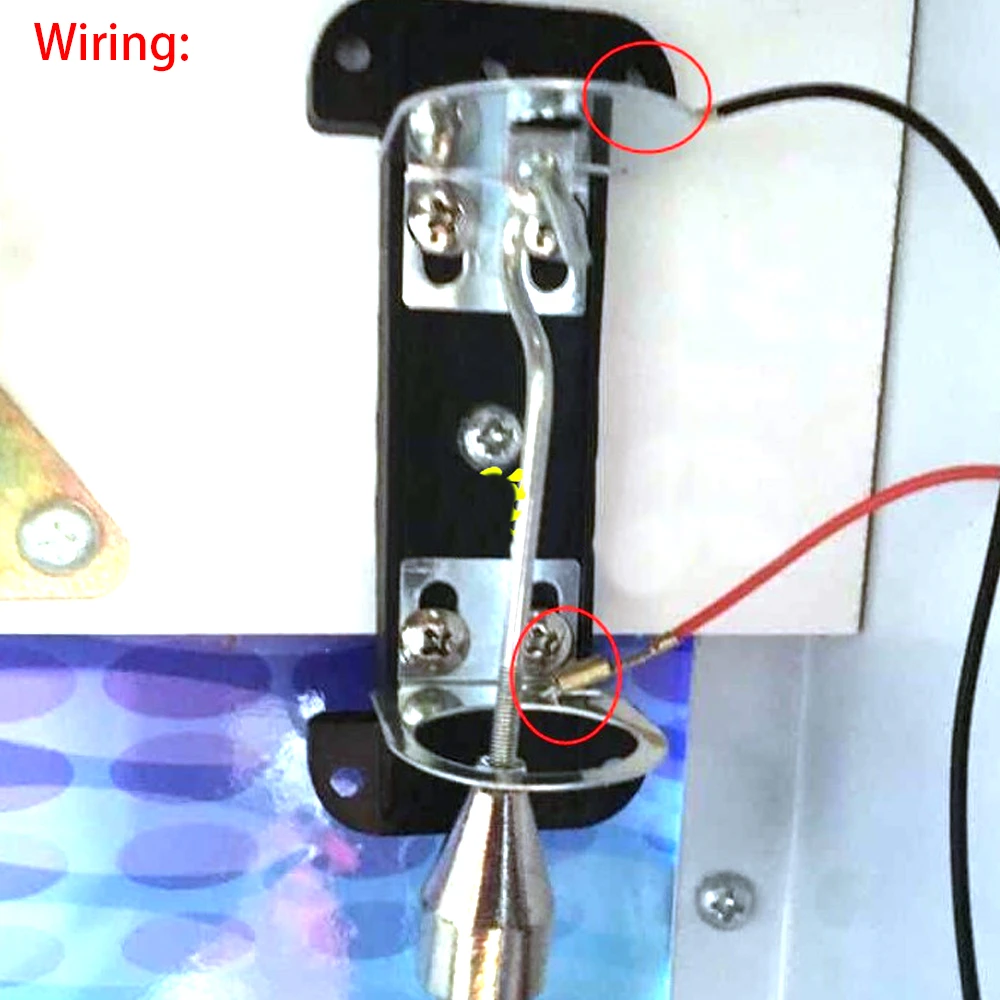
1 x arcade balancer sensor
Resources

Proud of your Raspberry Pi? Let the world know!
This eye catching sticker set will brighten up any laptop, desktop, monitor, car bumper, coffee machine, Anglepoise lamp, or anything else you can think of!
What's in the box?
1 x Set of 6 stickers

Proud of your Raspberry Pi? Let the world know!
This eye catching sticker set will brighten up any laptop, desktop, monitor, car bumper, coffee machine, Anglepoise lamp, or anything else you can think of!
What's in the box?
1 x Set of 6 stickers

Proud of your Raspberry Pi? Let the world know!
This eye catching sticker set will brighten up any laptop, desktop, monitor, car bumper, coffee machine, Anglepoise lamp, or anything else you can think of!
What's in the box?
1 x Set of 6 stickers

The MonkMakes Switch for micro:bit is a solid-state (no moving parts) switch that allows an output of a micro:bit to turn things on and off.
This board can be used to switch low voltage devices such as light bulbs, a motor, a small heating element or even a string of 12V LED lighting. The voltage needs to be kept under 16V, but the switch will automatically protect itself against too much current.
What's in the box?
1 x Solid-state Switch for micro:bit
Resources
Hi Res Images (Google File Share)
For further help please email [email protected]

Features
- 3 Way multiplug with dual USB
- Surge protected 450 Joules
- Safety On-off illuminated reset button
- 0.5m Braided cord
- 16A Rating
- 2.4A USB ports
What's in the box?
1 x Switched 3-Way Surge Protected Multiplug
2 x Safety Plug Socket Covers
4 x Self Adhesive Cable Clips
6 x 3M Double Sided Mounting Tape pieces

Please note: Raspberry Pi, camera board, camera cable and tripod are NOT included.
An affordable, simple solution to mounting your Raspberry Pi to your Raspberry Pi High Quality Camera, Global Shutter Camera or HQ M12 Mount Camera.
This sleek and transparent plate provides a secure and stable platform for attaching your camera to your Raspberry Pi. With its easy assembly process and included hardware, you can quickly and effortlessly set up your camera system.
The clear acrylic construction adds a touch of modernity while allowing for easy visibility of the camera. Enhance your photography and video projects with this durable and aesthetically pleasing mounting plate.
Combine with our affordable flexible tripod for a great project foundation!
What's in the box?
1 x Mount plate
8 x 5mm male to female brass spacers
8 x M2.5 SS nuts
8 x M2.5x4mm SS screws
Assembly guide
1. Install the standoffs first using their male threaded sides. Four on one side of the plate to mount the RPi3/4/5 and four on the other side of the plate to mount the camera. Secure them in place by tightening their nuts.
2. Mount the RPi board and camera board using the screws. (In no particular order)
3. Connect your RPi and HQ cam with the ribbon cable.

- Great for electronic projects and kits.
- Perfect use for home, office and industry electrical equipment and electrical appliances
- Size: 10mm
- Voltage: 1.8V ~ 2.2V for Red & Yellow, 3.0V ~ 3.4V for Blue, Green & White
- Current: 20 mA
- Luminous Intensity: 5000 MCD
- Colour: WHITE
- Lens Colour : Clear
Resources
Python library
Introduction

The mini Breakout Module expands the capabilities of the Micro:bit development platform by providing access to more pins allowing for more creative and complex projects using more components.
What's in the box?
1 x Mini Breakout Module for Micro:bit

What's in the box?
1 x roll of masking tape

Specifications
- Material: Acrylic
- Colour: Transparent
- Layer: 3-Layer
- Compatible Model: For Raspberry Pi 5/4/3/2 model B
Convenient access to all external ports, like USB, GPIO and SD card.
What's in the box?
4 x Acrylic Boards (not including Raspberry Pi boards)
1 x set Screws and Nuts
3 x 30mm fans that get powered from GPIO(Not the RPi5 fan adapter)
1 x Fan Cover
You might also like to add the RPi 5 fans that are OS controlled.

A perfect project for your Creality Falcon Laser. Get those wishlist projects going!
What's in the box?
10 x keyrings

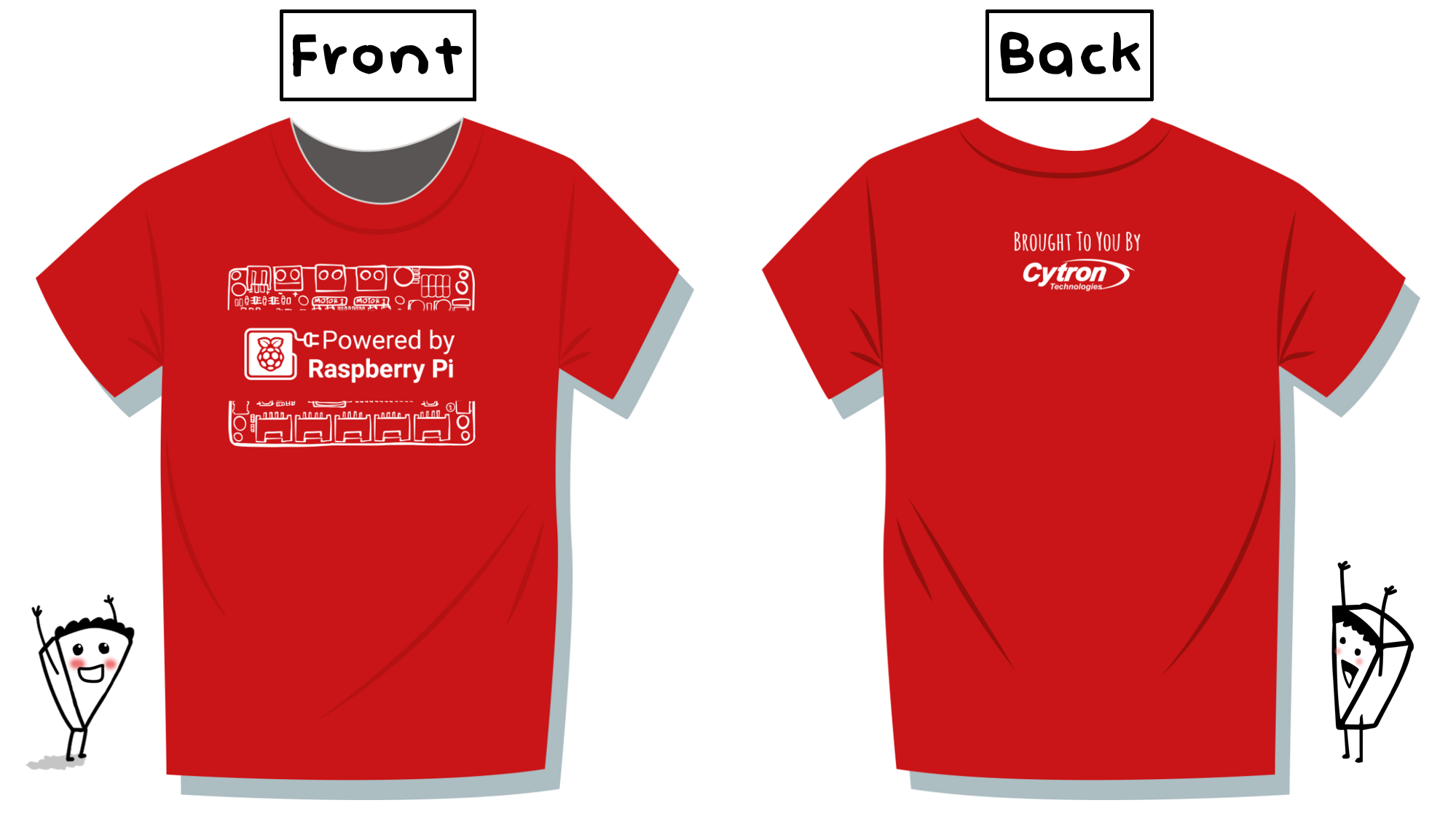
Features
- The new "Powered by Raspberry Pi" logo T-shirt from Cytron Technologies!
- 100% cotton
- RED colour with WHITE colour design
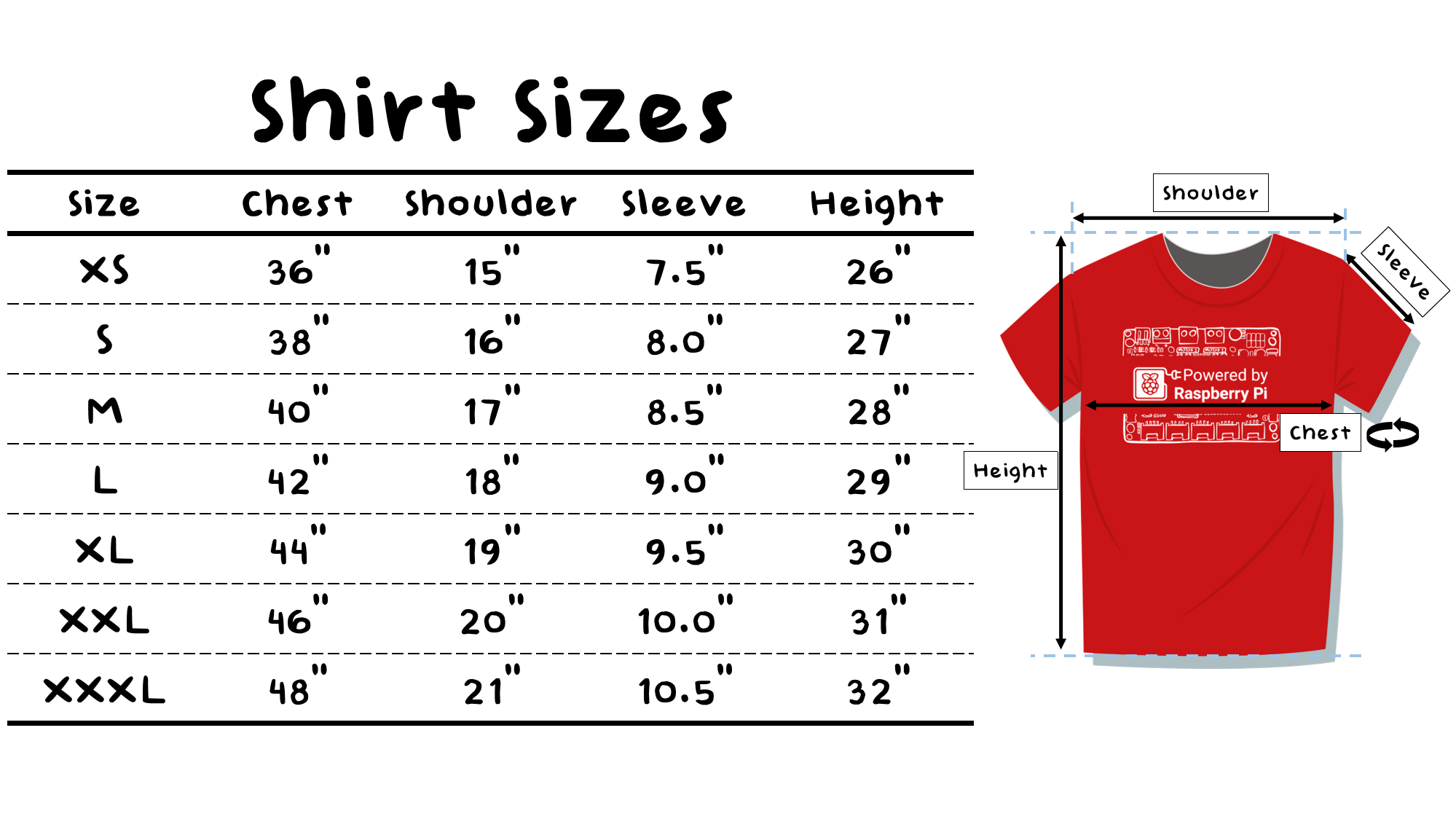
Available Sizes
- Extra Small (XS): 36" or 91.44cm for the Chest, 26" or 66.04cm for Height
- Small (S): 38" or 96.52cm for the Chest, 27" or 68.58cm for Height
- Medium (M): 40" or 101.6cm for the Chest, 28" or 71.12cm for Height
- Large (L): 42" or 106.68cm for the Chest, 29" or 73.66cm for Height
- Extra Large (XL): 44" or 111.76cm for the Chest, 30" or 76.2cm for Height
- Double Extra Large (XXL): 46" or 116.84 cm for the Chest, 31" or 78.74 cm for Height
- Triple Extra Large (XXXL): 48" or 121.92 cm for the Chest, 32" or 81.28 cm for Height
What's in the box?
1 x T-shirt "Powered By Raspberry Pi"
Features
- The new "Powered by Raspberry Pi" logo T-shirt from Cytron Technologies!
- 100% cotton
- RED colour with WHITE colour design
Available Sizes
- Extra Small (XS): 36" or 91.44cm for the Chest, 26" or 66.04cm for Height
- Small (S): 38" or 96.52cm for the Chest, 27" or 68.58cm for Height
- Medium (M): 40" or 101.6cm for the Chest, 28" or 71.12cm for Height
- Large (L): 42" or 106.68cm for the Chest, 29" or 73.66cm for Height
- Extra Large (XL): 44" or 111.76cm for the Chest, 30" or 76.2cm for Height
- Double Extra Large (XXL): 46" or 116.84 cm for the Chest, 31" or 78.74 cm for Height
- Triple Extra Large (XXXL): 48" or 121.92 cm for the Chest, 32" or 81.28 cm for Height
What's in the box?
1 x T-shirt "Powered By Raspberry Pi"

What's in the box?
1 x Constructor - Baron Retro Plane

What's in the box?
1 x Constructor - Steamer Train Engine

What's in the box?
1 x Creality WIFI Cloud Box 2.0 With TF Card

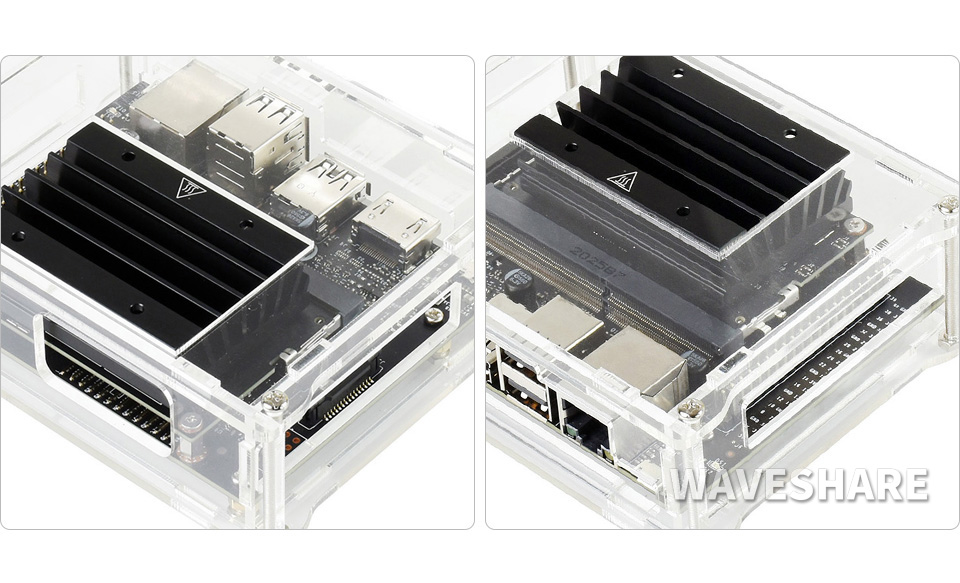
Jetson Nano Acrylic Case
Specialized For Jetson Nano 2GB Developer Kit, Simple & Nice
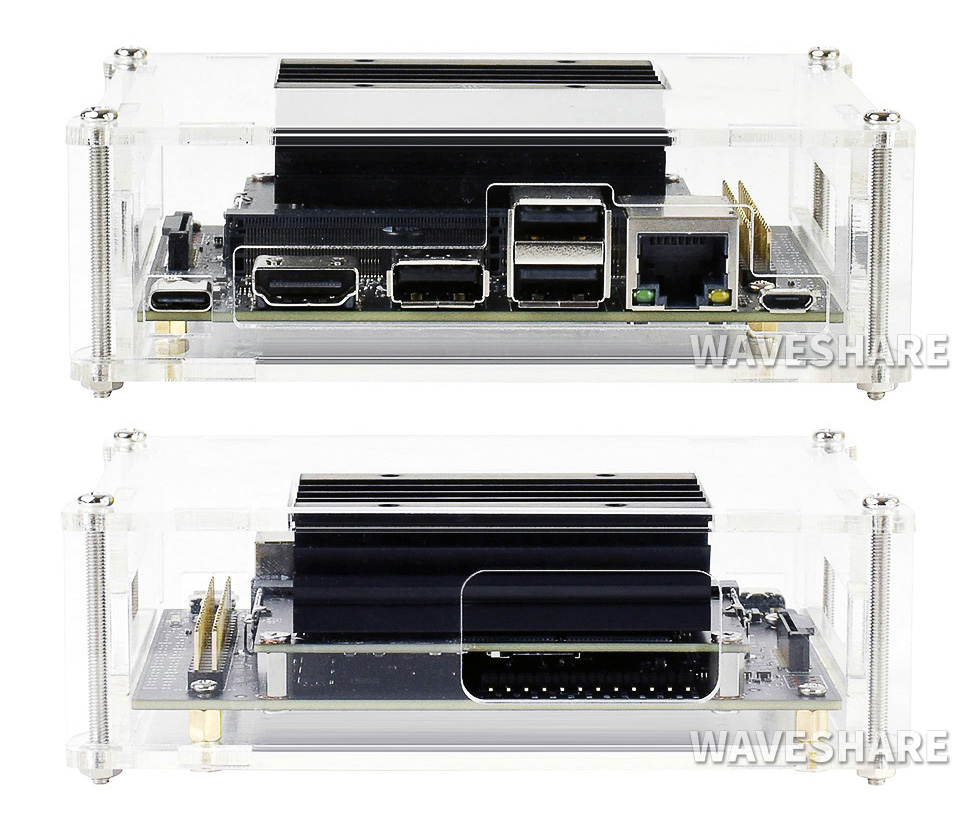
Cut-Outs For The Essential Ports And TF Card
Easy Access For GPIO And Camera Port
Outline Dimensions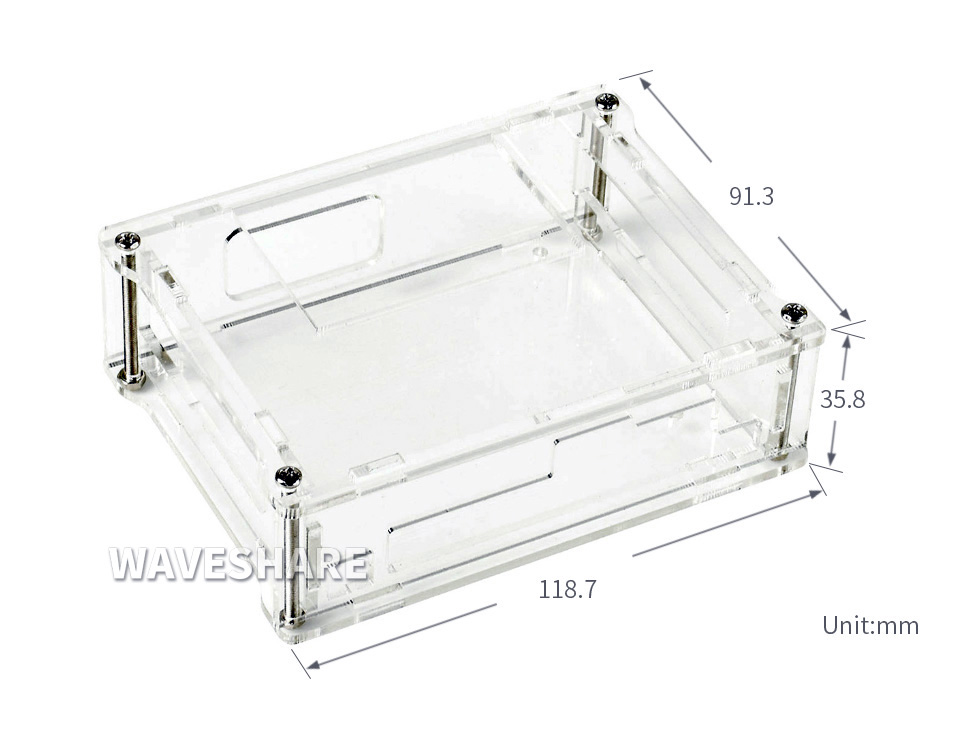
What's in the box?
1 x Acrylic Clear Case for Jetson Nano 2GB Developer Kit (Jetson Nano 2GB Developer Kit not included)
Resources
Wiki: Jetson_Nano_Case_(D)