
Special Offers


Quickly and easily get started with learning electronics using the Arduino Starter Kit, which have a universal appeal to STEAM fans at home, businesses in STEAM industries, and schools alike. No prior experience is required, as the kits introduce both coding and electronics through fun, engaging, and hands-on projects. You can use the starter kit to teach students about current, voltage, and digital logic as well as the fundamentals of programming. There’s an introduction to sensors and actuators and how to understand both digital and analog signals. Within all this, you’ll be teaching students how to think critically, learn collaboratively, and solve problems.
Projects you can make:
- 01 GET TO KNOW YOUR TOOLS an introduction to the basics
- 02 SPACESHIP INTERFACE design the control panel for your starship
- 03 LOVE-O-METER measure how hot-blooded you are
- 04 COLOR MIXING LAMP produce any color with a lamp that uses light as an input
- 05 MOOD CUE clue people in to how you're doing
- 06 LIGHT THEREMIN create a musical instrument you play by waving your hands
- 07 KEYBOARD INSTRUMENT play music and make some noise with this keyboard
- 08 DIGITAL HOURGLASS a light-up hourglass that can stop you from working too much
- 09 MOTORIZED PINWHEEL a colored wheel that will make your head spin
- 10 ZOETROPE create a mechanical animation you can play forward or reverse
- 11 CRYSTAL BALL a mystical tour to answer all your tough questions
- 12 KNOCK LOCK tap out the secret code to open the door
- 13 TOUCHY-FEEL LAMP a lamp that responds to your touch
- 14 TWEAK THE ARDUINO LOGO control your personal computer from your Arduino
- 15 HACKING BUTTONS create a master control for all your devices!
Once you’ve mastered this knowledge, you’ll have a palette of software and circuits that you can use to create something beautiful, and make someone smile with what you invent. Then build it, hack it and share it. You can find the Arduino code for all these projects within the Arduino IDE, click on File / Examples / 10.StarterKit.
Have a look at these video tutorials for a project by project walk-through.
Pictures shown are for illustration purpose only. Actual product may vary due to product enhancement.
What's in the box?
1 x Projects Book (170 pages),
1 x Arduino Uno,
1 x USB cable,
1 x Breadboard 400 points,
70 x Solid core jumper wires,
1 x Easy-to-assemble wooden base,
1 x 9v battery snap,
1 x Stranded jumper wires (black),
1 x Stranded jumper wires (red),
6 x Phototransistor,
3 x Potentiometer 10kOhms,
10 x Pushbuttons,
1 x Temperature sensor [TMP36],
1 x Tilt sensor,
1 x alphanumeric LCD (16x2 characters),
1 x LED (bright white),
1 x LED (RGB),
8 x LEDs (red),
8 x LEDs (green),
8 x LEDs (yellow),
3 x LEDs (blue),
1 x Small DC motor 6/9V,
1 x Small servo motor,
1 x Piezo capsule [PKM17EPP-4001-B0],
1 x H-bridge motor driver [L293D],
1 x Optocouplers [4N35],
2 x Mosfet transistors [IRF520],
5 x Capacitors 100uF,
5 x Diodes [1N4007],
3 x Transparent gels (red, green, blue),
1 x Male pins strip (40x1),
20 x Resistors 220 Ohms,
5 x Resistors 560 Ohms,
5 x Resistors 1 kOhms,
5 x Resistors 4.7 kOhms,
20 x Resistors 10 kOhms,
5 x Resistors 1 MOhms,
5 x Resistors 10 MOhms
Resources
Need Help?
- On the Software on the Arduino Forum
- On the Product itself through our Customer Support

The Creality Falcon2 Pro S 40W Laser Engraver is designed for creators who demand speed, quality, and flexibility. With intelligent features like autofocus, smart air assist, and batch production mode, it’s your ultimate tool for serious laser work.
Rock solid
The frame of the Creality Falcon2 Pro S 40W Laser Engraver is made from aerospace-certified aluminium. Your laser remains exceptionally stable even at top speed and delivers razor-sharp results.
Large Work Area
Small production or large one-off? With the 355mm x 390mm work area, anything goes here. More space offers more possibilities and leads to more productivity.
High Speed and High Finish
The Creality Falcon2 Pro S 40W Laser Engraver cuts at high speeds of up to 600mm/s and produces top-quality results thanks to clever rail guidance.
40W Laser Power
Eight 5.5W lasers combine to form a powerful 40W laser module. This allows you to cut 20mm basswood or coloured acrylic in a single pass.
Intelligent Autofocus
Manual fiddling is a thing of the past. The intelligent autofocus included with the Creality Falcon2 Pro S 40W Laser Engraver automatically ensures perfect focus at the touch of a button.
Auto Cut-Through & Smart Camera
You set the target, the Creality Falcon2 Pro S 40W Laser Engraver does the rest. Precise cuts, zero waste. Position your designs at the touch of a button thanks to the built-in smart camera.
Optional Air Purifier
Two powerful extra fans immediately extract harmful vapours with the optional Air Purifier, including pre-filter, HEPA filter and activated carbon filter.
Integrated Air assist
The integrated air assist system continuously clears smoke and debris from the engraving path, improving cut quality and reducing surface burn marks. This is particularly valuable when producing signage, decorative items or fine-detail engravings where edge quality matters
Safety First
Thanks to various safety features, you are optimally equipped for every project:
- Fully enclosed housing with class 1 laser protection and double light filtering,
- Lid-Open Safety Stop,
- Smart Air Assist,
- Emergency stop switch,
- 5-flame sensors.
Versatile monitoring for more safety control:
- Airflow Monitoring: Displays the current airflow rate, allowing the airflow to be adjusted to specific engraving requirements.
- Flame Monitoring: If a flame is detected, the display flashes red and triggers an alarm, causing the device to switch off immediately.
- Lens monitoring: An alarm is triggered if the lens becomes heavily soiled, which prevents lens breakage and frequent replacement
| Device size | 664mm x 570mm x 328mm |
| Weight | 27.88 kg |
| Working space | 355mm x 290mm |
| Max. device power | 240 W |
| Input voltage | 100-240 V~ 50-60 Hz |
| Output voltage | DC 24.0 V 10.0 A |
| Operating temperatures | 5-35 °C |
| Laser source | Diode laser |
| Laser wavelength | 455±15 nm |
| Laser spot | 0.08 x 0.12 mm |
| Laser engraving software | Falcon Design Space, LightBurn, LaserGRBL |
| Operating system | Windows, MacOS |
| Supported materials | Cardboard, Wood, Bamboo, Rubber, Leather, Fabric, Acrylic and more! |
What's in the box?
1 x Creality Falcon2 Pro S 40W Laser Engraver
Unlock precision, speed, and safety with the Creality Falcon A1 Pro 20W Dual-Laser Engraver & Cutter. Designed for makers, educators, and professionals, it combines a powerful 20W blue laser for deep cutting with an optional 2W IR laser for ultra-fine detail work on metals and jewelry. With AI autofocus, blazing 600 mm/s speeds, and advanced safety features, the Falcon A1 Pro makes engraving effortless, accurate, and safe.
Key Features
Dual-Laser Flexibility
Switch between a 20W blue laser for wood, acrylic, and leather, or the optional 2W IR laser for ultra-fine engraving on metals and delicate materials.
AI-Powered Autofocus
Autofocuses in just 3 seconds with precision better than 0.012″ (0.3 mm)—no manual adjustments needed.
Fast, Efficient Performance
Engraves up to 600 mm/s, cutting project time by up to 3× faster than previous models.
Smart App Control & Alerts
Monitor jobs in real-time via your phone with AI flame detection for instant safety alerts.
Enclosed & Safe Design
Features 8 safety shields and a compact enclosed body—ideal for classrooms, studios, and home workshops.
Touchscreen & Modular Build
User-friendly interface with a smart touch display and compact, all-in-one modular design.
Technical Specifications
- Laser Power: 20W Blue Laser (optional 2W IR module available)
- Engraving Speed: Up to 600 mm/s
- Autofocus Accuracy: <0.012″ (0.3 mm)
- Supported Materials: 350+ (wood, acrylic, leather, fabric, stainless steel, anodized aluminum, etc.)
- Safety Features: 8 safety shields, AI flame detection, enclosed design
- Machine Dimensions: 567 × 468 × 211 mm (685 mm with touchscreen)
- Weight: 16.8 kg
- Power Supply: 100–240 V, 50–60 Hz
What's in the box?
1 x Creality Falcon A1 Pro 20W Laser Engraver
Introducing the latest additions to the esteemed Arduino UNO family, the Arduino UNO R4 range. Building upon the beloved features of the UNO family, the UNO R4 range boasts a potent 32-bit microcontroller and remarkable new functionalities, making it an exceptional prototyping tool suitable for beginners and experienced electronics enthusiasts alike. This particular variant is the UNO R4 WiFi.
What sets the Arduino UNO R4 WiFi apart and makes it truly remarkable?
The Arduino UNO line is renowned for its user-friendly, robust, and accessible platform, and with the UNO R4 WiFi, it raises the bar even higher, establishing a new standard for prototyping and learning tools. Featuring a 32-bit microprocessor with increased memory, connectors, and connectivity options compared to previous generations, coupled with WiFi and Bluetooth Low Energy capabilities, a fully-addressable LED Matrix, Qwiic I2C connector, real-time clock (RTC), and diagnostics for runtime errors, the UNO R4 WiFi is the ideal solution for all your prototyping requirements.
Impressive New Features
The UNO R4 WiFi introduces a host of remarkable peripherals, including a 12-bit digital-to-analog converter (DAC), Controller Area Network (CAN) BUS, operational amplifier (OP AMP), and Serial Wire Debug (SWD) port. These additions unlock a realm of new possibilities, allowing makers to create innovative solutions and advanced projects.
Seamless Wireless Connectivity
With the UNO R4 WiFi, you can effortlessly embark on IoT projects. Equipped with the remarkable ESP32-S3-MINI coprocessor that enhances the capabilities of the RA4M1 microcontroller, the UNO R4 WiFi enables easy connection to the internet through its built-in WiFi and Bluetooth Low Energy functionality.
Onboard LED Matrix
The UNO R4 WiFi features a vibrant 96-dot LED matrix, perfectly suited for creative projects involving animations or visualizing sensor data without the need for additional hardware.
Qwiic I2C Connector
Including an industry-standard Qwiic I2C connector, the UNO R4 WiFi facilitates rapid prototyping. Not only that, it enables compatibility with a wide range of modules that can be connected via I2C, significantly expanding the capabilities of the UNO R4 and allowing for the effortless creation of customized projects.
Diagnostics for Runtime Errors
The UNO R4 WiFi incorporates a built-in error detection mechanism that alerts you to any operations that could potentially cause the board to crash. This ensures you can develop your solutions with peace of mind and minimize the risk of issues.
Backward Compatibility
UNO R4 maintains the same pinout and 5V operating voltage as the UNO R3, enabling easy migration of existing shields or projects to the UNO R4.
Ample Memory and Enhanced Clock Speed
With 16 times more memory and a clock speed three times faster, the UNO R4 Minima excels at precise calculations and effortlessly handles complex projects.
Reliable and Robust Device
UNO R4 boards incorporate several protective features, such as overcurrent protection on the pins of the RA4M1, and the circuitry is designed to prevent wiring errors, reducing the risk of board damage. Furthermore, the board can be powered up to 24V.
Efficient Debugging
The UNO R4 Minima boasts an onboard SWD port, offering a straightforward and reliable method for debugging any issues by simply connecting a third-party debugging probe.
Technical specifications
- MCU: R7FA4M1AB3CFM#AA0 (Arm cortex M4)
- Memory: 256KB Flash / 32KB SRAM
- Operating Voltage: 5V
- Input Voltage 6-24V
- Clock Speed: 48 MHz
- Programming Port: USB-C
- WiFi/BLE: ESP32-S3-MINI
- LED Matrix: 12x8 (96 red LEDs)
- Additional Connections: Qwiic Connector, OFF Pin, VRTC Pin
- Digital Pins: 14
- PWM: 6
- ADC: 6
- DAC: 1 (12 bit)
- SPI: 1
- I2C: 1
- CAN: 1
What's in the box?
1 x Arduino Uno Rev 4 WiFi
You might be interested in a power supply, USB Type C cable or experimental platform for your new Uno.
Resources

The brain of this board is the Raspberry Pi RP2040 silicon; a dual-core Arm Cortex M0 running at 133MHz. It has 264KB of SRAM, and the 16MB of flash memory is off-chip to give you extra storage.
But what’s really exciting is the on-board connectivity options. The hugely popular and highly adaptable u-blox NINA-W102 radio module is on there to make this a true IoT champion. This also means you can harness the power of the cloud, with fully Arduino Cloud compatibility.
It’s got on-board, built-in sensors to turn your builds into powerhouse projects, too. Microphone and motion sensing add a depth of possibilities that’s almost impossible to find in a board of this size.
The Arduino Nano RP2040 Connect is the premium choice for RP2040 devices, and the perfect option for upgrading your projects and unlocking the potential of new ones.
Specifications:
| Board | Nano RP2040 Connect | |
SKU: ABX00053 | ||
Microcontroller | Raspberry Pi RP2040 | |
USB connector | Micro USB | |
Pins | Built-in LED pin | 13 |
Digital I/O Pins | 20 | |
Analog Input Pins | 8 | |
PWM pins | 20 (Except A6, A7) | |
External interrupts | 20 (Except A6, A7) | |
| Connectivity | Wi-Fi | Nina W102 uBlox module |
Bluetooth | Nina W102 uBlox module | |
Secure element | ATECC608A-MAHDA-T Crypto IC | |
| Sensors | IMU | LSM6DSOXTR (6-axis) |
| Microphone | MP34DT05 | |
Communication | UART | Yes |
I2C | Yes | |
SPI | Yes | |
Power | Circuit operating voltage | 3.3V |
Input Voltage (VIN) | 5-21V | |
DC Current per I/O pin | 4 mA | |
Clock speed | Processor | 133 MHz |
Memory | AT25SF128A-MHB-T | 16MB Flash IC |
Nina W102 uBlox module | 448 KB ROM, 520KB SRAM, 16MB Flash | |
Dimensions | Weight | 6 g |
Width | 18 mm | |
Length | 45 mm | |
What's in the Box ?
1 x Arduino Nano RP2040
Resources
Documentation
OSH: Schematics
Arduino NanoRP2040 Connect is open-source hardware! You can build your own board using the following files:
Download the full pinout diagram as PDF here
All CAD files are available for download at the Nano RP2040 Connect's Documentation Page.
Your Business. Anywhere
Portable by design, F2 moves easily across different scenarios, so you can create and sell wherever business happens.
- Home studio production
- On-site customization
- Retail store integration
- Small-batch B2B orders
Unlock More Materials for More Creative Possibilities
5W IR + 15W Diode Dual Laser System
Perfect for premium metals and plastics, delivering vivid color engraving and deep black results.
Surface Detail or Deep Dimension
From detailed marking to deep 3D wood embossing. F2 delivers exact precision for fine details and raw power for thicker cuts.
Sharp Black or Vibrant Colour
Whether you want sharp, understated black marking or more vibrant color engraving, F2 helps you bring different styles and product looks to life with precision.
Flat Area Expansion or Full Wraps
- 360° Rotary Engraving - Go beyond flat. Easily engrave 360-degree full-wrap designs on tumblers, mugs, rings, and ornaments.
- 4X Your Workspace - Handle oversized projects or run efficient batch production with a seamless slide extension.
Flawless from Preview to Production
- 50MP Camera: Precise Placement, Minimized Waste - The built-in 50MP camera provides a real-time 1:1 workspace preview for absolute accuracy. Eliminate guesswork, avoid costly misalignments, and stop wasting valuable materials.
- High-Resolution Engraving, 100% Reprint Accuracy - Enjoy visibly cleaner micro-contrast. F2 produces ultra-fine lines, punchy highlights, and rich shadows that hold up up close.
Endless Templates. Effortless Creation
Unlock the full potential of your machine. Access ready-to-use material settings and master advanced techniques for both precision engraving and high-power cutting.
Key Features
Dual Laser System
- Blue-light laser: 445 nm (±15 nm), 15 W output power
- Suitable for cutting and engraving non-metal materials (wood, acrylic, leather, rubber, paper, etc.).
- Infrared laser: 1064 nm (±5 nm), 5 W output power
- Ideal for marking and engraving metals (stainless steel, copper, aluminum, precious metals), anodized aluminum, and some plastics.
Working Area & Processing Height
- Standard working area: 115 mm × 115 mm
- With slide extension: 115 mm × 400 mm (for batch production or long materials)
- Maximum processing height: 120 mm (reduced when using rotary attachments)
Processing Speed
- Maximum speed: 6,000 mm/s
Safety
- Class 4 laser device: Can be operated with the protective enclosure open; always use proper safety measures (goggles, enclosure closed, ventilation).
- Orange protective enclosure: Meets optical safety standards.
- Emergency stop button: Immediate shutdown in case of abnormal events.
Supported Materials
- Non-metals: Wood, bamboo, MDF, leather, PU, synthetic leather, ABS, acrylic (all types), rubber, paperboard, felt, fabric, denim, silicone, some stone, ceramics, glass (with black tape/coating).
- Metals: Stainless steel, aluminum, copper, brass, titanium alloy, coated metal, anodized aluminum, precious metals (gold, silver; use low power and fewer passes).
Software & Compatibility
- xTool Studio: Official software for Windows and macOS (not mobile compatible).
- File formats: SVG, DXF, AI (converted to SVG), JPG, JPEG, PNG, BMP.
- NOT COMPATIBLE WITH LIGHTBURN
Advanced Processing Features
- Embossment: Uses grayscale depth maps for 3D engraving on wood, black acrylic, and metals.
- Color marking: Achievable on stainless steel, titanium, and copper with the infrared laser.
- Batch processing: AI camera recognition for batch jobs (requires clear, non-reflective outlines).
- Curved-surface engraving: Enhanced capability over previous models.
- Auto-focus: For precise laser height adjustment.
Accessories
- Slide Extension: Expands working area.
- Rotary Attachment (RA2 Pro / RA3): For cylindrical/ring objects (≤120 mm diameter).
- Desktop Air Purifier / Exhaust System: Removes fumes and odors.
- Touchscreen Controller: Enables offline operation and file storage.
- Pedal Switch: Hands-free batch processing.
Applications
- Engraving and cutting non-metals: Custom signs, jewelry, accessories, crafts, packaging, textiles, and even food (cakes, bread, jerky).
- Metal marking and engraving: Industrial parts, tools, personalized gifts, jewelry, color marking on select metals.
- Batch production: Efficient processing of multiple items with AI camera recognition.
- Curved and 3D surfaces: Enhanced engraving for more complex shapes.
- Embossment: 3D relief engraving for artistic and functional applications.
Safety & Maintenance
- Always wear goggles rated for both laser wavelengths.
- Keep enclosure closed during operation.
- Use proper ventilation (air purifier or exhaust).
- Remove the key after use to prevent unauthorized operation.
- Clean field lens and fan module regularly for optimal performance.
- Lubricate enclosure sides with white lithium grease if movement is not smooth.
What's in the box?
1 x xTool F2 main unit
1 x Pipe (for exhaust)
1 x Baseplate
1 x Slatted panel (for cutting)
1 x L-shaped positioning piece (for batch processing)
1 x Power adapter and cable
1 x USB cable
1 x Grease
1 x Key (pre-installed)
1 x Screwdriver
1 x Lint-free cloth
1 x Material pack
1 x Quick Start Guide
1 x Safety Instructions
Resources
Take your creative projects to a whole new level with the Creality Falcon2 Pro S 22W—a compact but powerful professional diode laser engraver built for efficiency, precision, and safety.
Key Features:
Smart Focus at the Push of a Button
Intelligent autofocus automatically adjusts focus for sharp, clean cuts—no manual calibration required.
Fast & Robust Engraving
Laser speeds up to 600 mm/s on a rigid, aerospace-certified aluminum frame for wobble-free performance.
Optimal Work Area
A 355mm × 390 mm working surface suits small-series batch jobs or one-off large-format designs.
Enhanced Air Quality
Built-in air purification system with dual fans and optional HEPA/activated carbon filtration keeps smoke and fumes at bay.
Integrated Air assist
The integrated air assist system continuously clears smoke and debris from the engraving path, improving cut quality and reducing surface burn marks. This is particularly valuable when producing signage, decorative items or fine-detail engravings where edge quality matters
Smart Camera Assistance
Integrated camera enables on-screen positioning and preview via Falcon Design Space, LightBurn, or LaserGRBL—helps eliminate material waste.
Why It Stands Out:
This Pro S model combines ultra-fast engraving, smart focus, and advanced air filtration in a compact machine—ideal for professionals, makers, and small business environments. With reduced maintenance and intelligent positioning, it’s built for repeatable precision.
Specifications
| Product Name | Creality Falcon2 Pro S |
| Machine Power (MAX) | 120W | 240W |
| Optical Power | 22W | 40W |
| Product Size | 664*570*328mm |
| Equipment Weight | 18.8kg | 19.6kg |
| Input Voltage | 100-240V~ 50-60Hz |
| Output Voltage | DC 24.0V 5.0A | DC 24.0V 10.0A |
| Operating Temperature | 5℃ – 35℃ |
| Engraving Area | 355mm x 390mm |
| Laser Source | Diode Laser |
| Laser Spot | 0.08*0.1mm | 0.08*0.12mm |
| Laser Wavelength | 455±15nm |
| Laser Class | Class 1 (FDA) |
| Laser Engraving Software | Falcon Design Space, LightBurn, LaserGRBL |
| Operating System | Windows / MacOS |
| Supported File Formats | Jpeg, jpg, png, bmp, svg, dxf, etc. |
| Supported Materials | Cardboard, wood, bamboo, rubber, leather, fabric, acrylic, plastic, etc. |
| Certifications | FDA, CE, ROHS, FCC, PSE |
| Gross Weight | 26.88KG | 27.88KG |
| Package Size | 770*645*340mm |
What's in the box?
1 x Creality Falcon2 22W PRO S Laser
Resources
Sleek and Simple design, The Argon REMOTE works out of the box with the Argon ONE V2, Argon ONE M.2 and for Raspberry Pi 5 the Argon ONE V3 M.2 NVME PCIE Case.
Specifications
- Control the Argon case power ON & OFF.
- In Raspbian, once the Argon Script is installed you can configure the other buttons of the Argon REMOTE via terminal by typing: "argonone-ir"
- When paired with Argon ONE it works in Libreelec, upon installation of the Argon Software for LibreElec in the system.
- Requires: 2 x AA Batteries (not included in the package)
What's in the box?
1 x Argon IR Remote
Need batteries? You will find our battery selection here
Resources

MODULAR CASE NOT INCLUDED
The Modular Raspberry Pi Case is designed to be fully customisable by the user, and adaptable to suit a range of requirements. The streamlined look, and adaptability makes it perfect for many applications, including: the hobbyist maker, digital signage, industrial protection, living-room & child-friendly media centres, classroom eduction, workshops and many more! All add-ons are designed to be interchangeable and can be added and removed when required.
The USB/HDMI security cover is a dual-use shroud that can be utilised to protect access to all the external inputs and outputs. Two covers can be used simultaneously if only very limited access is required, and “punch-out” access hatches are available for both the Ethernet and Micro USB power port if these inputs are required. Security covers are tamperproof and can only be removed from inside the case.
In addition to protecting the Raspberry Pi ports, the shroud is offset from the body by 12mm. The enables the secure, internal and protected use of up to four nano USB dongles with the cover installed.
Specifications:- Dual-Use - Compatible with Either Set of I/O Ports e.g. HDMI or USB Side
- Secure and Tamper-Proof
- RJ45 & Micro USB Power Breakout Hatches
- Off-Set to Enable the Use & Internal Protection of up to 4 Nano USB Dongles!
- 1 x USB/HDMI Cover

You can read more about the Maker board here
What's in the box?
1 x Raspberry Pi Compute Module 4, 2GB RAM, 16GB eMMC No Wireless
1 x CM4 Maker Board Board1 x Cytron USB-C 5V 3.5A Power Adapter
1 x High-Speed HDMI Cable 1.5m
1 x USB C cable
- Compute Module 4 Product Brief
- Compute Module 4 datasheet
- Compute Module 4 STEP file
- Compute Module 4 Lite (without eMMC) STEP file
- CM4 IO board datasheet
- How to flash Raspberry Pi OS onto the Compute Module 4 eMMC with usbboot, by Jeff Geerling with video
- Mini Base Board WiKi page, by Waveshare
- BCM2711 (Processor SoC) Peripherals
- Raspberry Pi Getting Started by raspberrypi.org
- Raspberry Pi Projects and tutorials

RASPBERRY PI NOT INCLUDED(Neither the key-ring and keys for those who wondered)
This cute little GPIO reference board from allows you to quickly and easily distinguish between the different pins of the Raspberry Pi Model B , Raspberry Pi 2B, Pi 3B and Pi 4B . It's even got a key chain hole, so you can carry it around and keep it handy - you'll never know when you need to hack a Pi!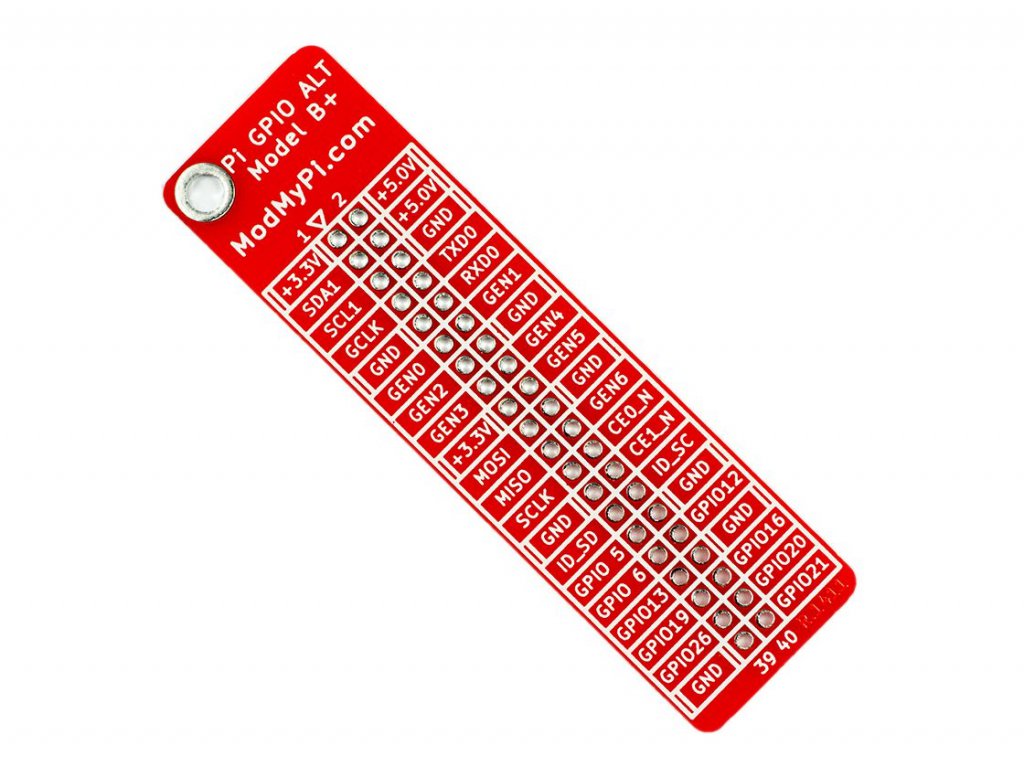
The GPIO reference board features BCM numbering on one side and the pin names on the other. It can be soldered for permanent referencing, or slipped on and off when required.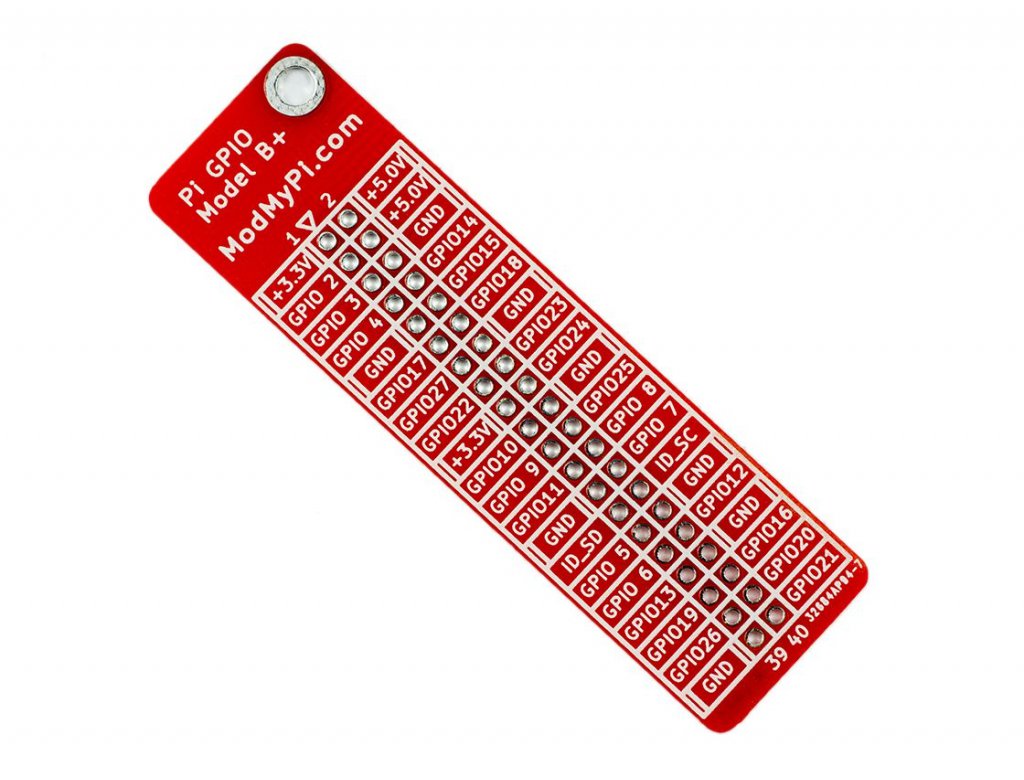
On the RPi3 and later you'll have to snip off a little bit of the corner closest to pin 39 thanks to the new POE pins on the board
What's in the box?
1 x GPIO reference board

The FLIRC USB dongle allows the use of any remote control with your Raspberry Pi. Configure the device on your desktop PC, then simply plug into your Pi for a perfect media centre companion! Amaze your friends and family when the tiny box stuck to the back of your TV controls your entire media collection using an old DVD remote!
New Flirc Version 2 is smaller, lighter and much more professional!
What's in the box?
1 x Flirc receiver
- Setting up OSMC (XBMC) media operating system on the Raspberry Pi.
- Setting up your FLIRC module and porting it to any remote.
- Putting it all together!
- More advanced FLIRC programming - porting an entire keyboard to a remote!
Please Note: These are 11mm standoffs. Different HATs can sometimes require different size standoffs - always measure before buying.
If you need different sizes have a look at the rest of our range of standoffs
The 11mm spacers in the kit fit between the Pi PCB and the HAT, and can be secured using the included M2.5 bolts and nuts.
What's in the box?
4 x M2.5 x 11mm Male to Female Standoffs
4 x M2.5 Bolts
4 x M2.5 Nuts

RC522 chip
MF RC522 is applied to the highly integrated read and write 13.56MHz contactless communication card chip, NXP launched by the company for the "table" application of a low-voltage, low-cost, small size of the non-contact card chip to read and write, smart meters and portable handheld devices developed better choice. The MF RC522 use of advanced modulation and demodulation concept completely integrated in all types of 13.56MHz passive contactless communication methods and protocols. 14443A compatible transponder signals. The digital part of to handle the ISO14443A frames and error detection. In addition, support rapid CRYPTO1 encryption algorithm, terminology validation MIFARE products. MFRC522 support MIFARE series of high-speed non-contact communication, two-way data transmission rate up to 424kbit/s. As new members of the 13.56MHz reader card series of highly integrated chip family, MF RC522 MF RC500 MF RC530 There are a lot of similarities, but also have many of the characteristics and differences. Communication between it and the host SPI mode helps to reduce the connection narrow PCB board volume, reduce costs.
RFID module
The MF522-AN module uses the the original Philips MFRC522 chip design circuit card reader, easy to use, low cost, and applies to the user equipment development, the reader and the development of advanced applications, the need for the user RF card terminal design/production. This module can be directly loaded into the various reader molds. Utilizes a voltage of 3.3V, through the SPI interface simple few lines directly with any user CPU motherboard connected communication can ensure that the module is stable and reliable work, distance card reader
Specifications
Electrical parameters
- Operating current :13-26mA/DC 3.3V
- Idle current :10-13mA/DC 3.3V
- Sleep current: <80uA
- Peak current: <30mA
- Operating Frequency: 13.56MHz
- Supported card types: mifare1 S50, mifare1 S70 MIFARE Ultralight, mifare
- Pro, MIFARE DESFire
- Product physical characteristics: size: 40mm×60mm
- Environmental Operating temperature: -20 to 80°C
- Environmental Storage Temperature: -40 to 85°C
- Relative humidity: relative humidity 5%-95%
Module interfaces SPI Parameter:
Data transfer rate: maximum 10Mbit/s
What's in the box?
1 x RFID-RC522 module
1 x Standard S50 blank card (Non-contact IC card)
1 x S50 special-shaped card (key ring shape)
1 x Straight and 1 x angled male to male header(Soldering required)
Resources
Setup guide

- Model Number: blank card
- Material: PV
- Colour: blank white
- Size: 85.6mm X 54mm
- Thickness: 0.8mm
- Printing: offset printing
- Chip: 1k S50
- Certification: CE,FCC
- Frequency: 13.56MHz
- Protocol standard: 14443a
- Memory: 8kbits
What's in the box?
1 x RFID Smart Card

- Joystick Size: Approx. 95x60x100mm
- Encoder Board Size: Approx. 85x35mm
- USB Cable Length: Approx. 1.8m
- Colour: Red
We have tested this unit on Raspberry Pi using Retropie and a Windows 7 PC using MAME.
What's in the box?
1 x Encoder Board
1 x USB Cable
1 x 5 pin Cable for Joystick
1 x 5 Pin Joystick
8 x 30mm Push Buttons
2 x 24mm Push Buttons
10 x Cables for Buttons
Resources
Get Retropie on the Raspberry Pi
ModMyPi setup guide

It's easy to set up, features a great resolution, comes complete with a black acrylic stand, and has touch by default!
Recent upgrades
If you were used to seeing the Self Test at power on, this has now been removed. However if you remove the jumper located on the controller board you can re-enable this feature.
This device uses the Pi's HDMI output for display, and the Pi's USB port for touch control. Assembly of the Waveshare 10.1" screen is easy, just follow this simple guide here.
Please Note. This device does require some simple set up. You will need attach the EU fitting to the power adapter.
The LCD Screen Features
- 10.1inch HDMI LCD (B)
- 1280x800 Resolution
- UK 5V 2A Power Supply Included
- Capacitive touch control
- Supports Raspberry Pi, Ubuntu, Windows 10 IoT driver free
- Can also be used as a computer monitor, supports Windows 10/8.1/8/7/XP etc.
- Supports BB Black, comes with Angstrom image
- HDMI interface for displaying, USB interface for touch control
- Input interfaces: HDMI
- Multi languages OSD menu, for power management, brightness/contrast adjustment, etc.
- Firmware is upgradable to support more new features (continually updated)
The Case Features
- Material : High quality black and clear Acrylic
- Comes with bottom holder, 45° tilt angle
- Features mounting holes for Raspberry Pi 3B/2B/B /A /B, and BB Black
What's in the box?
1 x HDMI 10.1" Touch Screen
1 x Acrylic panels
1 x HDMI cable
Resources
User Manual
Quick Assembly Guide
Wiki

MS wind vane as used in the Raspberry Pi foundation weather station project to measure wind direction.
Hack this component to form part of your weather station.
Specifications:
| Range | 0 to 360° (352° electrical, 8° open) |
| Accuracy | 1% of full scale |
| Operating Voltage | 10-36 VDC |
| Sensitivity | 1 m/s (2.2 mph) |
Resources:
View the project details here
And some more help here
Article specific to the wind vane only

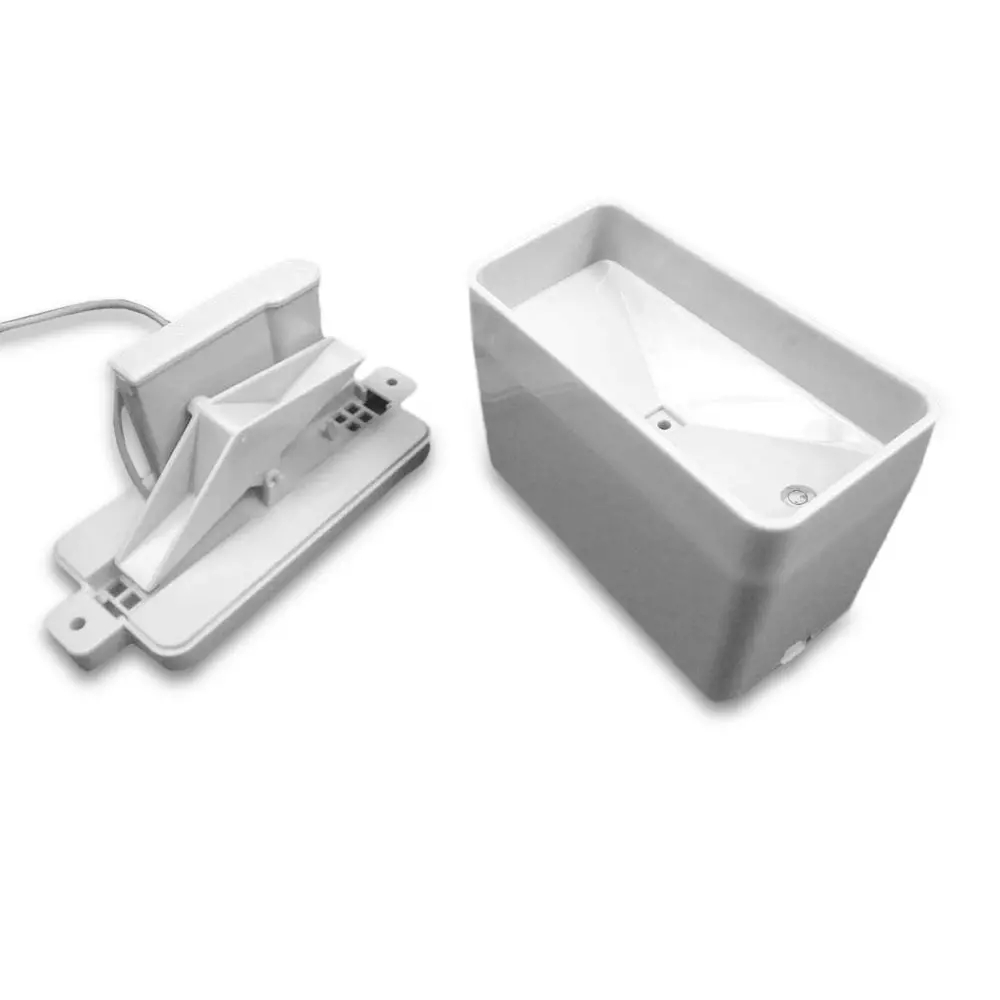
MS rain gauge as used in the Raspberry Pi foundation weather station project to measure rainfall.
Hack this component to form part of your weather station.
Specifications
- Rain gauge measures 0.011" (0.2794 mm) increments per bucket tip
What's in the box?
1 x Rain Gauge
Resources
View a weather project details here