
Generic2


USB-C to header/solder breakout board. Handy for your USB-C powered projects.
What's in the box?
1 x USB-C breakout pcb
You might need want to solder a header on this board for use with jumpers cables.

Arduino is an open-source electronics platform based on easy-to-use hardware and software. Arduino boards are able to read inputs - light on a sensor, a finger on a button, or a Twitter message - and turn it into an output - activating a motor, turning on an LED, publishing something online.
Specifications
- Arduino compatible board
- Microcontroller ATmega328
- Operating Voltage 5V
- Input Voltage (recommended) 7-12V
- Input Voltage (limits) 6-20V
- Digital I/O Pins 14 (of which 6 provide PWM output)
- Analog Input Pins 6
- DC Current per I/O Pin 40 mA
- DC Current for 3.3V Pin 50 mA
- Flash Memory 32 KB (ATmega328) of which 0.5 KB used by bootloader
- SRAM 2 KB (ATmega328)
- EEPROM 1 KB (ATmega328)
- Clock Speed 16 MHz
- Length 68.6 mm
- Width 53.4 mm
What's in the box?
1 x UNO R3
1 x USB cable
Resources
Find more info on Arduino at https://www.arduino.cc/en/Guide
RP2040 MCU Board Zero, a Pico-like MCU board based on Raspberry Pi RP2040, Castellated module, suitable for SMD applications.
Board specifications
- RP2040 microcontroller chip designed by Raspberry Pi in the United Kingdom
- Dual-core Arm Cortex M0+ processor, flexible clock running up to 133 MHz
- 264KB of SRAM, and 2MB of on-board Flash memory
- USB-C connector, keeps it up to date, easier to use
- Castellated module allows soldering direct to carrier boards
- USB 1.1 with device and host support
- Low-power sleep and dormant modes
- Drag-and-drop programming using mass storage over USB
- 29 × multi-function GPIO pins (20× via edge pinout, others via solder points)
- 2 × SPI, 2 × I2C, 2 × UART, 4 × 12-bit ADC, 16 × controllable PWM channels
- Accurate clock and timer on-chip
- Temperature sensor
- Accelerated floating-point libraries on-chip
- 8 × Programmable I/O (PIO) state machines for custom peripheral support
C/C++,MicroPython support
Comprehensive SDK, dev resources, tutorials to help you easily get started
29 × multi-function GPIO pins
configurable pin function, allows flexible development and integration
What's in the box?
1 x RP2040-Zero with pre-soldered headers
Resources
You'll find loads of usable info at the very similar Waveshare board

Atmel's ATMega328P 8-Bit Processor in 28 pin DIP package. It comes with 32K of program space. 23 I/O lines, 6 of which are channels for the 10-bit ADC. Runs up to 20MHz with external crystal. Package can be programmed in circuit. 1.8V to 5V operating voltage! The famous Arduino Deumilanove, and Arduino UNO is using this ATMega microcontroller. Anyhow, this microcontroller is fresh new without any bootloader.
This microcontroller is pre-loaded with Optiboot bootloader (Uno 16MHz). This means you can use Arduino code in your own project without using an actual Arduino Board. No programmer is needed anymore but you still need UC00A and basic circuit. Please select Arduino Uno Board in the Arduino IDE. We are using this microcontroller in our Breadboard Friendly Arduino (BBFuino). Therefore, you can refer to BBFuino's schematic and tutorial for more information.
What's in the box?
1 x IC ATMEGA328P
High-Precision DS3231 I2C Real-Time Clock (RTC) Module
Keep flawless time on your microcontrollers even when disconnected from mains power. The DS3231 is an ultra-accurate I2C Real-Time Clock that features an integrated temperature-compensated crystal oscillator (TCXO). By housing the crystal inside the chip itself and tuning it against temperature changes, this module guarantees long-term timekeeping precision while lowering your project's overall component count.
Key Capabilities
Complete Time & Calendar Tracking: Tracks seconds, minutes, hours, day, date, month, and year with full leap-year compensation valid up to the year 2100. It supports both 24-hour and 12-hour (with AM/PM indicators) formats.
Dual Alarms & Outputs: Features two programmable calendar alarms alongside a configurable square-wave output signal.
Power-Failure Resilience: An onboard voltage reference and comparator circuit constantly monitor your main VCC line. If it drops, the board automatically shifts to its battery backup, triggering a reset output if needed. The
/RSTpin can also be toggled manually for microprocessor resets.Integrated Digital Thermometer: Includes an onboard digital temperature sensor accessible over the same I2C bus, featuring an accuracy profile of ±3°C.
Extended Backup Performance: Timekeeping and temperature readings remain uninterrupted during a primary power failure. Once main power returns, the module assists in smoothly restarting your host microcontroller.
Technical Specifications
Dimensions: 38mm x 22mm x 14mm
Weight: 8g
Operating Voltage: 3.3V to 5.5V
Core Controller: High-accuracy DS3231 RTC IC
Timing Accuracy: ±2ppm across a 0°C to 40°C threshold (translates to roughly a 1-minute variance per year)
Onboard Memory: AT24C32 EEPROM chip providing 32K of extra storage space
Bus Communication: I2C interface running at speeds up to 400kHz (optimized at 5V)
Expandable Address Routing: Devices can easily be daisy-chained on the same line. The default EEPROM address is
0x57, but it can be changed manually using the A0, A1, and A2 solder jumpers.Backup Power: Utilizes a standard CR2032 coin cell battery (NOT INCLUDED) to preserve internal registers during a system shutdown.
What's in the box?
1 x RTC Module
You will need to get a CR2032 backup battery
Resources

- Ribbon of 40 x 300mm
- Male to Female
Features
- Tested for Compatibility with the Raspberry Pi
- Breadboard compatible
- Colour: Multi-coloured
What's in the box?
40 x 200mm Male to Female Jumper cables

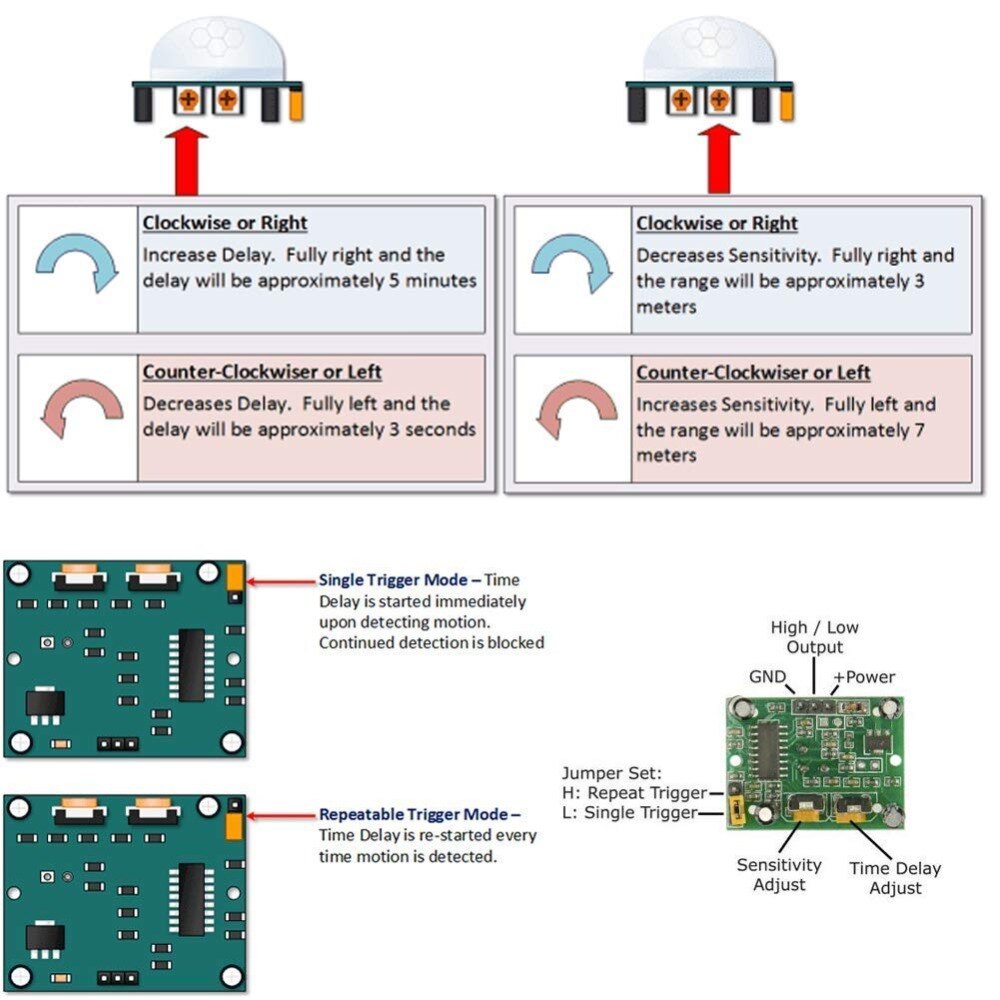
PIR sensors, often referred to as, "Passive Infrared" or "IR motion" sensors, enable you to sense motion. Everything emits a small amount of infrared radiation (IR), and the hotter something is, the more radiation it emits. PIR sensors are able to detect a change in average IR levels of their detection zone (e.g. when a human enters a room, that room will increase in temperature slightly) and hence sense motion.
This one's great, as it can be powered via the Raspberry Pi's 5V output, and be read directly from the Raspberry Pi's GPIO input (as the sensor has a digital 3.3V output!)
This PIR includes an adjustable delay before firing (approx 0.5 - 200 seconds), has adjustable sensitivity and two M2 mounting holes! It runs on 4.5V-20V power (or 3V by bypassing the regulator with a bit of soldering) and has a digital signal output (3.3V) high, 0V low. Its sensing range is up to 7 meters in a 100 degree cone.
Specifications
- Input Voltage: 4.5V - 20V
- Current Draw: <50µA
- Digital Output: 3.3V (High)
- Digital Output: 0V (Low)
- Working Temperature: -15°C to 70°C
- Delay Time: 0.5 - 200 Seconds
- Sensing Angle: 100° Cone
- Range 5m - 7m
Dimensions
- Sensor Lens Diameter: 23mm
- Length: 24.03mm
- Width: 32.34mm
- Height (with lens): 24.66mm
- Centre screw hole distance: 28mm
- Screw hole diameter: 2mm (M2)
What's in the box?
1x HC-SR501 Motion Sensor
Resources
- PIR Sensors and the Raspberry Pi
- Python Library
- User's Manual
- Automatic Door Beel With PIR Sensor
- Raspberry Pi: Mengantaramuka Penderia Modul Penderia Pergerakan PIR

Specifications
- Each Relay has LED indication when ON
- SPDT Relays with terminal block outputs.
- Relay Coil voltage: 5 VDC
- Power Requirement: 5 VDC
- 10A 250V AC / 10A 30V DC
What's in the box?
1 x Two channel 5V DC Relay Module
Resources
Interfacing with a relay : https://tutorials-raspberrypi.com/raspberry-pi-control-relay-switch-via-gpio/

Specifications
- Multicolored
- 300mm
- Female to Female
What's in the box?
1 x Ribbon of 40 lines
Resources
This is a HDMI to VGA converter which will allow you to convert your digital HDMI output signal, into an analog signal. Perfect for hooking your Pi up to a VGA computer screen.
Specifications
- HDMI(Type A) to VGA(D-SUB)
- Colour: Black
What's in the box?
1 x HDMI to VGA Converter
You will find this motor and wheel can be installed conveniently with many fixed locations on the acrylicplate of most robot chassis, and is very suitable for Raspberry Pi, Arduino and MCU robotics.
Features
- Working Voltage: 3-6V
- Specifications: double shaft, the wheel can be attached at both sides of the motor
- Gear ratio: 1:48
- No-load speed (at 5V): 90RPM
- No-load current (at 5V): 190mA
- Rated Torque: 78mN.m (0.8kgf.cm)
- Wheel Diameter: Black Wheel: 66mm
- Wheel Thickness: Black Wheel: 25mm
- Wire length (optional): 15cm
- Motor Size: 70 x 36.5 x 24.5mm (L*W*H)
- Net Weight: 65g
What's in the box?
1 x motor
1 x wheel
You might also need a mounting bracket for this wheel
These high-power LEDs deliver smooth, uniform illumination without glare or visual striping, making them an excellent light source for video camera lighting, custom LED lamps, aquariums, and DIY illumination projects.
⚠️ Important Thermal Warning: These high-output LEDs generate substantial heat during operation. To prevent thermal runaway and permanent damage, they must be mounted to an adequate heatsink.
Technical Specifications
Optical & Physical Properties
- Luminous Intensity (Max): 260 Lumens
- Colour Temperature: 10,000K – 15,000K (Cool White / Daylight spectrum)
- Viewing Angle: 120°
- Dimensions: 14.5mm x 7.5mm
- Net Weight: 2 g
Electrical & Power Profiles
- Total Power Consumption: 1 Watts
- Power Dissipation: 1W
- Continuous Forward Current: 280 mA
- Peak Forward Current: 350 mA
- Forward Voltage: 2.5V (Typical) | 4V (Maximum)
- Reverse Voltage: 5V
- Reverse Current: 10 µA
Thermal Thresholds
- Thermal Resistance: 12 °C/W
- Maximum LED Junction Temperature: 120°C
- Operating Temperature Range: -35°C to +90°C
- Storage Temperature Range: -40°C to +100°C
What's in the box?
10 x Cool White metal base LED
Resources

NOTE: These sensors are not capacitive sensors and rely on physical interaction with soil and moisture which prevents them from being used for long-term monitoring. This sensor is only suitable as for use with learning!
This is a summary of the soil moisture sensor that can be used to detect moisture, when the soil is dry, the module outputs a high level. Use this sensor to build an automatic watering system.
Specifications
- Operating voltage: 3.3V~5V.
- Adjustable sensitivity (blue digital potentiometer adjustment)
- Dual output mode, analog output more accurate.
- A fixed bolt hole for easy installation.
- Power indicator (red) and digital switching output indicator (green).
- LM393 comparator chip, stable.
- PCB Dimension: 3cm x 1.5cm.
- Soil Probe Dimension: 6cm x 2cm.
- Cable Length: 21cm.
Connections
VCC: 3.3V-5V.
GND: GND.
DO: digital output interface (0 and 1).
AO: analog output interface.
What's in the box?
1 x Soil moisture detector module
1 x Probe
5 x Jumper Cables
Resources
Setup with Raspberry Pi

- 2 X 20 pins
- Pitch: 2.54mm
- 12.2mm solder tails (pin's length)
- Gold plated
What's in the box?
1 x 2x20 female header
Resources
Technical Drawing

DHT11 is the most common sensor that is usually used by students and makers out there. The main function of this sensor is to measure the temperature and humidity of the surroundings. The sensor is also factory calibrated and hence easy to interface with any microcontrollers like Arduino. The sensor can measure temperature from 0°C to 50°C and humidity from 20% to 90% with an accuracy of ±1°C and ±1%. So if you are looking to measure in this range then this sensor might be the right choice for you!
The DHT11 sensor can either be purchased as a sensor or as a module. Either way, the performance of the sensor is the same. The sensor will come as a 4-pin package out of which only three pins will be used whereas the module will come with three pins as shown below. The only difference between the sensor and module is that the module will have a filtering capacitor and pull-up resistor inbuilt so that you can just simply connect wires and start your project!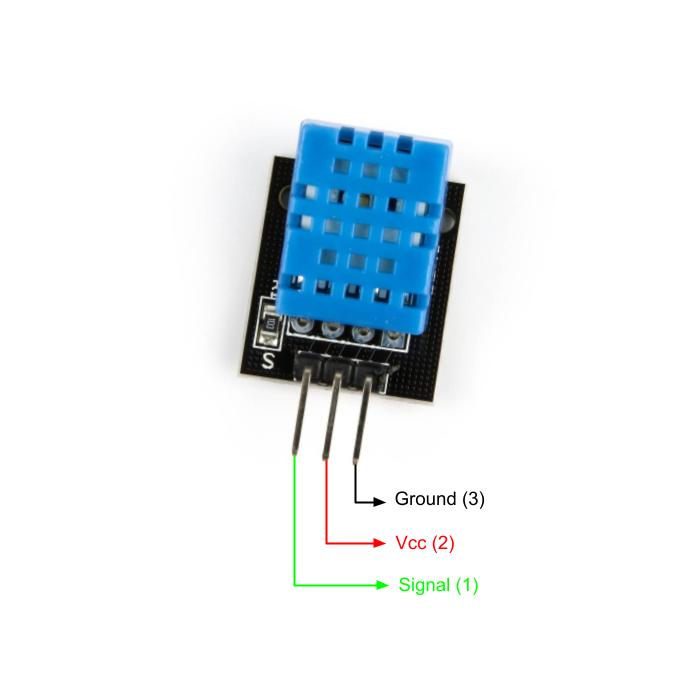
Pinout Configuration
- Vcc: Power supply 3.5V to 5.5V
- Signal: Outputs both Temperature and Humidity through serial Data
- Ground: Connected to the ground of the circuit
Features
- With calibrated digital signal output
- Adopt special digital module acquisition technology and temperature and humidity sensing technology to ensure high reliability and excellent long-term stability.
- The sensor is composed of a resistance liquid contact element and an NTC temperature measuring element and is connected to a high-performance 8-bit microcontroller. Therefore, the product has the advantages of high quality, ultra-fast response, strong anti-interference ability, and high-cost performance.
- The single-wire serial interface makes system integration simple and fast. Ultra-small size, low power consumption, and a signal transmission distance of more than 20 meters make it the best choice for any application, even the most demanding ones. The product is easy to connect and can be plugged directly into the sensor expansion board.
Application
- Measure temperature and humidity
- Widely used for IoT projects
- Local Weather station
- Automatic climate control
- Environment monitoring
Specifications
- Operating Voltage: 3.0V to 5.5V
- Operating current: 0.3mA (measuring) 60uA (standby)
- Output: Serial data
- Temperature Range: 0°C to 50°C
- Humidity Range: 20% to 90%
- Resolution: Temperature and Humidity both are 16-bit
- Accuracy: ±1°C and ±1%
What's in the box?
1 x DHT11 Temperature and Relative Humidity Sensor Module
Resources
- How to setup a DHT11 with your Raspberry Pi.
- DHT 11 Datasheet
- https://github.com/adafruit/DHT-sensor-library

Tactile Switches or tact switches are an on/off electronic switch that is only on when there is some pressure put on it or when the button is pressed. As soon as the tactile switch button is released and the pressure has been took off, the circuit is then broken.
- Size: (Approx.)6x6x5mm
- Life: 100000 times
- Quantity: 5pcs
- Current: 50mA
- Voltage: 12V
What's in the box?
5 x Tactile Switches
Resources
Python library
Introduction to Buttons and Switches
Types of buttons and switches
This infrared obstacle/object detection sensor is super easy to use. It comes with a potentiometer to adjust the sensitivity. The output is a digital signal so it is easy to interface with any microcontroller such as Maker UNO, Mega, Leornado, Zero, 101, or even the Raspberry Pi or Raspberry Pi Zero. This infrared sensor offers simple, user-friendly, and fast obstacle detection via infrared reflection, it is non-contact detection. As it is based on light reflection, the detection varies with different surfaces. And any infrared source might also interfere with the detection.
It comes in a pair of Infrared emitter and receiver at the front of the module, whenever an object blocks the infrared source, it reflects the infrared and the receiver gets it and the signal goes through a comparator circuit on board. Depending on the threshold that is being adjusted, it will output logic LOW at the output pin and the green LED will light up to indicate the detection. Turning the onboard potentiometer clockwise will increase the sensitivity and further increase the detection range. Compatible with 5V or 3.3V power input.
Note: Please make sure that there is a gap between the emitter and the receiver so that the sensor can work properly.
Specifications
- Working voltage : 3.3V – 5V DC
- Working current : ≥ 20mA
- Working temperature : -10°C – 50°C
- Detection distance : 2cm – 40cm
- IO interface : 4-wire interface (-/ /S/EN)
- Output signal : TTL level (low level if obstacle detected, high if no obstacle)
- Adjustment method : multi-turn resistance adjustment
- IR pulse frequency : 38kHz
- Effective angle : 35°
- Board Size : 1.6cm x 4cm
- Weight : 9g
What's in the box?
1 x Infrared Obstacle Avoidance Sensor
Resources
Video:
You can use this device from 3.5-7VDC input voltage (although most USB devices tend to hover around 4.75 to 5.25) and up to 3A of current. It displays both voltage and current readouts. It's a very handy tool for testing USB devices, checking load levels and debugging battery chargers and boost converters.
Specifications
Voltage range: 3.3V-9V
Current range: 0-3A
Voltage display: red
Current display: blue
Out put : 2 USB
Size: 52mm x 34mm x12mm
Weight: 16g
Shell color: Dark black
What's in the box?
1 x Voltage Tester Dual USB

The 28BYJ-48 motor runs in full step mode, each step corresponds to a rotation of 11.25°. That means there are 32 steps per revolution (360°/11.25° = 32). In addition, the motor has a 1/64 reduction gear set.
The power consumption of the motor is around 240mA.
The ULN2003 is one of the most common motor driver ICs, consisting of an array of 7 Darlington transistor pairs, each pair is capable of driving loads of up to 500mA and 50V. Four out of seven pairs are used on this board.
The board has four LEDs that show activity on the four control input lines (to indicate stepping state). They provide a nice visual when stepping.
The board also comes with an ON/OFF jumper to isolate power to the stepper Motor.
Specifications
- High quality stepper motor with ULN2003 driver
- Suitable for microcontroller development
- Voltage: DC 5V
- Diameter: 28mm
- Step Angle: 5.625 x 1/64
- Reduction Ratio: 1/64
- Dimensions: 1.38 in x 1.18 in x 0.39 in (3.5 cm x 3.0 cm x 1.0 cm)
- Weight: 1.45 oz (41 g)
What's in the box?
1 x stepper motor
1 x ULN2003 driver
Resources
How to control a ULN2003 stepper motor with Raspberry Pi

Raspberry Pi and jumper cables are not included.
A DC-to-DC converter is an electronic circuit or electromechanical device that converts a source of direct current (DC) from one voltage level to another. It is a type of electric power converter.
Ideal for reading high 5V sensors on your SBC or Microcontrollers, or sending signals to 5V input devices
Specifications
- Mutual conversion between 3V and 5V, It's convenient for PI connected to external 5V sensors or modules
- Supports total of 8 channels
- Range of voltage converted: 1.8V~6VDC
What's in the box?
1 x Voltage Converter Module
Resources
In the case of translating between 3.3V and 5V system:
- VCCA connects to 3.3V power supply
- VCCB connects to 5V power supply
- GND connects to power negative pole respectively, the two power supply should be common-grounded with each other
- When Ax has 3.3V input, Bx will get 5V output
- When Bx has 5V input, Ax will get 3.3V output
- NO direction control required