
Special Offers


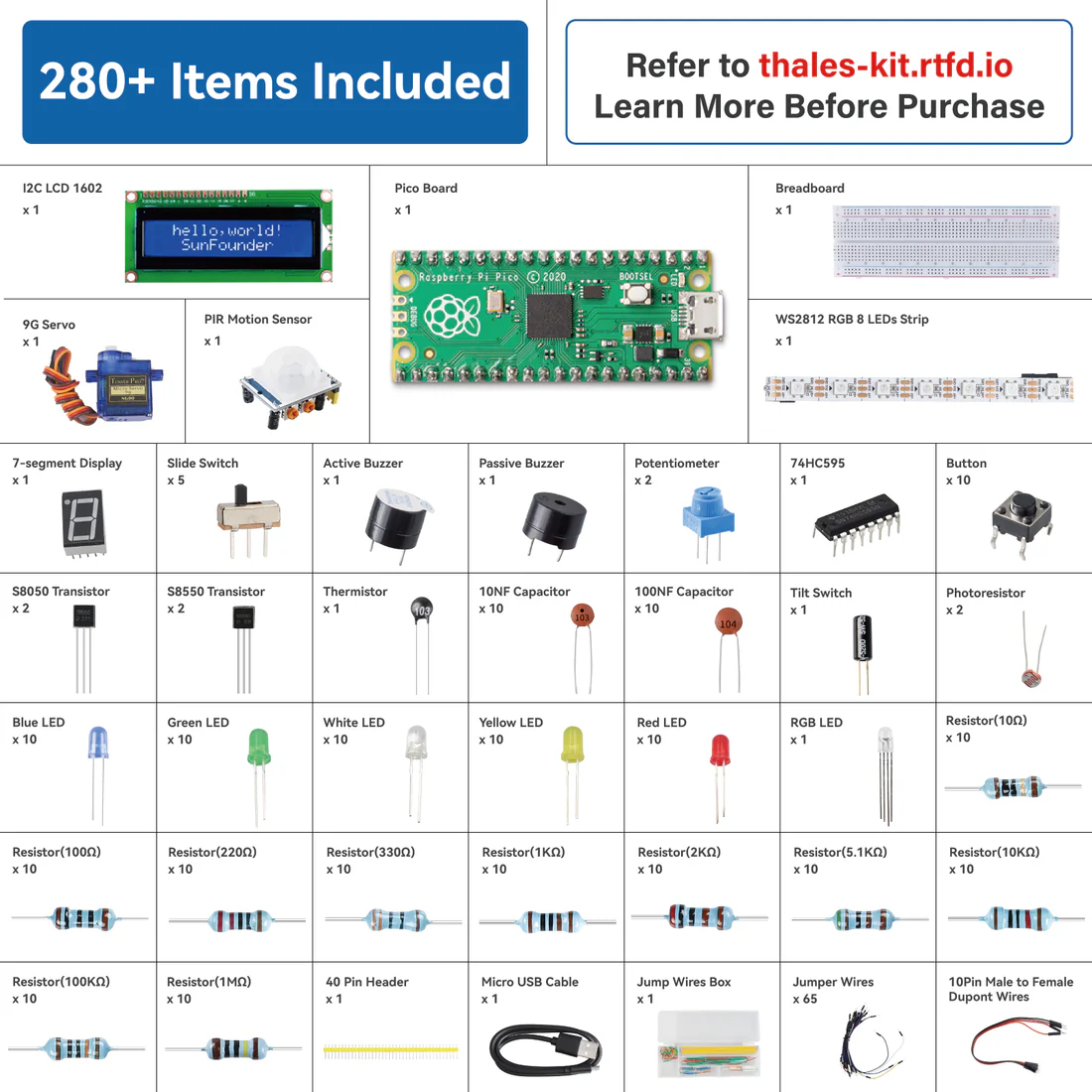
SunFounder Thales Starter Kit is a basic learning kit based on Raspberry Pi Pico.
The kit contains various types of components, such as displays, sounds, drivers, controllers, and sensors, allows you to learn electronic devices comprehensively.
We have prepared many interesting and practical projects for you, and collected a lot of authoritative related information, just turn on your computer and you can complete programming learning in one stop.
In addition, we provide 2 programming languages: MicroPython and Arduino (C/C++). You can view different tutorials according to your needs。
If you want to learn another projects which we don’t have, please feel free to send Email and we will update to our online tutorials as soon as possible, any suggestions are welcomed.
What's in the box?
Resources
Our 4xAA battery holder is perfect for hobbyists looking for a reliable power source for their DIY electronics projects. Made from durable materials, it's easy to install and use with simple connections. Its compact design makes it portable, so you can work on your projects anywhere. Order yours today and take your projects to the next level!
Features
- Brand new and good quality
- Material: Plastic and metal
- Weight: 15g
- Color: black
- DC 5.5mm x 2.1mm Jack
- The case can hold 4 x AA batteries (battery is NOT INCLUDED)
- Connection: Series, so the output voltage will be 4 x battery voltage
- Output Voltage = 6.0VDC typical if you are using normal AA
- Output Voltage = 4.8VDC typical if you are using rechargeable NiMH
- Size: 5.7cm x 6.2cm x 1.5cm
- Perfect for use with your EDU:BIT
What's in the box?
1 x Quad AA Battery Holder
Need batteries? You will find our battery selection here

Based on the Raspberry Pi CM5
Use CM5 to reproduce the original appearance of the Pi 5 as much as possible. Compatible with the interfaces of the Raspberry Pi 5
Specifications
| CM5 socket | Suitable for all variants of Compute Module 5 |
|---|---|
| Networking | Gigabit Ethernet RJ45 port |
| Connector | 16PIN PCIe (PCIe Gen2/3 × 1) Raspberry Pi 40PIN GPIO header × 1 |
| USB | USB 3.2 Gen1 × 2; USB 2.0 × 2 |
| MIPI | MIPI 4-lane interface × 2 (22pin 0.5mm FPC connector) |
| Video | HDMI port × 2, supports dual 4K outputs |
| Audio | Onboard audio header, comes with an audio adapter for connecting 3.5mm headphone / microphone, enabling audio input and output |
| Storage | TF card socket for Compute Module 5 Lite (without eMMC) variants |
| Fan Header | 5V, 4PIN JST-SH PWM connector |
| Power input | DC 5V 5A |
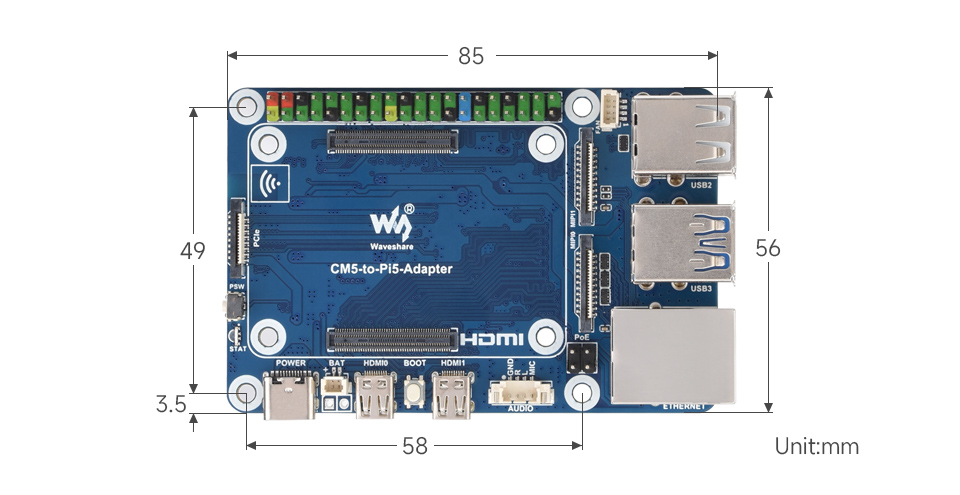
| Dimensions | 85 × 56 (mm) |
Install CM5 Easily
Onboard 40 PIN GPIO header and Standard CM5 connector
Supports Access To Compute Module 5 Lite / eMMC Series Boards
Onboard USB Audio Decoder Chip
Compared to the Raspberry Pi 5, the CM5-to-Pi5-Adapter adds an audio header, supports microphone input
What's On Board?
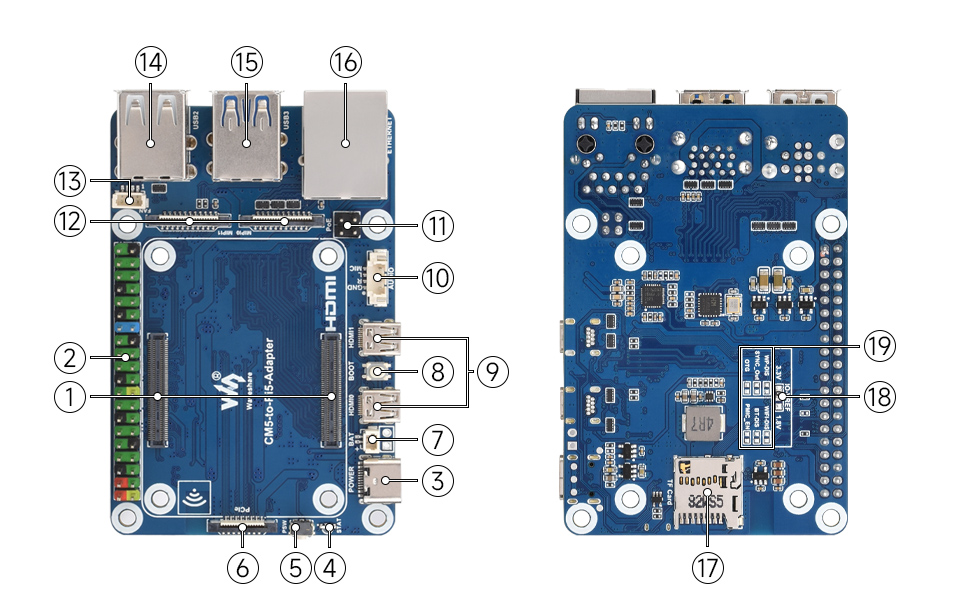
- CM5 socket
Suitable for all variants of Compute Module 5 - 40PIN GPIO interface
Suitable for connecting to various HAT / HAT+ modules - Power supply / Programming
5V / 5A power supply, or used for eMMC burning - STAT LED
Dual-color LED indicator - PSW power button
Long press to force power off, short press to soft power off or on - PCIe interface
for connecting various PCIe expansion boards - RTC battery header
for connecting an external RTC battery to maintain real-time clock operation - BOOT button
Press before powering on and release after powering on to enter the burning mode - Micro HDMI port × 2
supports 4k output - Extended audio interface
Expands audio header via USB, comes with an audio adapter for connecting 3.5mm headphone/Mic
- PoE 4PIN header
for connecting to PoE module - Dual MIPI interfaces
for connecting to DSI displays or CSI cameras - 4PIN JST-SH PWM Fan header
for connecting cooling fan, 5V power supply - USB 2.0 port × 2
- USB 3.2 Gen1 port × 2
Dual USB 3.2 Gen1 ports, supports simultaneous read and write, up to 5 Gbps speed. - Gigabit Ethernet RJ45 port
Supports 10M / 100M / 1000M network access - TF card slot
for connecting a TF card with pre-burnt image (Lite variant ONLY) - IO-VREF selection
CM5 IO logic level: 3.3V (default) or 1.8V - Other function pins
Hardware disable function or write protection
Outline dimensions
What's in the box?
1 x CM5-to-Pi5-Adapter
1 x Audio-Adapter
1 x MX1.25 4PIN dual-plug cable ~200mm
1 x Screws pack
Resources

Hyper PLA is designed for high speed printing up to 600mm/s. With improved fluidity to speed up the printing process, greater toughness over PLA and dimensional stability for high accuracy puts Hyper PLA in a level of its own over other filaments. The best of all is that the spool is eco friendly as part of Creality's better filament plan and the filament is neatly wounded onto the spool for a very professional look!
Specifications:
- Filament: Creality Hyper Series PLA
- Diameter: 1.75mm +- 0.03mm
- Colour: Red
- Filament weight: 1kg
- Filament with spool weight: 1.29kg
- Printing Temperature: 190°C - 230°C
- Bed Temperature: 25°C - 60°C
- Printing platform: Glass with adhesive, PEI Platform, Textured Paper
- Cooling fan speed: 100%
What's in the box?
1 x Creality Hyper PLA Filament with RFID, 1kg, 1.75mm, Red
Interstate 75 W is a RP2350-based driver board for HUB75-style LED matrices - they're the chainable LED panels (32 x 32 or 32 x 64) that you sometimes see making up video walls or big advertising displays. It's designed to plug neatly into the back of a LED panel, and it provides a quick and easy way to whip up some scrolling signage or an eye-catching LED display for sensor outputs. I75 W has wireless connectivity so you can also use it to display information from the internet! ????
It's powered via USB-C, which should also be able to power a few connected panels happily, assuming you're not planning anything too eye-bleedingly bright. It has three handy user buttons (A, B and BOOT) and an onboard RGB LED.
We've also popped a Qw/ST connector on there, to make it super easy to plug in Qwiic or STEMMA QT breakouts.
Here are some things you could do!
???? Tap into an API and display bus times, plane tracking or traffic info.
???? Generate a big bold graph showing air quality or other sensor readings.
???? Create some ad hoc, easily adjustable signage for your classroom, maker stall or kebab shop.
???? Scroll greetz to your crew, just like in the old days:
"`-._,-'"`-._,-' HACKED AND PACKED BY PIMORONI "`-._,-'"`-._,-'
Features
- Powered by RP2350A (Dual Arm Cortex M33 running at up to 150MHz with 520KB of SRAM)
- 4MB of QSPI flash supporting XiP
- Raspberry Pi RM2 module (CYW43439), supporting IEEE 802.11 b/g/n wireless LAN, and Bluetooth
- Compatible with our 32x32, 32x64, 64x64 and 128x64 LED matrices.
- Sturdy screw terminals for powering the LED panels
- USB-C connector for programming and power
- Two user buttons (labelled A and B)
- Reset and boot buttons (the boot button can also be used as a user button)
- RGB LED
- Qw/ST (Qwiic/STEMMA QT) connector
- Comes fully-assembled (no soldering required)
- Programmable with C/C++ or MicroPython
What's in the box?
1 x Interstate 75 Matrix driver board
Resources
Getting started with Interstate 75
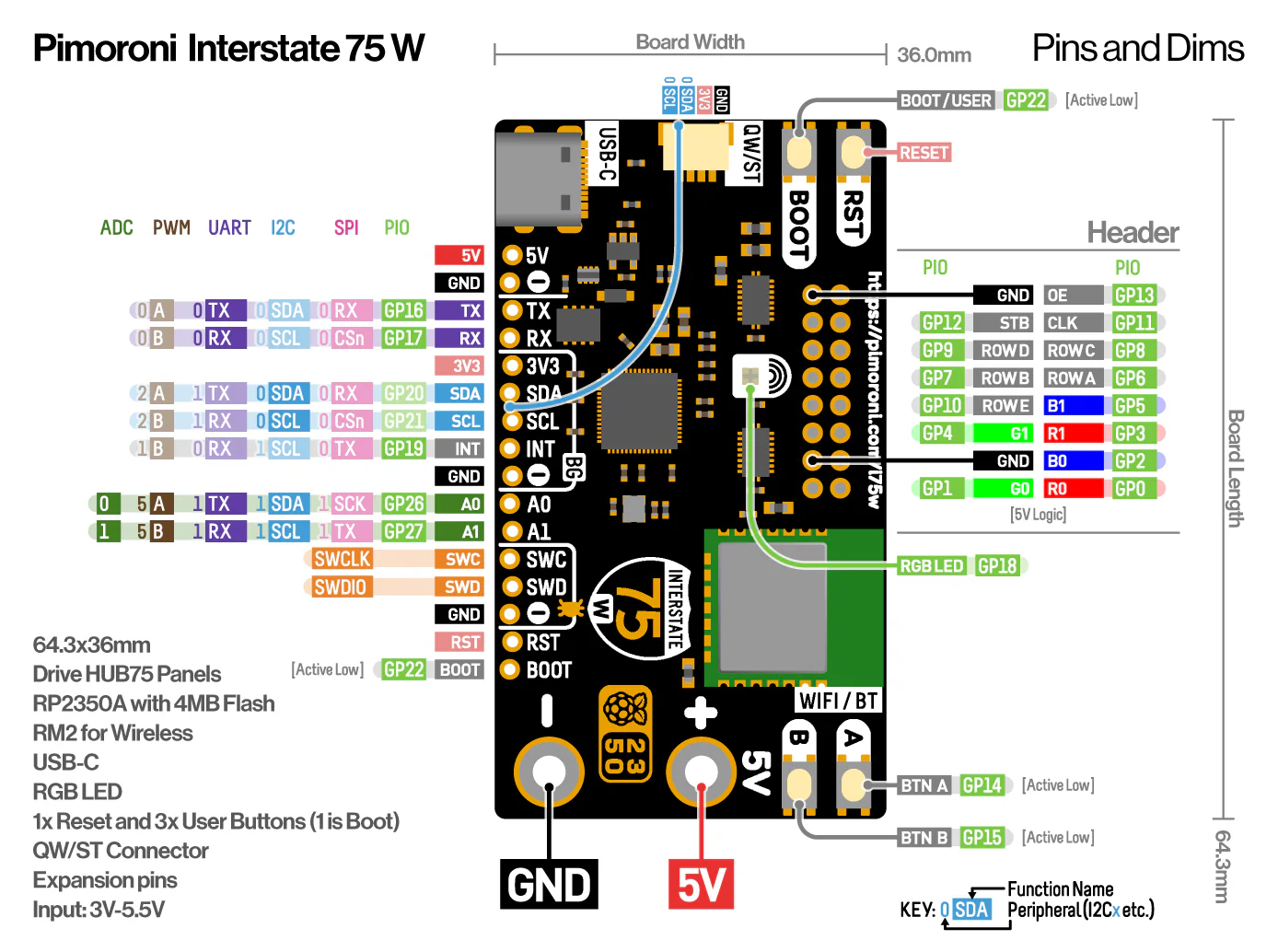
Pinout and Schematic
Getting Started
You can find the most recent version of the MicroPython firmware and examples at the link below:
Connecting Breakouts
I75 W has a Qw/ST (AKA Qwiic/STEMMA QT) connector, so you can connect up Qw/ST breakouts easily using a JST-SH to JST-SH cable.
We've also broken out a bunch of useful pins along the bottom edge of the board (including I2C, analog, UART and debug pins) so you can solder things like breakouts or analog potentiometers directly to them.
Notes
- Measurements: approx 64.3 x 36 x 17mm (L x W x H, including connectors)
About RP2350
The RP2350 chip is the Double Quarter Pounder & Fries to the RP2040's Double Cheeseburger and can have one or more RISC-V burgers instead of either of the M33 ARMs, to stretch the metaphor.
In addition to the modern M33 ARM cores, there are sides of: more PIO capability, a variety of low power states for sipping electrons, a whole security system and some sprinklings of specialist digital video circuits to offload DVI/HDMI output.
You can expect a tasty boost in performance - our "real world" MicroPython tests are running up to 2x faster compared to RP2040, and floating point number crunching in C/C++ is up to 20x faster. The extra on-chip RAM will make a big difference when performing memory intensive operations (such as working with higher resolution displays) and even more can be added thanks to external PSRAM support.
RP2350 comes in two flavours - A (standard) and B (all the pins). The B chip has a stonking 48 usable GPIO pins, including 8 ADCs and 24 PWMs, and features on some of our new products.
Swap out your Picade's arcade buttons for the crystal clear ones in this kit, pop one of the Picade Plasma PCBs over the button's spade terminals, hold the PCB in place with the spade connectors, and chain all of the Plasma PCBs together with the included cables. Use the host cable to connect the Plasma chain to your Picade X HAT, install our Picade Plasma software, and BAM, your Picade is 110% more colourful!
Each Picade Plasma PCB has four tiny, addressable, RGB LEDs (APA102) and a data in and data out JST connector. They're designed to fit neatly inside the recess on the back of our low-profile arcade buttons and shine their light through the clear plastic. The white PCB bounces an spilled light from the LEDs to give them extra GLOW.
Picade Plasma Features
- APA102 addressable RGB LEDs
- Chain-able
- JST connectors for data in and data out
- Designed for our low-profile arcade buttons
- Connects to the Hack Header on our Picade X HAT
- Python daemon
What's in the box?
10 x clear 30mm push-fit arcade buttons
10 x Picade Plasma PCBs
5 x 10cm button cables
4 x 30cm buttons cables
1 x 30cm host cable
Resources
As well as using Plasma buttons with Picade and Picade X HAT, you can connect them straight to GPIO on your Pi, or other microcontroller. This makes them ideal for DIY arcade builds and even building things like your own DIY midi controller.
You can read our tutorial on fitting Picade Plasma buttons to find out how to fit the buttons and control them with the Picade Plasma software.
Notes
- PCB dimensions: 24mm diameter, 5.75mm thick (including JST connector)
- LED brightness is limited to a sensible level in software. Adjust this at your peril!
- Picade Console is for illustration only, and not included!
The Argon ONE V5 Case is designed to elevate your Raspberry Pi 5 experience with unmatched performance, versatility, and style. Built from casted aluminum, the sleek enclosure not only protects your Raspberry Pi but also opens up a whole new dimension for Raspberry Pi.
Key Features
- Made from Casted Aluminum that also serves as the heatsink for passive cooling
- Built-in 30mm PWM Fan for greater thermal control, providing active cooling ensuring optimal performance during intense workloads
- Dual HDMI Ports allow you to connect dual displays at high resolutions, making it perfect for multi-tasking and media playback
- Access your files faster with two additional front-Facing USB 2.0 Ports for easier access to peripherals, boosting convenience and flexibility
- Connect more frequently with built-in DAC with 3.5mm Mic & Headphone Jacks providing 3.5mm mic input and headphone output, ideal for seamless video calls and enhanced audio output
- Supercharge your Raspberry Pi 5 with high-speed storage using the built-in SINGLE NVMe PCIe Slot, delivering faster data access and expanded storage capabilities
- Tap into the future of smart homes with an Internal USB Port for ZigBee Modules allowing for easy integration of ZigBee modules, making it perfect for Home Assistant and other IoT projects
- Limitless possibilities with standard Raspberry Pi HAT Compatibility all in one package
- Optional addons: Removable OLED cover can be replaced with the Argon ONE V5 Industria OLED Display Module or add the Argon ONE V5 Industria ZigBee Module to integrate with Home Assistant.
What's in the box?
1 x Argon ONE V5 case with single NVME Expansion Board
Resources
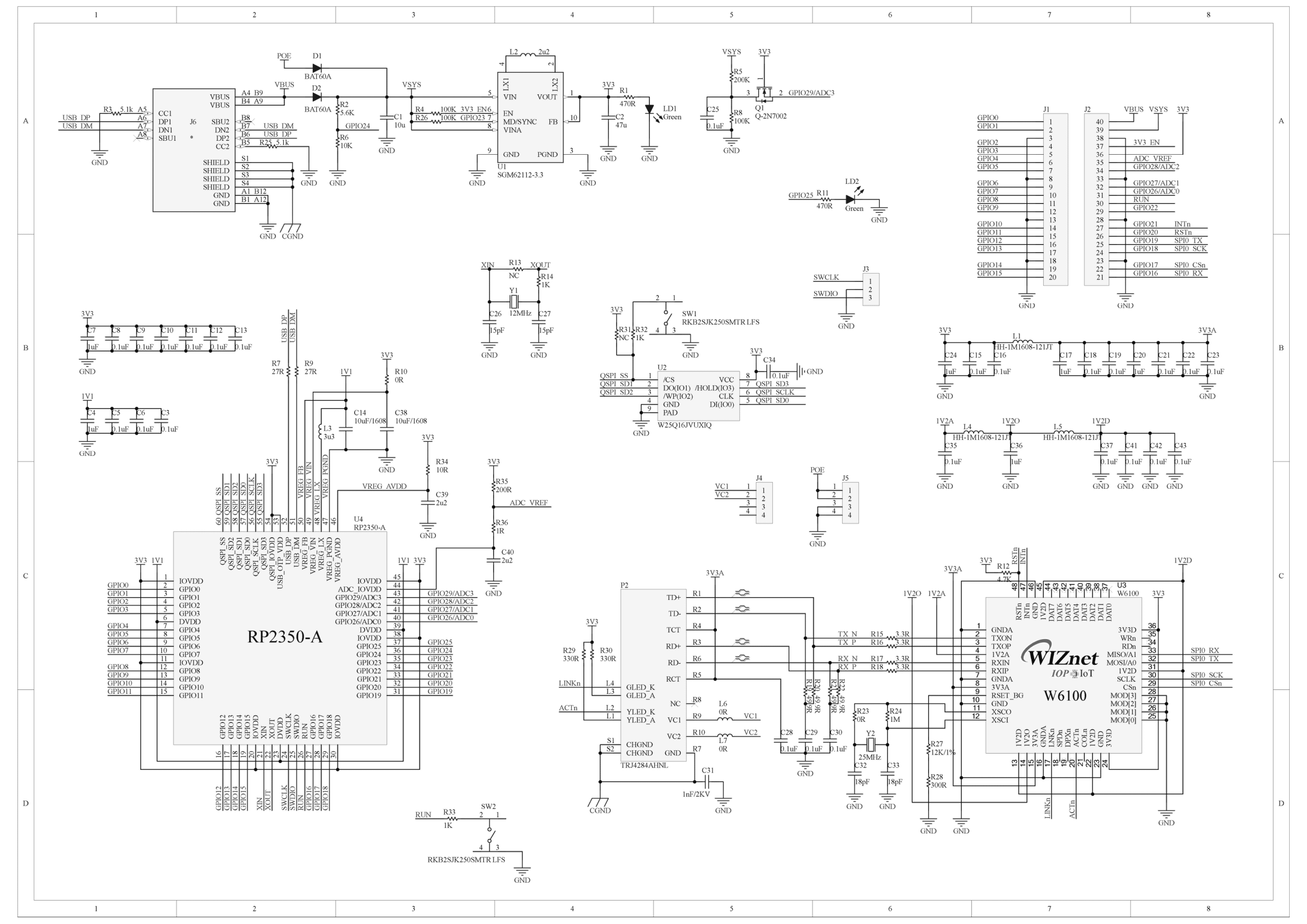
The WIZnet W6100-EVB-Pico2 is a microcontroller board based on the Raspberry Pi RP2350 and fully hardwired TCP/IP controller W6100, with Ethernet via the W6100 and USB-C!
The board can also support PoE via the optional WIZPoE-P1 PoE add-on module.
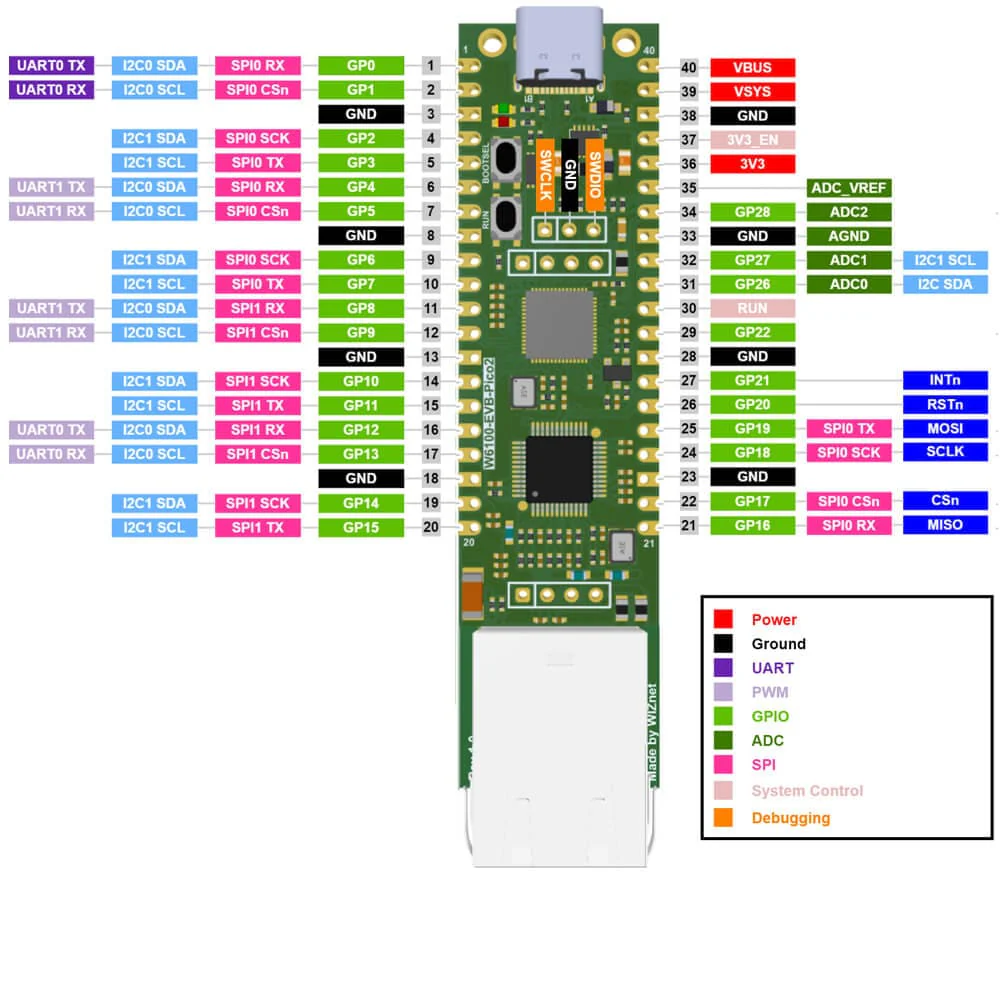
The W6100-EVB-Pico2 pinout is directly connected to the GPIO of RP2350 as shown in the pinout image. It has the same pinout as the Raspberry Pi Pico 2 board. However, GPIO16, GPIO17, GPIO18, GPIO19, GPIO20, GPIO21 are connected to W6100 inside the board. These pins enable SPI communication with W6100 to use the Ethernet function. If you use the Ethernet function, these pins cannot be used for any other purpose.
MicroPython is not yet supported as the wiznet5k library does not yet support the W6100 chip. WIZnet are working on this. CircuitPython may support the chip in IPV4 mode only.
The RP2350 GPIO used inside W6100-EVB-Pico is as follows.
| I/O | Pin Name | Description |
| I | GPIO16 | Connected to MISO on W6100 |
| O | GPIO17 | Connected to CSn on W6100 |
| O | GPIO18 | Connected to SCLK on W6100 |
| O | GPIO19 | Connected to MOSI on W6100 |
| O | GPIO20 | Connected to RSTn on W6100 |
| I | GPIO21 | Connected to INTn on W6100 |
| I | GPIO24 | VBUS sense - high if VBUS is present, else low |
| O | GPIO25 | Connected to user LED |
| I | GPIO29 | Used in ADC mode (ADC3) to measure VSYS/3 |
Apart from GPIO and ground pins, there are 7 other pins on the main 40-pin interface:
| Pin No. | Pin Name | Description |
| PIN40 | VBUS | USB-C input voltage, connected to USB-C port pin 1. Nominally 5V. |
| PIN39 | VSYS | Main system input voltage, which can vary in the allowed range 4.3V to 5.5V, and is used by the on-board LDO to generate the 3.3V . |
| PIN37 | 3V3_EN | Connects to the on-board LDO enable pin. To disable the 3.3V (which also de-powers the RP2350 and W6100), short this pin low. |
| PIN36 | 3V3 | Main 3.3V supply to RP2350 and W6100, generated by the on-board LDO. |
| PIN35 | ADC_VREF | ADC power supply (and reference) voltage, and is generated on W6100-EVB-Pico by filtering the 3.3V supply. |
| PIN33 | AGND | Ground reference for GPIO26-29. |
| PIN30 | RUN | RP2350 enable pin, To reset RP2350, short this pin low. |
WIZnet Controller Comparison
You may be wondering what the difference is between the different models of WIZnet boards we offer. This mostly comes down to the TCP/IP controller chip used.
Take a look at WIZnet's comparison table to identify the right board for your needs.
Features
- RP2350 Microcontroller with Integrated 16Mbit Flash
- Symmetric dual Arm Cortex-M33 cores at up to 150MHz
- 520kByte multi-bank high-performance SRAM
- External Quad-SPI Flash with eXecute In Place (XIP) capabilities
- Enhanced performance full-crossbar bus fabric
- Up to 48 multi-function General Purpose IO (8 can be used for ADC on RP2350-B)
- 1.8-5.0V IO Voltage
- Security Features
- One-Time Programmable (OTP) Memory: Used for boot configuration and secure key storage.
- Secure Boot: Ensures that only authenticated software can run on the device, utilizing OTP for key verification.
- Arm TrustZone Technology: Provides hardware isolation between secure and non-secure software, enhancing security for critical applications.
- Analog and Digital Peripherals
- 12-bit 500ksps Analogue to Digital Converter (ADC)
- 2 × UART, 2 × I2C, 2 × SPI, 16 × PWM channels
- 1 × Timer with 4 alarms, 1 × Real Time Counter
- 3 × Programmable IO (PIO) blocks, 12 state machines total
- Flexible, user-programmable high-speed IO
- Can emulate interfaces such as SD Card and VGA
- W6100 Ethernet Controller
- Supports Hardwired Internet Protocols: TCP, UDP, IPv6, IPv4, ICMPv6, ICMPv4, IGMP, MLDv1, ARP, PPPoE
- Supports 8 independent SOCKETs simultaneously with 32KB memory
- Internal 16 Kbytes Memory for TX/ RX Buffers
- SPI Interface
- Connectivity
- USB-C port for power and data (and for reprogramming the Flash)
- 40 pin 21x51 'DIP' style 1mm thick PCB with 0.1" through-hole pins also with edge castellations
- 3-pin ARM Serial Wire Debug (SWD) port
- Networking
- 10 / 100 Ethernet PHY embedded
- Supports Auto-Negotiation
- Full / Half Duplex
- 10 / 100 Based
- Built-in RJ45(RB1-125BAG1A)
- Power Supply
- Built-in Switch-mode DC-DC converter (replacing LDO for enhanced power efficiency)
What's in the box?
1 x WIZnet W6100-EVB-Pico2
Resources
- Product documentation
- RP2350 datasheet
- W6100 Datasheet
- Schematic
- Part list & Gerber File
- CE Certificate
- CE Test Report
- FCC Certificate
- FCC Test Report
Pimout

Hyper PLA is designed for high speed printing up to 600mm/s. With improved fluidity to speed up the printing process, greater toughness over PLA and dimensional stability for high accuracy puts Hyper PLA in a level of its own over other filaments. The best of all is that the spool is eco friendly as part of Creality's better filament plan and the filament is neatly wounded onto the spool for a very professional look!
Specifications:
- Filament: Creality Hyper Series PLA
- Diameter: 1.75mm +- 0.03mm
- Colour: Grey
- Filament weight: 1kg
- Filament with spool weight: 1.29kg
- Printing Temperature: 190°C - 230°C
- Bed Temperature: 25°C - 60°C
- Printing platform: Glass with adhesive, PEI Platform, Textured Paper
- Cooling fan speed: 100%
What's in the box?
1 x Creality Hyper PLA Filament with RFID, 1kg, 1.75mm, Black

Hyper PLA is designed for high speed printing up to 600mm/s. With improved fluidity to speed up the printing process, greater toughness over PLA and dimensional stability for high accuracy puts Hyper PLA in a level of its own over other filaments. The best of all is that the spool is eco friendly as part of Creality's better filament plan and the filament is neatly wounded onto the spool for a very professional look!
Specifications:
- Filament: Creality Hyper Series PLA
- Diameter: 1.75mm +- 0.03mm
- Colour: White
- Filament weight: 1kg
- Filament with spool weight: 1.29kg
- Printing Temperature: 190°C - 230°C
- Bed Temperature: 25°C - 60°C
- Printing platform: Glass with adhesive, PEI Platform, Textured Paper
- Cooling fan speed: 100%
What's in the box?
1 x Creality Hyper PLA Filament with RFID, 1kg, 1.75mm, White

Hyper PLA is designed for high speed printing up to 600mm/s. With improved fluidity to speed up the printing process, greater toughness over PLA and dimensional stability for high accuracy puts Hyper PLA in a level of its own over other filaments. The best of all is that the spool is eco friendly as part of Creality's better filament plan and the filament is neatly wounded onto the spool for a very professional look!
Specifications:
- Filament: Creality Hyper Series PLA
- Diameter: 1.75mm +- 0.03mm
- Colour: Green
- Filament weight: 1kg
- Filament with spool weight: 1.29kg
- Printing Temperature: 190°C - 230°C
- Bed Temperature: 25°C - 60°C
- Printing platform: Glass with adhesive, PEI Platform, Textured Paper
- Cooling fan speed: 100%
What's in the box?
1 x Creality Hyper PLA Filament with RFID, 1kg, 1.75mm, Green

Poly-lactic acid, commonly known as PLA, stands out as the ideal material for beginners venturing into the realm of 3D printing. Its user-friendly nature, exceptional adhesion properties, and suitability for durable prints make it an excellent choice. Thanks to its rapid solidification, PLA delivers superior print quality for intricate, smaller objects without compromising on speed.
Specifications
- Material: 100% Poly-lactic acid, PLA
- Printing features:
- Bed temperature 45-55 ºC
- Printing temperature range 190-220 ºC
- Density 1.25 g/cm³
- Compatibility: Any printer that uses 1.75mm filament
- Dimensions:
- Filament diameter: 1.75mm
- Coil size (D x W): 200 x 66 mm
- Coil shaft diameter: 56mm
What's in the box?
1 x Creality CR-PLA Filament, black 1Kg
1 x Creality CR-PLA Filament, white 1Kg

Hyper PLA is designed for high speed printing up to 600mm/s. With improved fluidity to speed up the printing process, greater toughness over PLA and dimensional stability for high accuracy puts Hyper PLA in a level of its own over other filaments. The best of all is that the spool is eco friendly as part of Creality's better filament plan and the filament is neatly wounded onto the spool for a very professional look!
Specifications:
- Filament: Creality Hyper Series PLA
- Diameter: 1.75mm +- 0.03mm
- Colour: Red
- Filament weight: 1kg
- Filament with spool weight: 1.29kg
- Printing Temperature: 190°C - 230°C
- Bed Temperature: 25°C - 60°C
- Printing platform: Glass with adhesive, PEI Platform, Textured Paper
- Cooling fan speed: 100%
What's in the box?
1 x Creality Hyper PLA Filament with RFID, 1kg, 1.75mm, Red

Features
- Unidirectional microphone with flexible noise cancelling
- Ergonomic and comfortable ear pads 40 mm, 50 mW (RMS) stereo speakers 32 ohm nominal sensitivity
- Frequency range of 20Hz 20KHz, high speed USB connection
- Adjustable, very lightweight headband
- Volume control on the headset
Specifications
- Brand: A4tech
- Colour: Black
- Form factor: On Ear
- Noise control: Active Noise Cancellation
- Headphone jack: USB plug with 200cm cable
- Model name: Hu-30
- Connectivity technology: kablolu
- Included components: Ear Cushions
- Age range (description): Adult
- Material: Faux Leather
Headset
- Speaker unit: 40mm
- Frequency response: 20Hz - 20KHz
- Sensitivity: 102dB
- Impedance: 32 ohm
Microphone
- Frequency response: 100Hz - 10KHz
- Sensitivity: 42dB
What's in the box?
1 x stereo Headset with microphone

This is split-core current transformer is an AC current sensor. It is used for current measurement, monitor and protection for AC motors, lighting equipment, air compressors, home automation etc.
Features
- Opening size: 13x13mm
- Rated input current (RMS): 10% - 120% of that is 3A - 63A
- Output voltage(RMS): linear output. When the input current is 60A, the output voltage is 1V
- Linearity: ± 3%
- Output connectors: 3.5mm standard three-pin plug
- Lead length: 1 m
What's in the box?
1 x Current sensor
This sensor is perfect for use with our Raspberry Pi RPICT3T1 current and temperature sensor board.
A 4-channel low-voltage Solid State Relay controller designed for the Raspberry Pi Pico. Ideal for projects involving:
- Model railroads
- RV / caravan
- 12V lighting projects
- Aquarium and greenhouse automation
Features
- 4 x 2A (peak) 16V SSRs
- 128x64 pixel monochrome OLED display
- 4 x navigation buttons
- Buzzer
- Reset button
- Access to other GPIO pins
- Extensive MicroPython modules and example code
- Mounting holes
Note: Raspberry Pi Pico NOT included
What's in the box?
1 x Pico Controller
Resources
The MonkMakes GPIO Adaptor for Pi 400/500 makes it easy to use existing Raspberry Pi accessories with the Raspberry Pi 400/500. It's also makes the GPIO pins much more accessible for use with jumper wires.
The adapter is supplied with a Raspberry Leaf GPIO template.
What's in the box?
1 x GPIO Adapter for Pi400/500
1 x Leaf template
Resources
For further help please email [email protected]

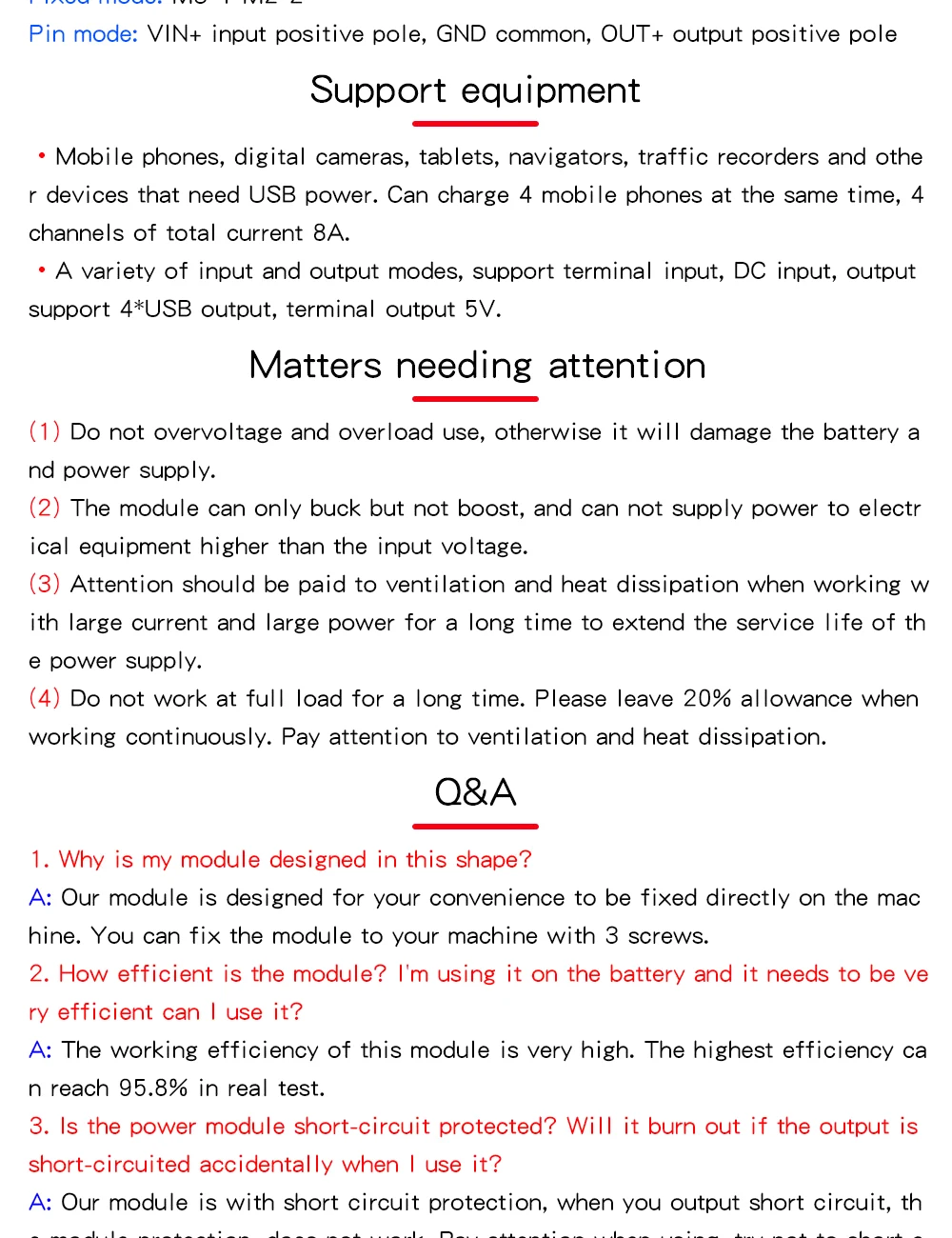
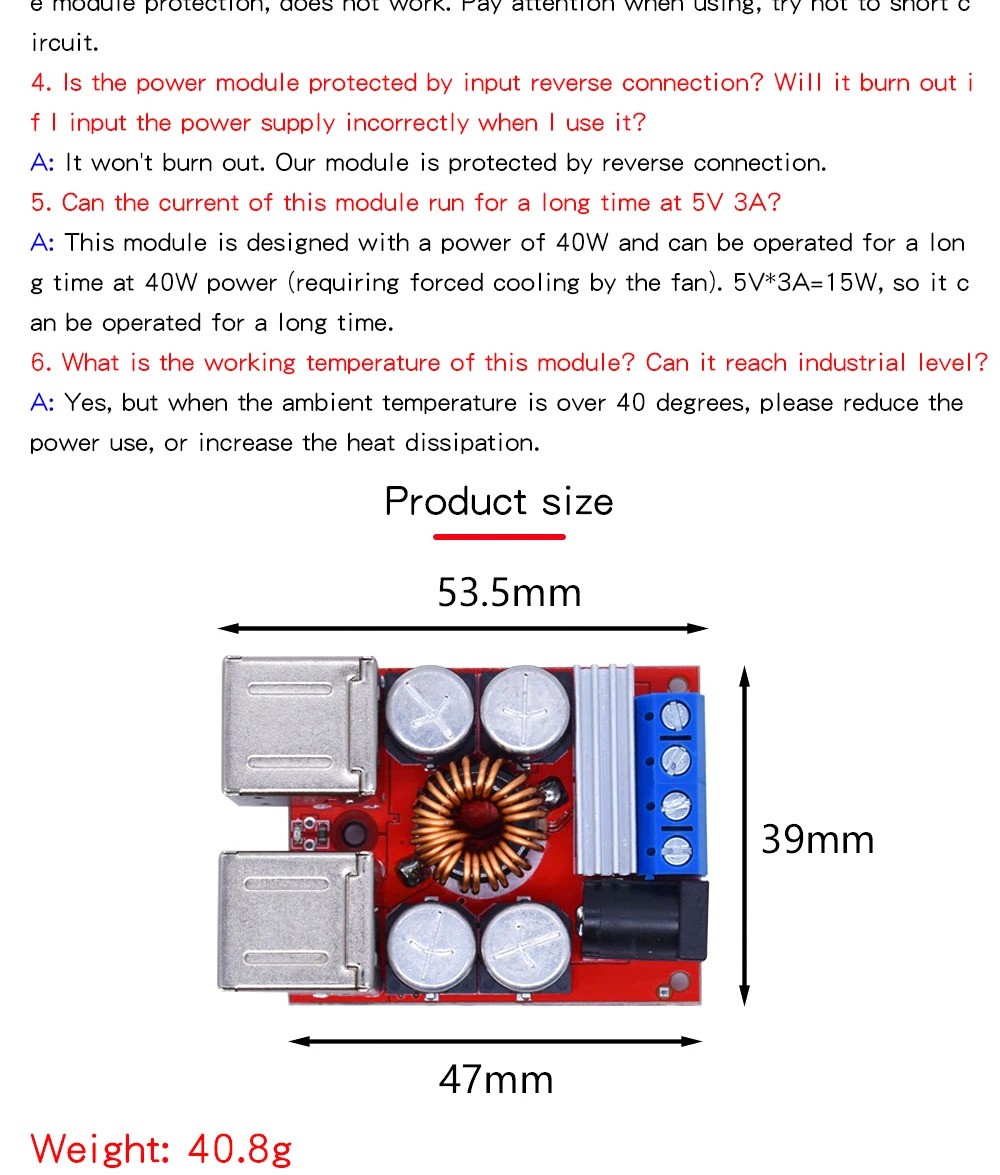
What's in the box?
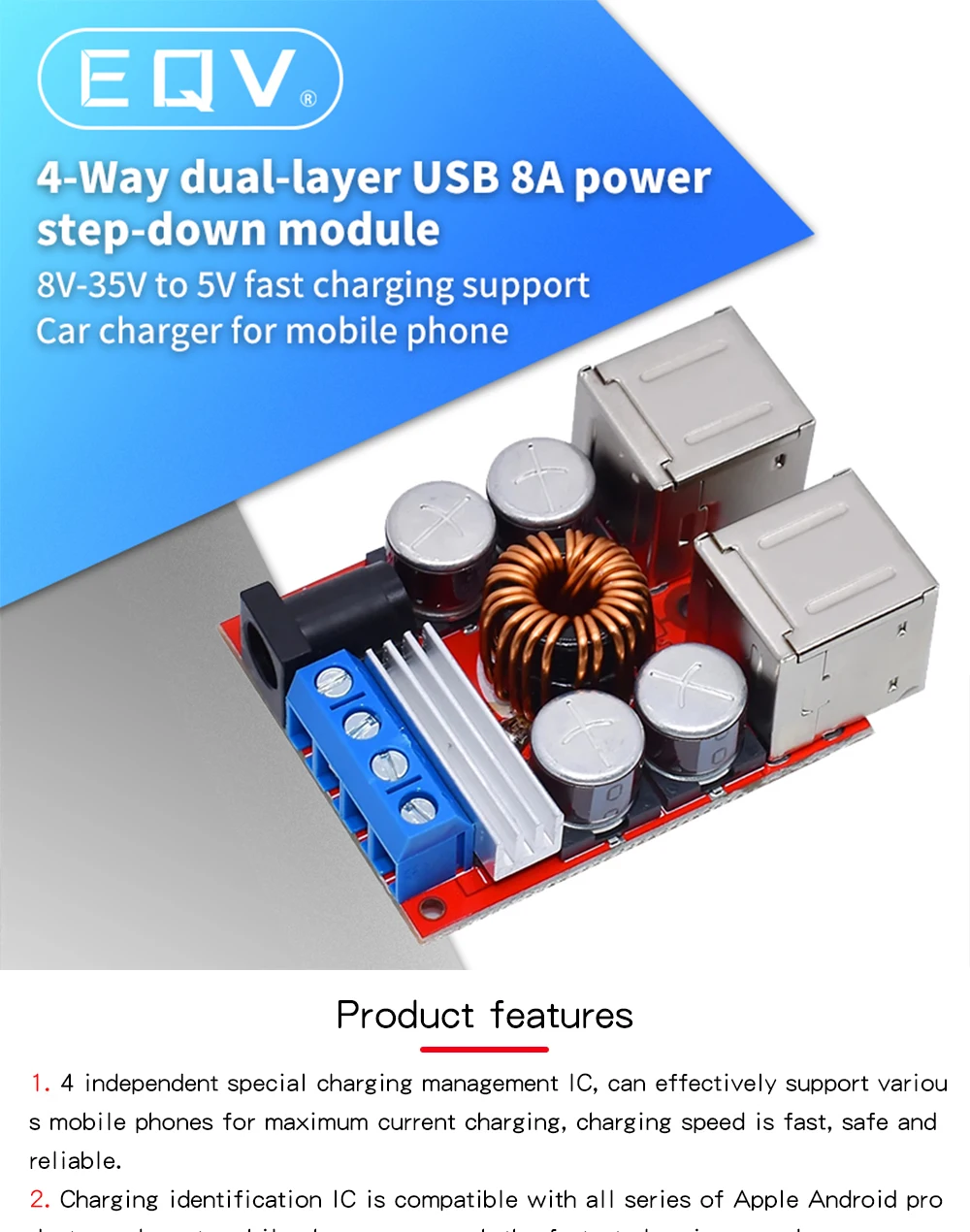
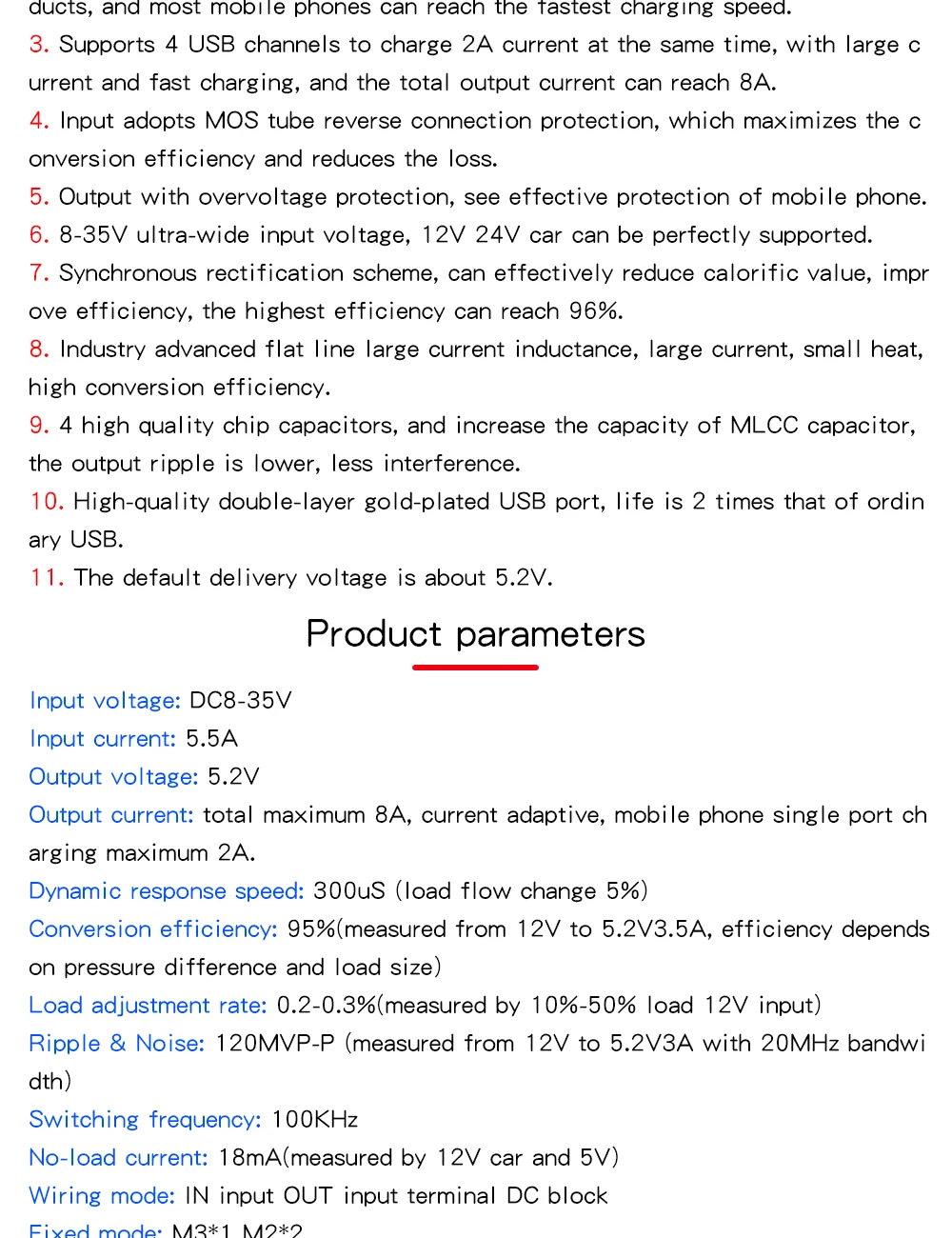
1 x DC-DC Vehicle Charging Board 8V-35V to 5V 8A Power Supply Depressurization Module 4 port USB Output mobile Charger
The Argon ONE V5 Case is designed to elevate your Raspberry Pi 5 experience with unmatched performance, versatility, and style. Built from casted aluminum, the sleek enclosure not only protects your Raspberry Pi but also opens up a whole new dimension for Raspberry Pi.
Key Features
- Made from Casted Aluminum that also serves as the heatsink for passive cooling
- Built-in 30mm PWM Fan for greater thermal control, providing active cooling ensuring optimal performance during intense workloads
- Dual HDMI Ports allow you to connect dual displays at high resolutions, making it perfect for multi-tasking and media playback
- Access your files faster with two additional front-Facing USB 2.0 Ports for easier access to peripherals, boosting convenience and flexibility
- Connect more frequently with built-in DAC with 3.5mm Mic & Headphone Jacks providing 3.5mm mic input and headphone output, ideal for seamless video calls and enhanced audio output
- Supercharge your Raspberry Pi 5 with high-speed storage using the built-in DUAL NVMe PCIe Slot, delivering faster data access and expanded storage capabilities
- Tap into the future of smart homes with an Internal USB Port for ZigBee Modules allowing for easy integration of ZigBee modules, making it perfect for Home Assistant and other IoT projects
- Limitless possibilities with standard Raspberry Pi HAT Compatibility all in one package
- Optional addons: Removable OLED cover can be replaced with the Argon ONE V5 Industria OLED Display Module or add the Argon ONE V5 Industria ZigBee Module to integrate with Home Assistant.
What's in the box?
1 x Argon ONE V5 case with dual NVME Expansion Board
Resources

This 3mm MDF (+-300mm x 300mm) is perfect for laser cutting and engraving.
A perfect fit for your Creality Falcon Laser. Get those wishlist projects started!
What's in the box?
6 x MDF boards