
Special Offers


- Tiny size & solidly built
- Well made terminal block
- Legible miniscule printing of the labels of each of the GPIO pin's function
- Secure connection to the Raspberry Pi
What's in the box?
1 x Terminal block
1 x Screwdriver
1 x Acrylic board
2 x Nuts
2 x M2.5x11 brass standoffs
4 x M2.5x5 6 brass standoffs
6 x Screws
Resources
Wiki - Raspberry Pi GPIO Terminal Board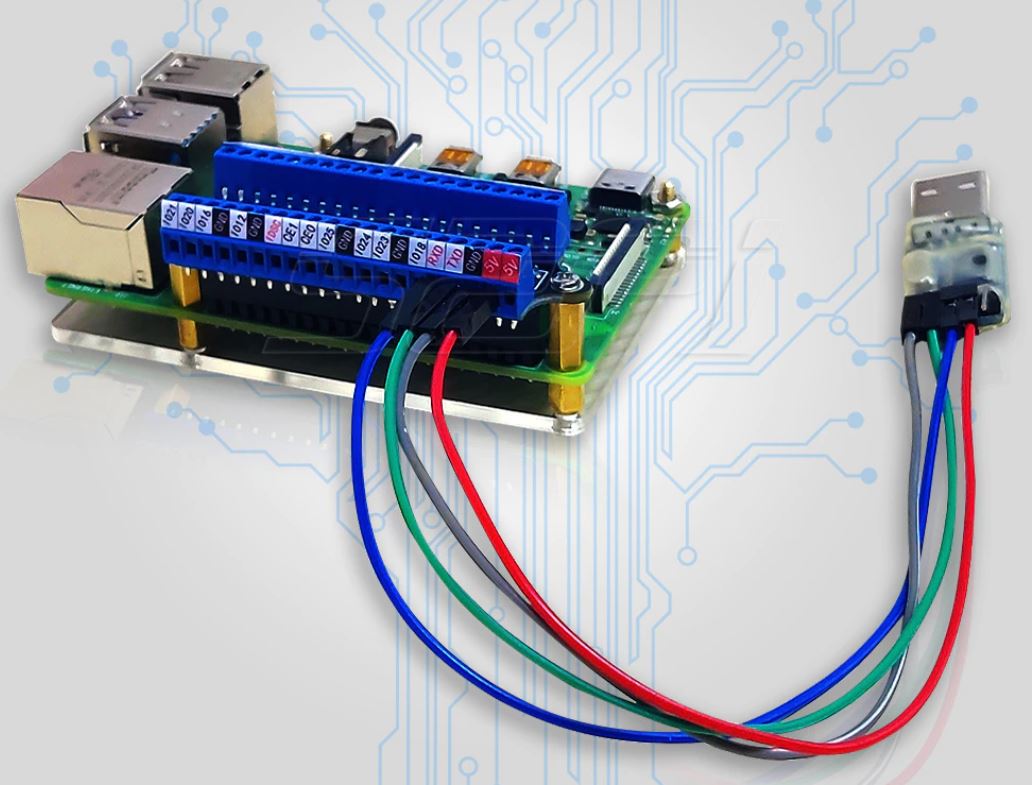
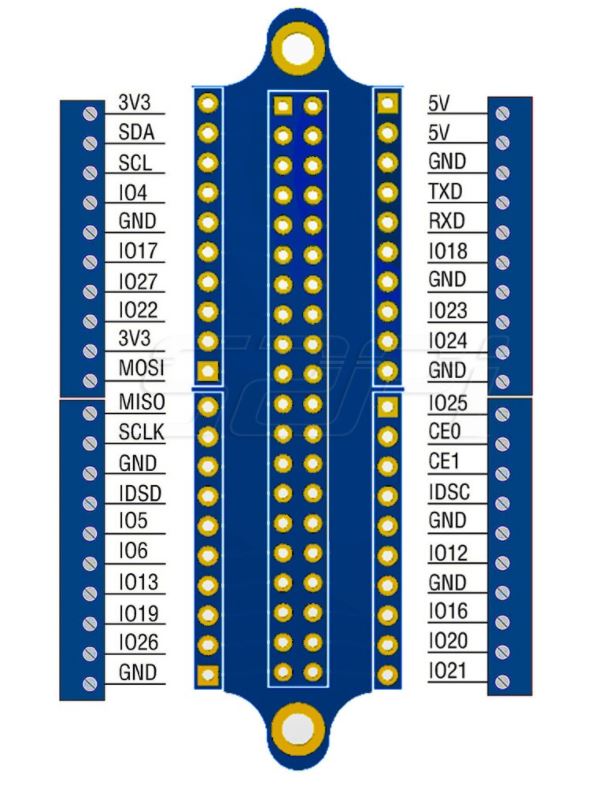
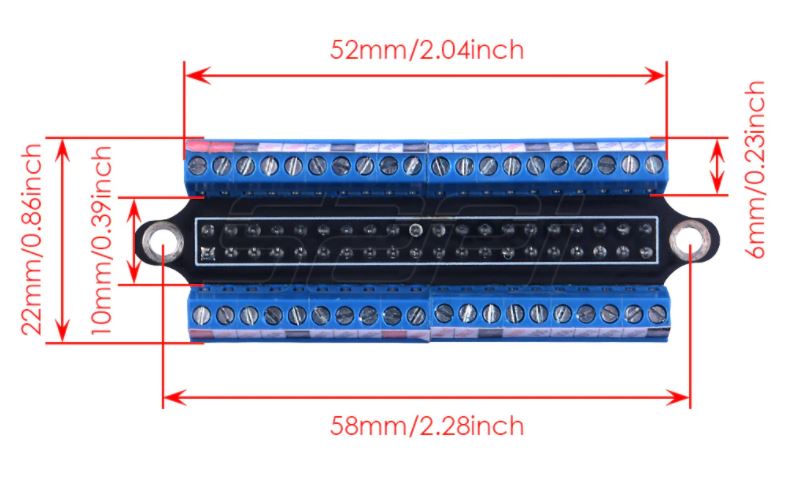
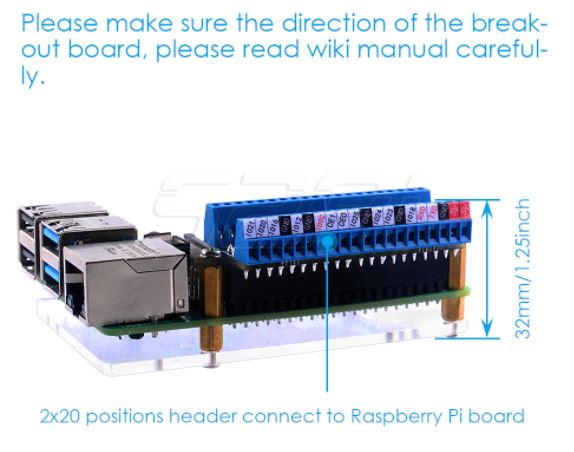
(* Raspberry Pi NOT included - ONLY GPIO screw terminal*)
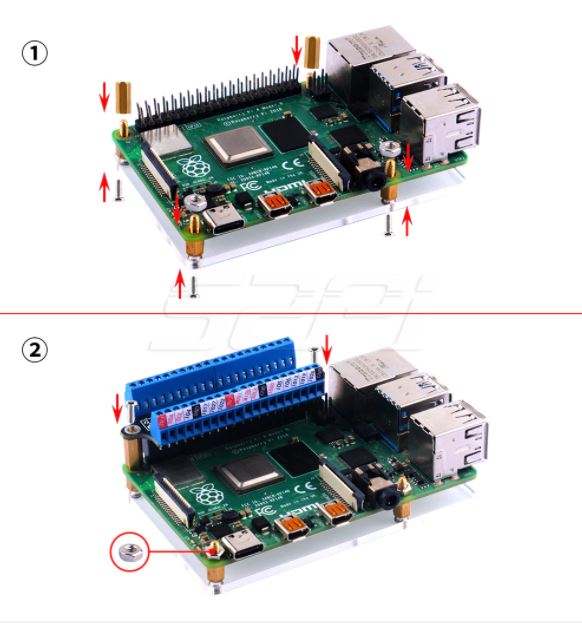
(* Raspberry Pi NOT included - ONLY GPIO screw terminal*)

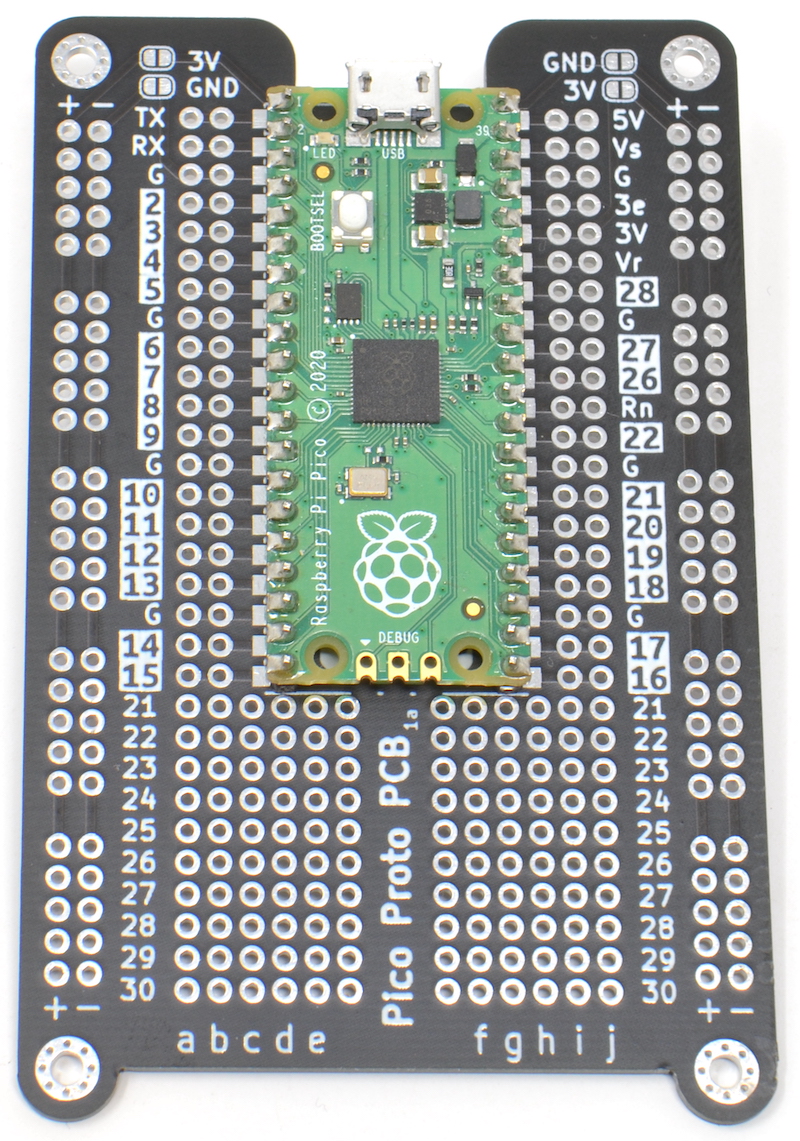
If you done using a breadboard for Pico and are ready to take your prototype to solder, you will love this board.
It can be tricky to work out which pin is which when using a Raspberry Pi Pico
with prototyping board. The MonkMakes Pico Proto PCB solves this problem by
labeling the Pico pins on the PCB.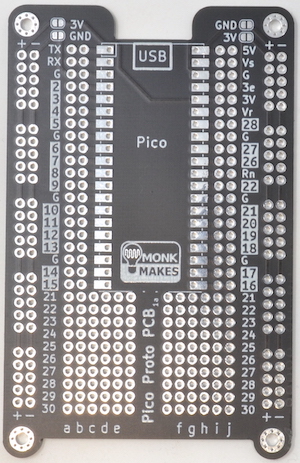
The MonkMakes Pico Proto PCB makes it easy to make soldered prototypes using the Raspberry Pi Pico. You can solder the Pico to the prototyping board using the castelations around the edge of the board, or using header pins, or even solder header sockets onto the Pico Proto PCB so that you can easily swap out the Pico.
Specifications
The layout of the Pico Proto PCB is modelled on a 400-point breadboard, and after the Pico is soldered to the PCB, there are 10 more rows, that can be used for through hole components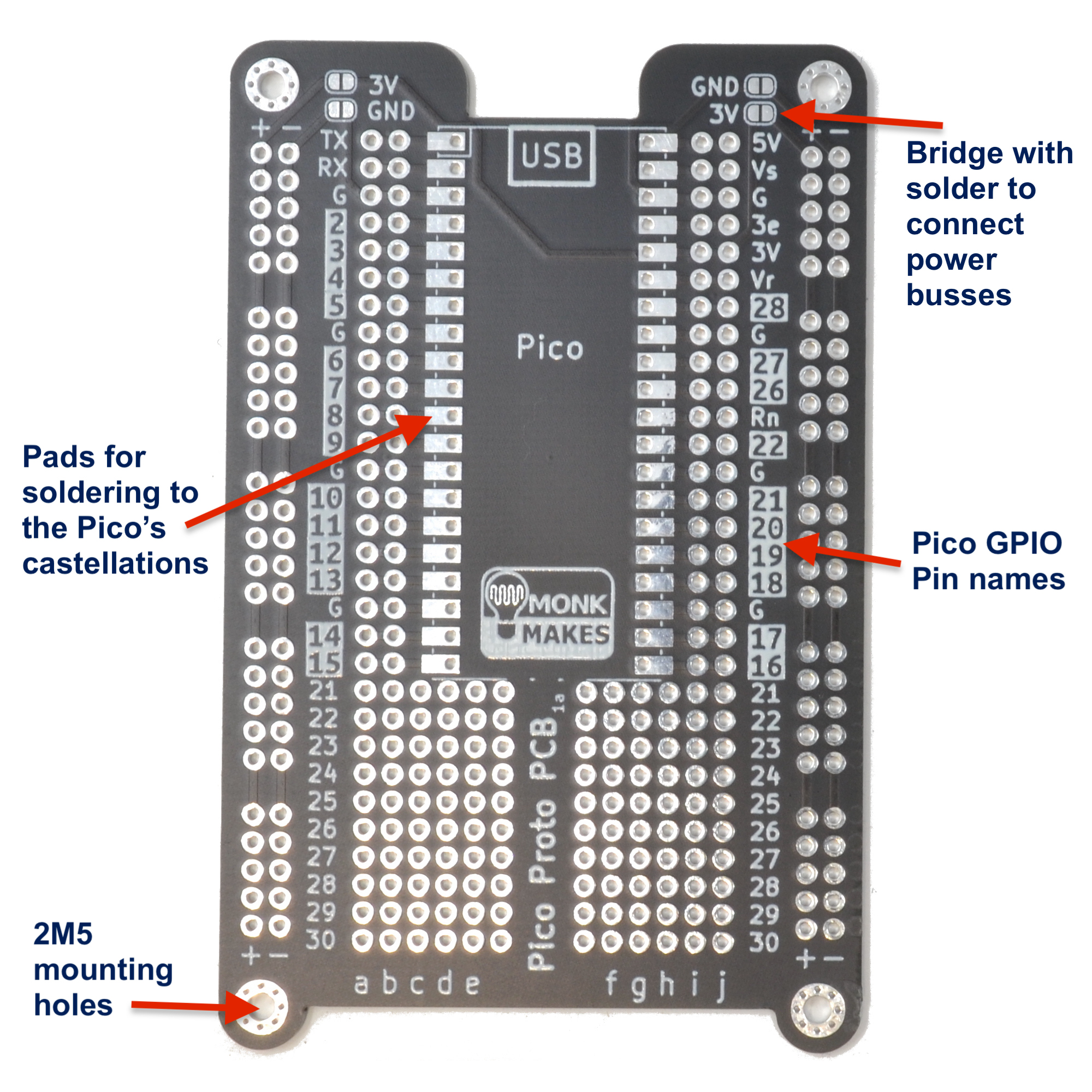
WARNING: Low voltage, low current usage only. Maximum 50V at 3A.
What's in the box?
1 x Pico Proto PCB
Resources
Instructions

Specifications
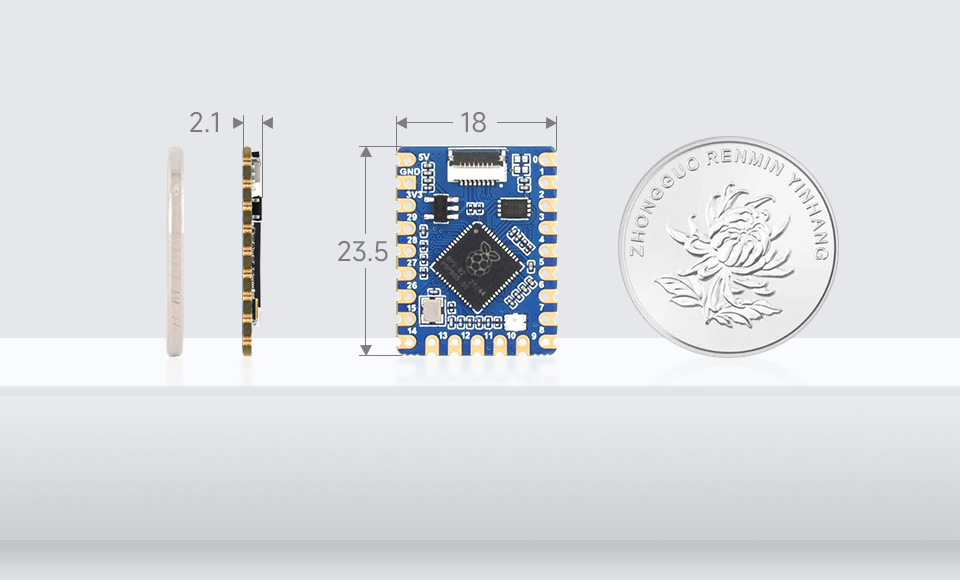
- RP2040 microcontroller chip designed by Raspberry Pi in the United Kingdom
- Dual-core Arm Cortex M0+ processor, flexible clock running up to 133 MHz
- 264KB of SRAM, and 2MB of onboard Flash memory
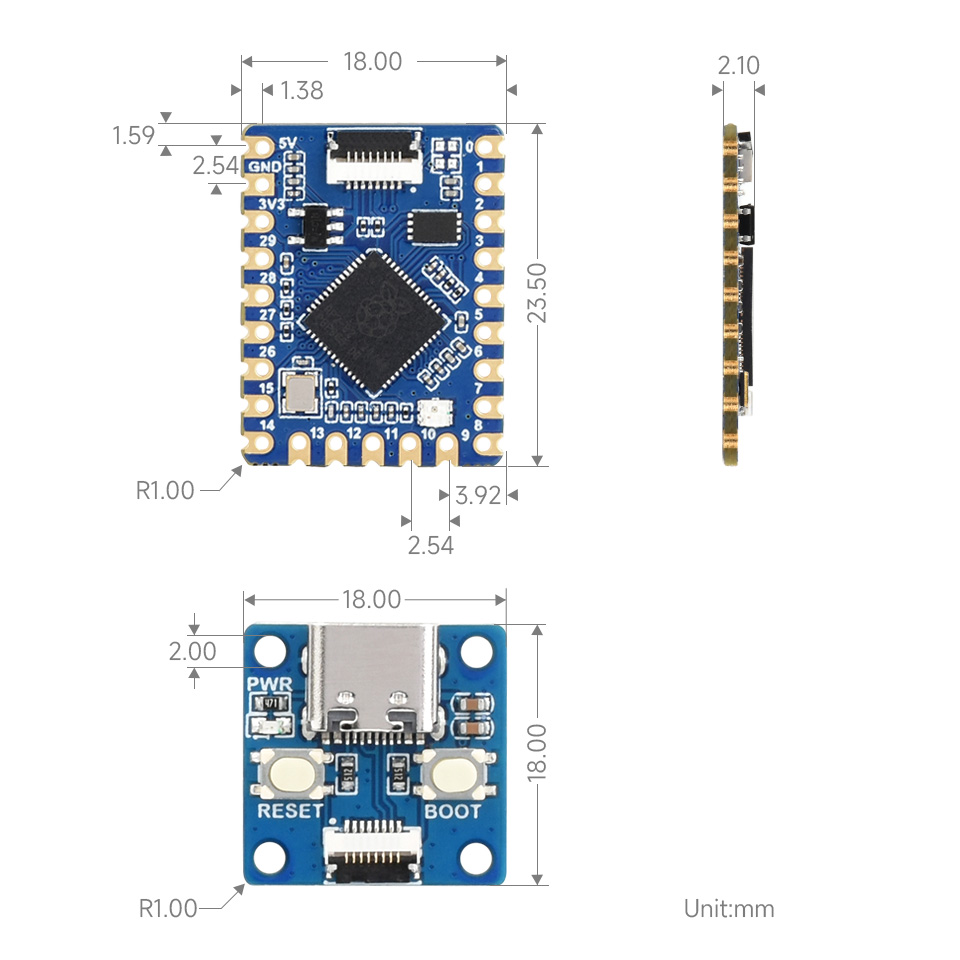
- Onboard FPC 8PIN connector, adapting USB Type-C port via adapter board
- Castellated module allows soldering direct to carrier boards
- USB 1.1 with device and host support
- Low-power sleep and dormant modes
- Drag-and-drop programming using mass storage over USB
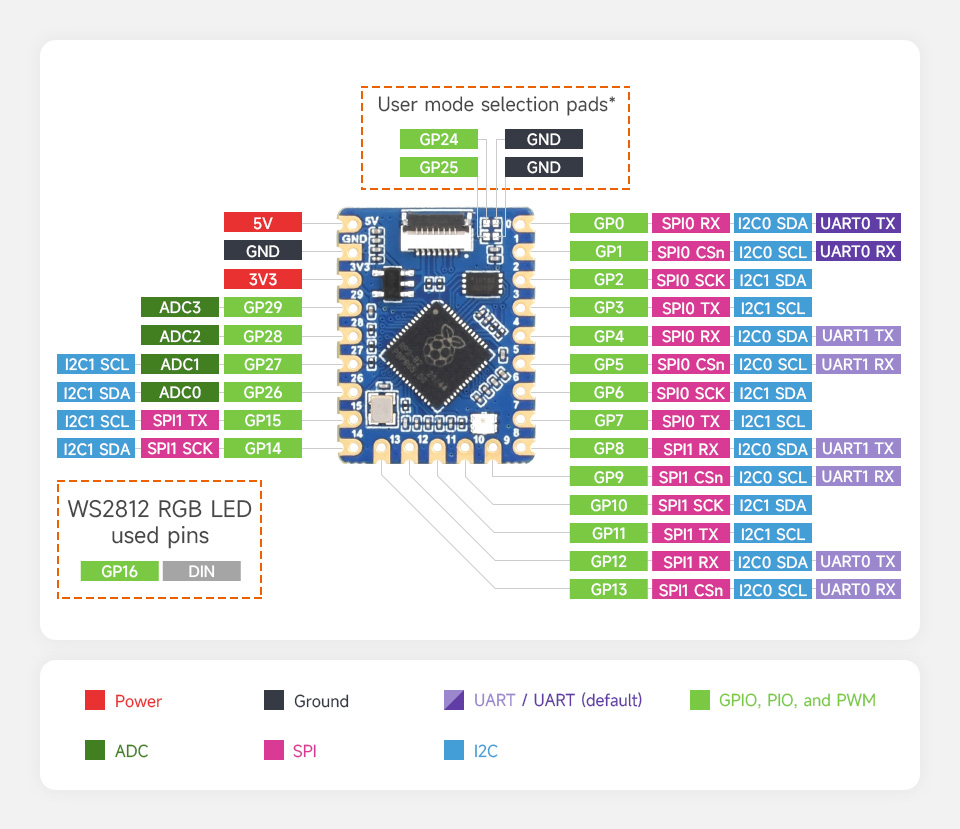
- 20 × multi-function GPIO pins
- 2 × SPI, 2 × I2C, 2 × UART, 4 × 12-bit ADC, 16 × controllable PWM channels
- Accurate clock and timer on-chip
- Temperature sensor
- Accelerated floating-point libraries on-chip
- 8 × Programmable I/O (PIO) state machines for custom peripheral support
Comprehensive SDK, Dev Resources, Tutorials To Help You Easily Get Started
20 × Multi-Function GPIO Pins
What's in the box?
1 x RP2040-Tiny
1 x RP2040-Tiny-Adapter
1 x 8PIN FPC cable ~15cm
Resources
Wiki: www.waveshare.com/wiki/RP2040-Tiny

Are you working on a project involving a fire-detecting robot or a smart system that requires flame detection? This versatile sensor module is tailor-made for your needs. Equipped with a flame sensor and an adjustable digital filter for digital output, it also retains the original analog output. This allows you to seamlessly integrate it into your setup either as a digital input or an analog input sensor, offering the flexibility of a minimum 3-wire interface or an optional 4-wire connection that utilizes both digital and analog functionalities.
Designed to detect fire or other light sources within the wavelength range of 760 nm to 1100 nm, the flame sensor has a pivotal role in scenarios such as fire-fighting robots and soccer robots. With a wide detection angle of 60 degrees and high sensitivity to the flame spectrum, this sensor serves as the "eyes" of the robot, enabling it to identify fire sources or specialized light sources like those used in a soccer game. The module even features M3 mounting holes for convenient installation onto your robot.
Operational within a temperature range of -25 degrees Celsius to 85 degrees Celsius, the flame sensor must maintain a safe distance from the flame during operation to prevent damage. It's compatible with various microcontrollers that support digital or analog input, such as PIC, SK40C, SK28A, SKds40A, and the Arduino series. Moreover, when coupled with a relay module, it can serve as a flame switch for added functionality.Features
- Detect fire, detect light source and sensitive to light with wavelenghth of 940nm
- Interface:Analog or digital
- Supply Voltage: +5 V
- Detection range: 20cm (1V) ~ 100cm (4.8V)
What's in the box?
1 x Flame Sensor Module
Resources
You might also need one of our tested 128GB, 256GB or 512GB NVMe drives or a clear acrylic case to protect your RPi5 and NVMe Base.
NVMe Base is a PCIe extension board for Raspberry Pi 5. Simply populate it with an M-key NVMe SSD (2230 to 2280 sizes supported) and mount it under your Pi for a compact and fast storage solution - It even comes with rubber feet!
It's the perfect solution for turning your Raspberry Pi 5 into a file server, media centre, reverse proxy, etc. - really any task that benefits from large amounts of fast storage, especially with random high operations per second (IOPS) workloads. In short it's a game changer!
NVMe base follows the new "PIP" design guidelines provided by Raspberry Pi ensuring that it will be easy to use and be supported long term by updates to Raspberry Pi OS - though it is very early days and things are improving rapidly there!
What's in the box?
1 x NVMe Base PCB with M.2 Slot (M-Key)
1 x 'PCIe Pipe' Flat Flex Cable
4 x Rubber feet
1 x M2 bolt and 2x nuts for SSD mounting
4 x 7mm M2.5 standoffs for base mounting
8 x short M2.5 bolts for base mounting
4 x long M2.5 bolts for 'pass-thru' mounting with a HAT
You might also need...
- a NVMe drive. Make sure you choose one that fits your NVMe board.
- an acrylic case or metal case to house your new setup
Driver compatibility
We have tested NVMe Base with the following M.2 NVMe drives successfully. We have usually tested one drive from one batch, so this is not comprehensive, or an 'Approved' list, but it's a good guide for drives to seek out:
- AData Legend 700
- AData Legend 800
- AData XPG SX8200 Pro
- Axe Memory Generic Drive
- Crucial P2 M.2
- Crucial P3 M.2
- Crucial P3 Plus M.2
- Inland PCIe NVMe SSD
- Kingston KC3000
- Kioxia Exceria NVMe SSD
- Kioxia Exceria G2 NVMe SSD
- Lexar NM620
- Lexar NM710
- Netac NV2000 NVMe SSD
- Netac NV3000 NVMe SSD
- Origin Inception TLC830 Pro NVMe
- PNY CS1030
- Sabrent Rocket 4.0
- Sabrent Rocket Nano
- Samsung 980
- Samsung 980 Pro (500GB/1TB)
- Team MP33
- Western Digital Black SN750 SE (Phison Controller
' Maybe' List. Works with quirks/not ideal.
These drives either needed extra power, were a bit quirky when we tested them or we've had reports of them being problematic. It may just be the drive we had, but they're probably best avoided.
- Kioxia BG4 2230. Performance very patchy. Runs at quite a high temp.
- Patriot P300 - These drives have various controllers, some of which seem to be incompatible at this time.
- Patriot P310 - These drives have various controllers, some of which seem to be incompatible at this time.
- Samsung 970 EVO Plus. Runs at a higher temp. Some user reports of problems under heavy load or not showing up on boot.
- Samsung 980 Pro (250GB). Reports of this size not working.
- WD Blue SN550. Our fresh unit could be used as storage but could not be booted from.
- WD Red SN700. Slow to boot first time, but worked and booted OK.
- WD SN740. Our fresh unit worked well. YMMV.
- WD Black SN770. Our fresh unit worked fine. YMMV.
- Patriot P300. All units we've tested work but we have heard of a 256GB/1TB variant that doesn't.
'Avoid' List. We've had problems or reports of problems.
- Transcend 110Q (TS500GMTE110Q)
- WD Green/Blue/Red/Black not in the above list. Variable results or not working because of quirks of a SanDisk controller/firmware. Our SN350 and SN570 prevented the RPi 5 from booting at all especially.
Otherwise most M.2 NVMe drive (Not SATA!) you have lying around should work fine.
Check out our benchmark results over at pibenchmarks.net!
Resources
- Video: Installing the Pimoroni NVMe Base on Raspberry Pi 5 ????
- Learn: Getting Started with NVMe Base for Raspberry Pi 5 ????
Firmware
For the most hassle-free experience, make sure your Raspberry Pi OS is up to date, and your RPi 5 firmware is updated to 2023-12-06 (Dec 6th) or newer. This supports all the features of the RPi PCIe spec and means you don't have to mess with config files to get started.
Software update on the RPi OS should do this for you, but to force it you can:
- open a Terminal (Ctrl-Alt-T)
- run
sudo raspi-configand choose 'Latest' under Advanced Options > Bootloader Version.
Running sudo rpi-eeprom-update in the Terminal will tell you which version of firmware is running.
PCIe 3 Mode
To enable experimental and not-officially-supported PCIe 3 mode, add the follow line to the [all] section at the end of your Raspberry Pi /boot/firmware/config.txt file like this:
[all]
dtparam=pciex1_gen=3
Save and reboot - your drive is ready to use!
Formatting the NVMe and booting from NVMe
If you want to boot from the NVMe drive, follow these extra steps:
- Make sure your firmware is updated as above!
- Format the drive using Raspberry Pi Imager
- You can do this with your NVMe Base installed by booting the RPi 5 from SD card and running Raspberry Pi Imager from the start menu.
- Open a Terminal (Ctrl-Alt-T).
- Run
sudo raspi-config - Choose NVMe/USB boot under Advanced Options > Boot Order.
- Reboot your RPi 5.
Notes
- Always power off your RPi and disconnect the power supply before installing or uninstalling the NVMe Base.
- NVMe Base offers a general purpose PCIe x1 connection - while we know most people want to add fast storage in theory you can use other devices with it, we just can't help you make them work! :-D What Would Jeff (Geerling) Do?

This kind of 8 way joystick is originally used in arcade games, but we think it is a good solution for DIY projects that need multiple frequency buttons. There is 4 micro switches that detect the stick position and users can easily get the stick positions by reading the voltage output from the connector with a controller such as Arduino and Raspberry Pi.
Features
- 8 way operation.
- Mountable in control panels.
- Easy to operate with high sensitivity.
- Use it to DIY your own Arcade gaming machine.
Specifications
- Top Ball Diameter: Approx. 35mm
- Total Size: Approx. 95x60x100mm
1 x Joystick
Cables not included
Resources
- Learn about RetroPie
- Compatible with Zero Delay Arcade USB Encoder & Wire Set (Not included)
- Compatible buttons

Consumables Accessories Kit for Laser Etcher
Unleash your creativity and enhance your laser etching projects with this Consumable Accessories Kit. Whether you're a professional or a hobbyist, this kit offers everything you need to achieve precise and clean cuts every time.
Key Features:
- Comprehensive set of accessories designed for compatibility with laser etchers.
- High-quality materials ensure durability and long-lasting performance.
- Easy to use, allowing even beginners to get started right away.
- Includes essential items to maintain and enhance your laser etcher's functionality.
What's in the box?
Consumable Accessories Kit (To go with Laser Etcher )
A Raspberry Pi SSD unlocks outstanding performance for I/O intensive applications on
Raspberry Pi 5 and other devices, including super-fast startup when booting from SSD. It
is a reliable, responsive, and high-performance PCIe Gen 3-compliant SSD capable of fast data transfer, available with 256GB, 512GB or 1TB capacity.
| Density | IOPS5 (4KB random read) | IOPS (4KB random write) |
| 256GB | 40k | 70k |
| 512GB | 50k | 90k |
| 1TB | TBC | TBC |
Features
- M.2 2230-format NVMe SSD for Raspberry Pi
- Official Raspberry Pi SSD
- Compatible with Raspberry Pi 5 (when used with a compatible SSD HAT)
- Complies with PCIe Gen 3 standard
- NVMe 1.4 register interface and command set
- Individually packaged in anti-static bags
- Choice of 256GB, 512GB or 1TB capacity
- Reliable and fast storage or boot drive for your Raspberry Pi 5
- Operating temperature: 0℃ to 70℃ (ambient)
- Dimensions: 30mm x 22mm x 1.35mm (2230 format)
What's in the box?
1 x Raspberry Pi SSD - 512GB
1 x Raspberry Pi M.2 HAT
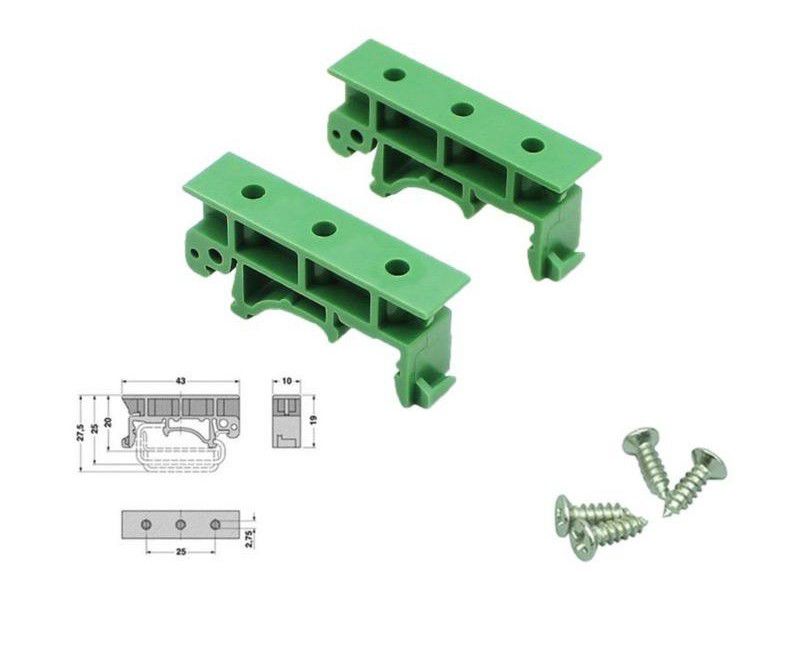
This DIN rail bracket is a reliable mounting accessory designed to secure electronic components, circuit boards, and terminal blocks onto standard DIN rails commonly used in industrial automation, electrical enclosures, and control panels. It ensures stable and organized installation, preventing movement or disconnection due to vibrations or mechanical stress. Made from high-quality insulating plastic, it provides excellent durability and protection against environmental factors, ensuring long-term performance in industrial settings.
With its pre-drilled holes and included screws, this bracket allows for quick and hassle-free installation, reducing assembly time and maintenance efforts. It is compatible with various industrial components such as relays, power supplies, PLC modules, and circuit protection devices, making it an essential accessory for control systems and wiring applications. Whether used in electrical cabinets, automation systems, or industrial machinery, this DIN rail bracket enhances organization and efficiency in any setup.
Features
- Material: PA66V0
- Wiring Method: Track Wiring
- Colour Classification: DRG-01
- Compatible with M3x10mm screw
- Supports standard DIN rails dimensions (Width: 35mm Height:7.5mm)
What's in the box?
2 x DIN Rail Bracket
4 x M3 Screw (10mm)
Firstly the Sonoff 4CH R3 is a 4-gang Wi-Fi Smart Switch. It is designed to give you the ability to integrate smart control into your existing home. It has 4 gangs that can be used to control lights as well as other home appliances at the same time in four areas of your home.
However there is a major difference between 4CHR3 and 4CHPROR3, which is the 4CHPRO R3 is designed with an additional function for RF control.
Additionally when compared with 4CH R2, you can access self-locking, interlock and inching mode on APP directly.
The new improvement is for users to set these 3 working modes on eWeLink APP instead of the hardware itself, therefore making it easier to operate.
So you can enable self-locking mode to turn on/off 4 connected devices independently, interlock mode to turn on 1 connected device every time and turn off the rest of devices simultaneously as well as inching mode to turn on 1 connected device and then make it turn off automatically after a given time (0.5 – 3600s).
Features
- Remotely control connected lights or devices via APP
- 3 working modes with self-locking, interlock and inching mode
- Support scheduling a timer to make devices automatically start and stop to work
- Customize smart scenes to make the device connected with the switch to trigger other devices
- Share the control permission of devices to other accounts to control together
- Check real-time ON/OFF status of devices on your mobile phone
- Power on state allows users to set the On/Off/Keep status for the connected device before power failure as well as ensure it remains the arranged status after power restoration
Loa and Icasa approved
LoA Certificate Number: 171461


Specifications
- Voltage Range: 100-240V AC 50/60Hz
- Max. Load: 10A/2200W/Gang 16A/3500W/Total
- Wireless Frequency: WiFi 2.4GHz
- Wireless Standard: IEEE802.11 b/g/n 2.4GHz(2400M-2483.5M)
- Security Mechanism: WPA/WPA2
- Enclosure Material: PC V0
- Gang: 4
- Dimension:145*90*34 (mm)
- Operating Temperature(recommended): -10ºC-40ºC(14°F-104°F)
- Operating Humidity: 5%-95%RH, Non-condensing
What's in the box?
1 x Sonoff 4CH R3 Smart Switch WiFi
WARNING: They do get very HOT during use.
Stop waiting for your media to buffer. The KODAK T330 is engineered for modern workflow demands, featuring a true USB 3.0 (USB 3.1 Gen 1) Type-C interface that leaves legacy USB 2.0 card readers in the dust.
With theoretical data transfer rates pushing up to 5 Gbps, this compact powerhouse allows you to offload gigabytes of 4K drone footage, high-frame-rate action cam clips, or raw DSLR photo sets onto your Type-C laptop, iPad, or smartphone in a fraction of the time.
Premium Thermal Design & Portable Ruggedness
High-speed data transfers generate heat, which can cause cheap plastic card readers to thermal throttle and slow down. The KODAK T330 solves this with a premium aluminum alloy casing that acts as a natural heatsink, keeping internal temperatures low for consistent, maximum-speed file transfers.
Its ultra-slim, minimalist profile slips effortlessly into your pocket or camera bag, while the integrated LED status light gives you instant visual confirmation during read and write processes so you never accidentally unplug your card during a critical transfer.
Key Features & Benefits
- True USB 3.0 SuperSpeed: Experience up to 10x faster data speeds than standard USB 2.0 readers—perfect for 4K video files and massive photo libraries.
- Premium Aluminum Construction: Crafted with a sleek, durable aluminum alloy shell that protects against drops and optimally dissipates heat.
- Native Type-C Connectivity: Connects directly to modern MacBooks, Windows USB-C laptops, iPads, and Android smartphones without requiring bulky adapters or cables.
- Smart LED Indicator: A soft, built-in LED light glows during connection and flashes during active data transfers to protect against data corruption.
- Plug-and-Play Simplicity: No drivers, external power, or software installations required. Just insert your MicroSD card and plug it in.
Technical Specifications
| Features | Specifications |
| Brand | KODAK |
| Model | T330 |
| Interface Type | USB Type-C |
| Protocol Standard | USB 3.0 / USB 3.1 Gen 1 (SuperSpeed) |
| Max Transfer Speed | Up to 5 Gbps (Theoretical) |
| Supported Card Type | MicroSD / TF (TransFlash) |
| Max Capacity Supported | Up to 2TB |
| Casing Material | Premium Aluminum Alloy |
| Status Indicator | Integrated Blue/White LED |
| Compatibility | Windows, MacOS, iPadOS, Android, Linux |
What's in the box?
1 x KODAK T330 USB 3.0 Type-C Micro SD Card Reader
Rsources
Common Applications
- Drone & Action Cam Shooters: Instantly offload 4K video clips from DJI drones or GoPro action cameras directly onto a Type-C tablet or phone while out in the field.
- Mobile Storage Expansion: Use a high-capacity MicroSD card inside the T330 as an ultra-portable, high-speed external flash drive for your USB-C smartphone or laptop.
- Dashcam Footage Review: Pull your vehicle's dashcam memory card and read it immediately on your phone screen at the roadside if needed.
Performance Note: To achieve maximum USB 3.0 speeds, ensure the T330 is plugged into a dedicated USB 3.0 (or higher) Type-C port on your host device, and that your MicroSD card supports high-speed reading formats (such as UHS-I U3/V30).