
Special Offers


In comparison with its predecessor, RP2040, RP235x offers:
- A 150MHz system clock (versus 133MHz)
- Dual Arm Cortex-M33 cores (versus dual Arm Cortex-M0+)
- Dual RISC-V Hazard3 cores
- 520KB RAM (versus 264KB)
- 8KB on-chip OTP storage
- A comprehensive security model, based on Arm TrustZone for Cortex-M
- Greatly improved power efficiency
Raspberry Pi Pico 2 pairs RP2350 with 4MB of on-board QSPI Flash memory (versus 2MB on Raspberry Pi Pico) for code and data storage.
1 x Raspberry Pi Pico 2 board with header
- Micro-USB cable - To provide power from your computer and program the board.
- Breadboard for Pico - A special breadboard from Monk Makes with printed Raspberry Pi Pico pinout to make projects easier!
Resources
- Raspberry Pi Pico Support docs available here
- Raspberry Pi Pico 2 announcement blog post
- Raspberry Pi Pico 2 product brief
- Raspberry Pi Pico 2 Pinout
- Raspberry Pi Pico 2 MicroPython SDK
- Raspberry Pi Pico 2 C/C++ SDK
- Raspberry Pi Product Information Portal (PIP)
- RP2350 Information
- Our Raspberry Pi Pico Tutorials
- Micropython website
- Raspberry Pi Pico 2 STEP file
- Raspberry Pi Pico 2 Fritzing part
- Raspberry Pi Pico 2 design files (Cadence Allegro)
Our Approved Reseller partners at Core Electronics offer a comprehensive Raspberry Pi Pico course.
The Argon ONE V5 Single and Dual case takes your Raspberry Pi 5 setup to a whole new level. Maximize the Argon ONE V5 case upgradeability with the integration of a ZigBee Module.
The Argon40 CC2562P Zigbee Chip is a powerful wireless communication module designed for seamless integration with Home Assistant. Offering robust Zigbee 3.0 connectivity, it ensures reliable control of smart home devices while supporting extended range and low power consumption. Ideal for building smart home networks, this chip is perfect for controlling lighting, security, and other IoT devices with enhanced performance and stability. Easy to set up and highly compatible, the CC2562P streamlines home automation, making your smart home more efficient and responsive.
Features
Zigbee 3.0 Support - Ensures stable and secure communication for smart home networks, with backward compatibility for earlier Zigbee devices
Extended Range - With transmission power up to +20 dBm, the CC2652P offers enhanced range of up to 200 meters
Low Power Consumption - Designed with ultra-low power usage in mind, ideal for battery-powered smart devices and sensors
High Compatibility - Seamlessly integrates with Home Assistant and various Zigbee coordinator systems
External Antenna for Improved Signal - Features an external SMA antenna that ensures superior signal reception, even in complex environments
Enhanced Security - Zigbee 3.0 offers advanced encryption and security features to keep your smart home network safe from unauthorized access
What's in the box?
1 x Argon ONE V5 Industria ZigBee Module
Resources
These kits are perfect for beginners that are just just getting exposed to the Raspberry Pi, Media enthusiasts looking to stream online content with Kodi, developers looking to exploit the many advantages of the RPI's GPIO pins and anybody looking to get some cool goodies at a great price! They contain all of the essential items that you need to get up and running in no time.
Please Note: These kits are pre-boxed and cannot be modified at all, we do however keep stock on all of the individual items so if you have a special need simply feel free to browse through the rest of our product offerings and select the items that you'd like.
What's in the box?
1 x Official 5.1V 5A 27W USB-C PD Power Supply in White
1 x 1m micro HDMI cable
1 x 64GB preloaded micro SD card with 64bit Raspberry Pi OS pre-loaded
Want to take your kit to the next level?
Turn your RPI into a Media Centre
Grab yourself a remote control, install LibreELEC or OSMC when setting up your RPI and you'll be streaming in no time. You can even add a wireless keyboard, mouse or other similar controllers
Want a cheap eco-friendly PC
Grab a Keyboard and Mouse, select Raspbian when setting up your RPI and you'll be browsing the web, sending emails, editing spreadsheets and watching videos just like you're used to with a desktop/laptop.
We know you love retro gaming!
RetroPie allows you to turn your Raspberry Pi into a retro-gaming machine Check out our Arcade section, whether you just want a retro control or a mini DIY arcade cabinet we have what you're looking for.
Did somebody say Robotics?
We've got some cool beginner's items in our robotic section
Our Kits come with the latest version of Raspberry Pi OS pre-installed, While we will certainly try our best to assist with any software related questions we cannot offer any kind of official support on community driven, open source, or non-PiShop produced proprietary software.
NOOBS, Raspbian, RetroPie, LibreELEC and OSMC are all examples of open-source software, please visit the developer's respective websites for more info.
Resources
A whole bunch of other really cool technical info can be found here.
Where do I start?.........Getting Started with Raspberry Pi
More on the Raspberry Pi 5
Please note: The batteries in the pic are not the supplied batteries. Please read the below description to see what is in the box.
The BBC micro:bit is a pocket-sized codeable computer with motion detection, a built-in compass, LED display, and Bluetooth technology built in.
It measures 4cm by 5cm, is available in a range of colours, and designed to be fun and easy to use. It can be coded with something simple in seconds – like lighting up its LEDs or displaying a pattern – with no prior knowledge of computing.
It also connects to other devices, sensors, kits and objects, and is a companion to Arduino, Galileo, Kano, littleBits and Raspberry Pi, acting as a spring board to more complex learning.
Each element is completely programmable via easy-to-use software on a dedicated website that can be accessed from a PC, tablet or mobile.
Product Overview
Get creative, get connected & get coding with the micro:bit go. A complete set containing all the parts and inspirational ideas to get started with the micro:bit. Each micro:bit go contains 1x micro:bit, USB cable, battery holder & 2x AAA batteries along with a Quick Start Guide featuring 4 fun ideas all in a retail ready pack. The micro:bit go is the quickest and easiest way for children to get going with the micro:bit. The micro:bit is a pocket-sized computer that you can code, customise and control to bring your digital ideas, games and apps to life. Measuring 4cm by 5cm, and designed to be fun and easy to use, users can create anything from games and animations to scrolling stories at school, at home and on the go - all you need is imagination and creativity. The micro:bit is completely programmable. That means each of its LEDs can be individually programmed as can its buttons, inputs and outputs, accelerometer, magnetometer and Bluetooth Smart Technology.
Features
- Upgraded processor (nRF52833)
- 64MHz Arm Cortex-M4 FPU (over 4 times faster!)
- 512KB Flash storage on board
- 128KB RAM
- MEMS Microphone with LED indicator and on-board speaker
- 5x5 LED matrix display
- Touch sensitive logo "button"
- Accelerometer/compass
- Light and temperature sensors
- Sleep/off mode for batteries powered projects (w/ LED indicator)
- Up to 200mA of current for external accessories
- Bluetooth 5.0 radio allowing micro:bits to talk to each other
- Notched edge connector (easier to connect things like crocodile clips and conductive thread)
- Dimensions: 52mm x 42mm x 11.7mm
It's the same shape and size so should be already familiar to countless teachers and learners, and also compatible with the vast majority of add-on boards and accessories.
Applications
Embedded Design & Development
What's in the box?
1 x micro:bit V2 board
1 x micro:bit USB cable
1 x AAA Battery holder
2 x 2 x AAA GP batteries
Resources
Using the micro:bit V2.2
Sensors
The micro:bit V2.2 has no less than six sensors onboard to create awesome projects:
More Resources
The BBC micro:bit is a pocket-sized computer that introduces you to how software and hardware work together. It has an LED light display, buttons, sensors, a speaker, microphone and many other input/output features that, when programmed, let it interact with you and your world.
Visit What is the micro:bit? to find out more or explore all the features in depth through short videos.
You will need a computer, tablet or phone to write and send code to the micro:bit, but once the code is on the micro:bit it works as a standalone device with just the battery pack. Visit getting started for support taking your first steps with the micro:bit.
The Micro:bit Educational Foundation produces free coding tools and teaching resources to support you as you explore the potential of the micro:bit:
- Choose your perfect programming tool in Let's Code:
- Run whole class coding sessions easily with micro:bit classroom
- Teach block-based coding with Microsoft MakeCode or text-based coding with the micro:bit Python Editor
- Explore our free resources for teachers including:
- Quick projects for beginners and more advanced users
- Curriculum-linked lessons and units of work
- Professional development courses and events like webinars and code-alongs
- Classroom resources such as student handouts, reward certificates and posters
As well as givings students a hands-on approach to coding, the micro:bit is an engaging classroom tool that gives students confidence to try new things and get creative with technology.
These kits are perfect for beginners that are just just getting exposed to the Raspberry Pi, Media enthusiasts looking to stream online content with Kodi, developers looking to exploit the many advantages of the RPI's GPIO pins and anybody looking to get some cool goodies at a great price! They contain all of the essential items that you need to get up and running in no time.
Please Note: These kits are pre-boxed and cannot be modified at all, we do however keep stock on all of the individual items so if you have a special need simply feel free to browse through the rest of our product offerings and select the items that you'd like.
What's in the box?
1 x Official 5.1V 5A 27W USB-C PD Power Supply in Black
1 x 1m micro HDMI cable
Want to take your kit to the next level?
Turn your RPI into a Media Centre
Grab yourself a remote control, install LibreELEC or OSMC when setting up your RPI and you'll be streaming in no time. You can even add a wireless keyboard, mouse or other similar controllers
Want a cheap eco-friendly PC
Grab a Keyboard and Mouse, select Raspbian when setting up your RPI and you'll be browsing the web, sending emails, editing spreadsheets and watching videos just like you're used to with a desktop/laptop.
We know you love retro gaming!
RetroPie allows you to turn your Raspberry Pi into a retro-gaming machine Check out our Arcade section, whether you just want a retro control or a mini DIY arcade cabinet we have what you're looking for.
Did somebody say Robotics?
We've got some cool beginner's items in our robotic section
Our Kits come with the latest version of Raspberry Pi OS pre-installed, While we will certainly try our best to assist with any software related questions we cannot offer any kind of official support on community driven, open source, or non-PiShop produced proprietary software.
NOOBS, Raspbian, RetroPie, LibreELEC and OSMC are all examples of open-source software, please visit the developer's respective websites for more info.
Resources
A whole bunch of other really cool technical info can be found here.
Where do I start?.........Getting Started with Raspberry Pi
More on the Raspberry Pi 5
The Raspberry Pi 45W USB-C Power Supply is an ideal power supply for USB-C powered Raspberry Pi products. It is especially suitable for Raspberry Pi 5 users who wish to drive high-power peripherals, such as hard drives and SSDs.
Delivering a maximum of 5.1V, 5A, it supports USB PD (Power Delivery) negotiation, so Raspberry Pi 5 can communicate with it and select the most appropriate power profile. This enables Raspberry Pi 5 to increase the USB current limit automatically from the default 600mA to 1.6A, in order to provide extra power for devices connected to the four Type A USB ports.
An extended range of built-in power profiles mean the Raspberry Pi 45W USB-C Power Supply is also an excellent option for powering third-party PD-compatible products such as smartphones, tablets and laptop computers. The available profiles are 9V, 5A; 12V, 3.75A; 15V, 3A; and 20V, 2.25A, all limited to a maximum of 45W.
These power supplies are great for Raspberry Pi 5 users who wish to drive high-power peripherals eg. hard drives and SSDs.
Specifications
- 100-240V AC 50/60Hz input
- USB power delivery, providing 5.1V/5.0A, 9.0V/5.0A, 12.0V/3.75A, 15.0V/3.0A, 20.0V/2.25A
- 1.5M 17AWG output cable
- Popular Raspberry Pi styled casing
- USB-C
What's in the box?
1 x 45W USB-C PD power supply
You will also need a euro plug adapter
Resources

Raspberry Pi RP2040 is the first microcontroller designed in-house at Raspberry Pi (“Raspberry Silicon”).
It features:
• Dual-core Arm Cortex-M0 @ 133MHz
• 264KB of on-chip RAM
• Support for up to 16MB of off-chip Flash memory via a QSPI bus
• DMA controller
• Interpolator and integer divider peripherals
• 30 GPIO pins, 4 of which can be used as analogue inputs
• 2 × UARTs, 2 × SPI controllers, and 2 × I2C controllers
• 16 × PWM channels
• 1 × USB 1.1 controller and PHY, with host and device support
• 8 × Raspberry Pi Programmable I/O (PIO) state machines
• USB mass-storage boot mode with UF2 support, for drag-and-drop programming
Please see the RP2040 datasheet for more details
and Hardware Design with RP2040
To date, RP2040 has only been available on Raspberry Pi Pico, and as a component to a limited number of partners. We now cover the availability of RP2040 as a component to the broad market in single-unit quantities. Bulk quantities on reels of 500 and more available soon.
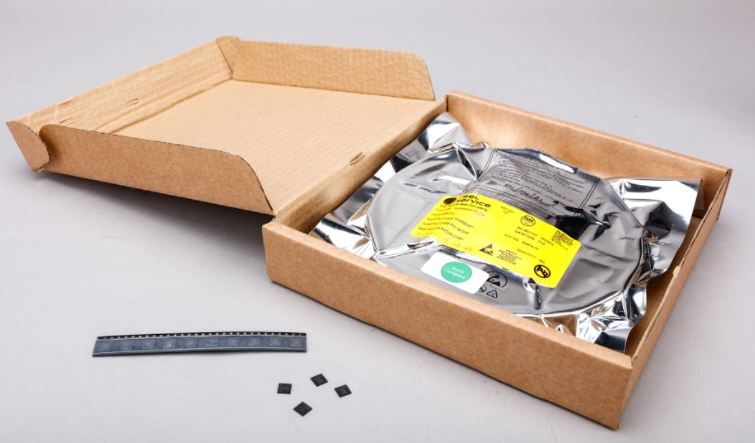

It features:
• Dual-core Arm Cortex-M0 @ 133MHz
• 264KB of on-chip RAM
• Support for up to 16MB of off-chip Flash memory via a QSPI bus
• DMA controller
• Interpolator and integer divider peripherals
• 30 GPIO pins, 4 of which can be used as analogue inputs
• 2 × UARTs, 2 × SPI controllers, and 2 × I2C controllers
• 16 × PWM channels
• 1 × USB 1.1 controller and PHY, with host and device support
• 8 × Raspberry Pi Programmable I/O (PIO) state machines
• USB mass-storage boot mode with UF2 support, for drag-and-drop programming
Please see the RP2040 datasheet for more details
and Hardware Design with RP2040
To date, RP2040 has only been available on Raspberry Pi Pico, and as a component to a limited number of partners. We now cover the availability of RP2040 as a component to the broad market in single-unit quantities. Bulk quantities on reels of 500.

Visit our blog to get more info on what you can do with your Pico
This Starter Kit is based around the Raspberry Pi Pico W (with pre-soldered headers) development board which features the Raspberry Pi RP2040 microcontroller chip. This kit is ideal for beginners that need a base to start testing their projects. We include a USB cable for programming/testing your Pico projects and an official power supply for when you deploy your Pico to perform it's duties.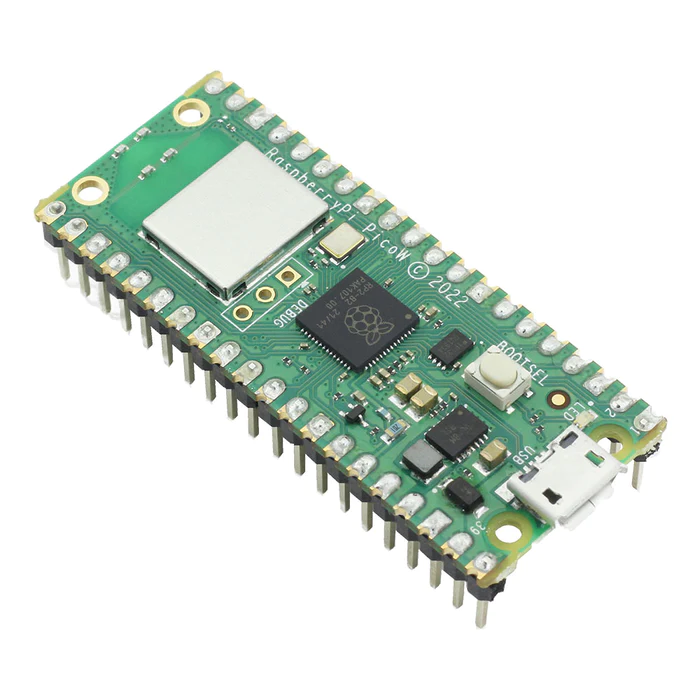
What's in the box?
1 x The Raspberry Pi Pico W microcontroller with pre-soldered headers1 x Official USB A male to USB micro B male 1m cable
1 x 5.1V 2.5A Official Power Supply white for Pico
1 x Solderless 400 Point Breadboard
1 x 120Pcs 10cm Breadboard Jumper Cable Kit
Resources:
Pico W documentation available here
Connecting to the internet with Raspberry Pi Pico W
Please note: cases and enclosures designed for the original Raspberry Pi 7" Touchscreen display will not fit the new Touch Display 2. The frame size and mounting holes are different.
Raspberry Pi Touch Display 2 is the long-awaited successor to our popular 7” Touch Display. It is a portrait-native display offering:
- 7” diagonal display size
- 85-degree viewing angle
- 24-bit RGB
- 720x1280-pixel resolution
- True multi-touch capacitive panel with five-finger touch
What's in the box?
1 x Raspberry Pi Touch Display 2
1 x 22-way to 15-way FFC DSI ribbon cable (for use with Raspberry Pi 5)
1 x 15-way to 15-way FFC DSI ribbon cable (for use with Raspberry Pi 4B/3B+/3/3A+/2/B+)
1 x GPIO connection cable
8 x M2.5 Fixing screws
1 x Enclosure for Raspberry Pi Touch Display 2 (7")
Use this handy little USB thingymajig allows you to power your Raspberry Pi Touch Display 2 from a USB port, keeping your GPIO pins free for HATs or jumper wires.
Resources
- Getting Started
- Raspberry Pi Touch Display 2 product brief
- Raspberry Pi Touch Display 2 install guide
- How to change screen orientation
- Enclosure Manufacturer assembly steps
Please Note: These kits are pre-boxed and cannot be modified at all, we do however keep stock on all of the individual items so if you have a special need simply feel free to browse through the rest of our product offerings and select the items that you'd like.
What's in the box?
1 x Iconic Raspberry Pi 3 Model A plus
1 x Official 5.1V 2.5A Power Supply in White
1 x black 1m Official HDMI cable
1 x 32 GB Kioxia Micro SD card with Raspberry Pi OS 64bit pre-loaded
1 x Official Pi3A Red/White Case
Want to take your kit to the next level?
Turn your RPI into a Media Centre
Grab yourself a remote control, install LibreELEC or OSMC when setting up your RPI and you'll be streaming in no time. You can even add a wireless keyboard, mouse or other similar controllers
Want a cheap eco-friendly PC
Grab a Keyboard and Mouse, select Raspbian when setting up your RPI and you'll be browsing the web, sending emails, editing spreadsheets and watching videos just like you're used to with a desktop/laptop.
We know you love retro gaming!
RetroPie allows you to turn your Raspberry Pi into a retro-gaming machine Check out our Arcade section, whether you just want a retro control or a mini DIY arcade cabinet we have what you're looking for.
Did somebody say Robotics?
We've got some cool beginner's items in our robotic section
Our Kits come with the latest version of Raspberry Pi OS pre-installed, While we will certainly try our best to assist with any software related questions we cannot offer any kind of official support on community driven, open source, or non-PiShop produced proprietary software.
NOOBS, Raspbian, RetroPie, LibreELEC and OSMC are all examples of open-source software, please visit the developer's respective websites for more info.
A whole bunch of other really cool technical info can be found here.
Where do I start?.........Getting Started with Raspberry Pi
You will find loads of info, lessons, projects and other resources at https://microbit.org/get-started/first-steps/introduction/
Are you a teacher that need assistance or material to improve your classes? Have a look at the free resources for teachers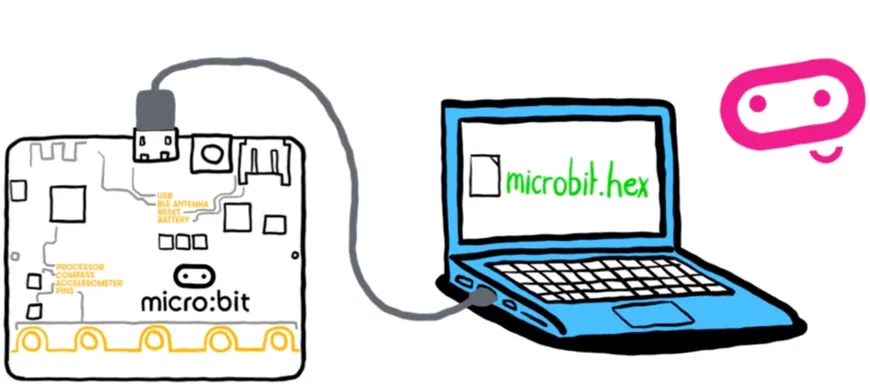
micro:bit V2 is a brand new, super-charged version of the popular pocket-sized codeable computer, brought bang up to date with a microphone, speaker and upgraded processing capabilities.
With over four times the processing power and eight times as much RAM as the original micro:bit this new model opens up a world of new possibilities! We're especially excited about how well MicroPython will run on the new model where previously the limited RAM was a struggle.
Features
- Upgraded processor (nRF52833)
- 64MHz Arm Cortex-M4 FPU (over 4 times faster!)
- 512KB Flash storage on board
- 128KB RAM
- MEMS Microphone with LED indicator and on-board speaker
- 5x5 LED matrix display
- Touch sensitive logo "button"
- Accelerometer/compass
- Light and temperature sensors
- Sleep/off mode for batteries powered projects (w/ LED indicator)
- Up to 200mA of current for external accessories
- Bluetooth 5.0 radio allowing micro:bits to talk to each other
- Notched edge connector (easier to connect things like crocodile clips and conductive thread)
- Dimensions: 52mm x 42mm x 11.7mm
It's the same shape and size so should be already familiar to countless teachers and learners, and also compatible with the vast majority of add-on boards and accessories.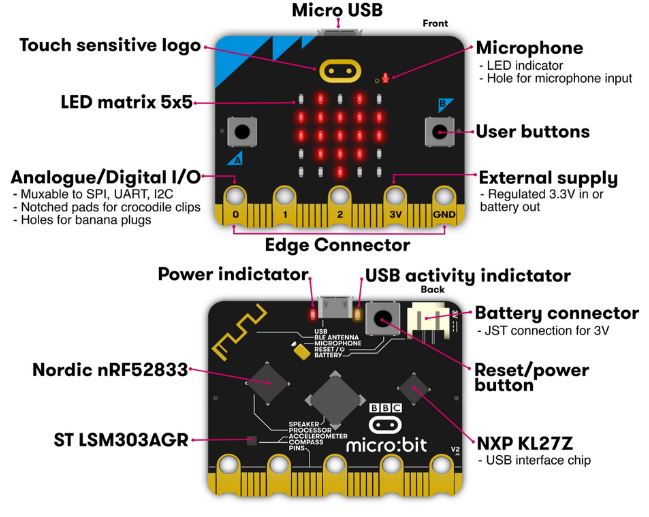
How does the BBC micro:bit work?
It's programmed with beginner friendly, drag and drop interface MakeCode with the option to progress into MicroPython later on, opening up even more programming possibilities!
It's packed with inputs, outputs, sensors and radio communication features that can be combined into and endless variety of projects.
- Inputs and outputs: An important part of any computer system. As a very small computer, the BBC micro:bit has plenty of inputs and outputs to learn about and use.
- LEDs: An LED, or light-emitting diode is an output device that gives off light. Your BBC micro:bit has a display of 25 LEDs for you to program.
- Buttons: A very common input device. Your micro:bit has two "clicky" buttons and a touch sensitive button you can program, and a reset button.
- Radio: A way of sending and receiving messages and BBC micro:bits can use radio waves to communicate with each other.
- Accelerometer: A motion sensor that measures movement. The accelerometer in your BBC micro:bit detects when you tilt it left to right, backwards and forwards and up and down.
- Compass: An input sensor that detects magnetic fields. Your BBC micro:bit has an inbuilt compass that can detect the direction in which it is facing.
- Light sensor: An input device that measures light levels. Your BBC micro:bit uses the LEDs to sense the levels of light and lets you program your micro:bit as a light sensor.
- Temperature sensor: An input device that measures temperature. Your BBC micro:bit has a temperature sensor inside the processor which can give you an approximation of the air temperature.
- Pins: On the bottom edge of your BBC micro:bit there are 25 gold strips, called pins. These pins allow you to really get creative. You can create circuits, connect external things like buzzers and motors and make your own fun projects.
- Sound: Your BBC micro:bit can be programmed to make a wide variety of sounds - from single notes, tones and beats to your own musical compositions.
What's in the box?
25 x micro:bit V2.2 boards of different colours
You will also need...
- microB USB Cable for programming
- Computer/laptop with Internet access
Resources
Datasheet - BBC MICRO BIT V2.2
Using the micro:bit V2.2
Sensors
The micro:bit V2.2 has no less than six sensors onboard to create awesome projects:
More Resources
The BBC micro:bit is a pocket-sized computer that introduces you to how software and hardware work together. It has an LED light display, buttons, sensors, a speaker, microphone and many other input/output features that, when programmed, let it interact with you and your world.
Visit What is the micro:bit? to find out more or explore all the features in depth through short videos.
You will need a computer, tablet or phone to write and send code to the micro:bit, but once the code is on the micro:bit it works as a standalone device with just the battery pack. Visit getting started for support taking your first steps with the micro:bit.
The Micro:bit Educational Foundation produces free coding tools and teaching resources to support you as you explore the potential of the micro:bit:
- Choose your perfect programming tool in Let's Code:
- Run whole class coding sessions easily with micro:bit classroom
- Teach block-based coding with Microsoft MakeCode or text-based coding with the micro:bit Python Editor
- Explore our free resources for teachers including:
- Quick projects for beginners and more advanced users
- Curriculum-linked lessons and units of work
- Professional development courses and events like webinars and code-alongs
- Classroom resources such as student handouts, reward certificates and posters
As well as givings students a hands-on approach to coding, the micro:bit is an engaging classroom tool that gives students confidence to try new things and get creative with technology.
These kits are perfect for beginners that are just just getting exposed to the Raspberry Pi, Media enthusiasts looking to stream online content with Kodi, developers looking to exploit the many advantages of the RPI's GPIO pins and anybody looking to get some cool goodies at a great price! They contain all of the essential items that you need to get up and running in no time.
Please Note: These kits are pre-boxed and cannot be modified at all, we do however keep stock on all of the individual items so if you have a special need simply feel free to browse through the rest of our product offerings and select the items that you'd like.
What's in the box?
1 x Official 5.1V 5A 27W USB-C PD Power Supply in White
1 x 1m micro HDMI cable
1 x 64GB preloaded micro SD card with 64bit Raspberry Pi OS pre-loaded
Want to take your kit to the next level?
Turn your RPI into a Media Centre
Grab yourself a remote control, install LibreELEC or OSMC when setting up your RPI and you'll be streaming in no time. You can even add a wireless keyboard, mouse or other similar controllers
Want a cheap eco-friendly PC
Grab a Keyboard and Mouse, select Raspbian when setting up your RPI and you'll be browsing the web, sending emails, editing spreadsheets and watching videos just like you're used to with a desktop/laptop.
We know you love retro gaming!
RetroPie allows you to turn your Raspberry Pi into a retro-gaming machine Check out our Arcade section, whether you just want a retro control or a mini DIY arcade cabinet we have what you're looking for.
Did somebody say Robotics?
We've got some cool beginner's items in our robotic section
Our Kits come with the latest version of Raspberry Pi OS pre-installed, While we will certainly try our best to assist with any software related questions we cannot offer any kind of official support on community driven, open source, or non-PiShop produced proprietary software.
NOOBS, Raspbian, RetroPie, LibreELEC and OSMC are all examples of open-source software, please visit the developer's respective websites for more info.
Resources
A whole bunch of other really cool technical info can be found here.
Where do I start?.........Getting Started with Raspberry Pi
More on the Raspberry Pi 5
SD card quality is a critical factor in determining the overall user experience for a Raspberry Pi single-board computer. Recent cards support higher bus speeds, and the command queueing extension, which permits a degree of pipelining of random read operations; together these close some of the gap between SD card and NVMe SSD performance.
Specifications
- A2 class micro-SD cards with support for DDR50 and SDR104 bus speeds and command queueing (CQ) extension
- 64GB capacity
- Random 4KB read performance
- 3,200 IOPS (Raspberry Pi 4, DDR50)
- 5,000 IOPS (Raspberry Pi 5, SDR104)
- Random 4K write performance
- 1,200 IOPS (Raspberry Pi 4, DDR50)
- 2,000 IOPS (Raspberry Pi 5, SDR104)
What's in the box?
1 x Raspberry Pi A2-Class SD card
Resources
Raspberry Pi Operating System Downloads: https://www.raspberrypi.org/downloads/
Read more on the Raspberry Pi Blog article
Updates
13/10/2025 - Pre-Programmed 64bit with Raspbian_Bookworm_2025-09-25 Individually packed (SD Adaptor in Jewel case)
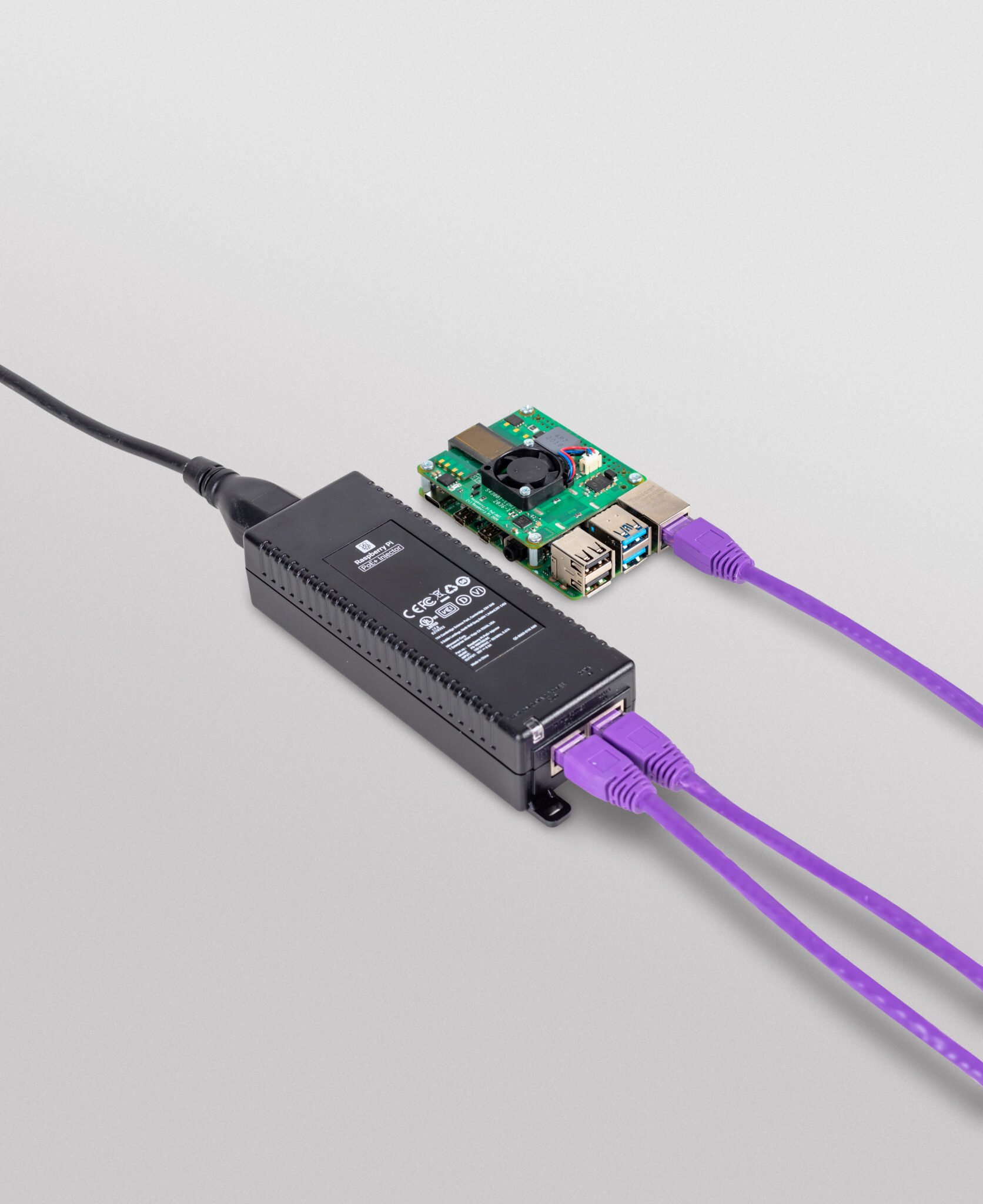
Note: The Raspberry Pi PoE+ Injector is supplied WITHOUT a local IEC mains lead.
A single port 30W PoE+ Injector enabling PoE supply to PoE enabled Raspberry Pi boards
Specifications
- Data rate: 10/100/1000 Mbps
- Input voltage: 100 to 240 V AC
- Output power: 30W
- Power output on pins: 4/5 (+), 7/8 (–)
- Nominal output voltage: 55 V DC
- Dimensions: 159 mm (L) × 51.8 mm (W) × 33.5 mm (H)
- Data connectors: Shielded RJ-45, EIA 568A and 568B
- Power connector: IEC c13 mains power input (not included)
- Operating ambient temperature: –10⁰C to +50⁰C
- Operating humidity: Maximum 90%, non-condensing
- Storage temperature: –20⁰C to +70⁰C
- Storage humidity: Maximum 95%, non-condensing
- Operating altitude: –300m to 3000m
- MTBF: 200,000 hrs @ 25⁰C
What's in the box?
1 x PoE+ Injector
Resources
The Arduino Starter Kit R4 WiFi represents the next evolution in maker education, featuring the advanced Arduino UNO R4 WiFi board with enhanced capabilities including WiFi/Bluetooth connectivity, onboard LED matrix, extra peripherals, and cutting-edge AI integration. This comprehensive learning platform bridges traditional electronics education with modern IoT and AI technologies. Great for: Beginners, students, hobbyists, and families with tech-curious kids.
Benefits
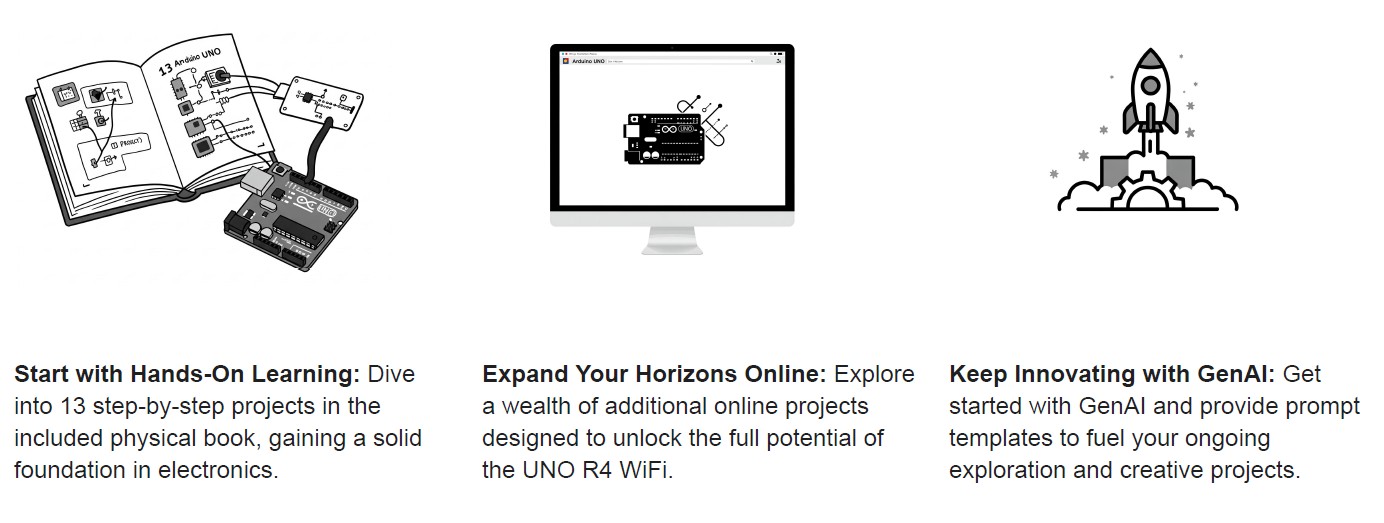
Experience the Latest Arduino hardware
Step up to the Arduino UNO R4 WiFi, the most advanced and feature-rich version of the iconic UNO family.
Learn the basic of electronics
With the included project book, learn the basics of electronics, become familiar with electronic components and build your fi rst Arduino project.
Explore New Creative Frontiers
Discover exciting new online projects which explore the possibilities the UNO R4 WiFi's enhanced features bring, including capacitive sensing, mouse/keyboard simulation, and an onboard LED matrix. New projects coming on regular bases (3 months).
Unleash Your Inner Innovator with GenAI
Leverage the power of AI to build unique projects and push the boundaries of your creativity with an intelligent coding assistant by your side.
User Journey
Specifications
What's in the box?
1 x Project book (150 pages)
1 x LCD screen (16x2 characters)
3 x Capacitors 100μF
3 x Transparent gels (R, G, B)
1 x Arduino UNO R4 WiFi board
3 x Diodes
1 x USB-C cable
1 x Breadboard
1 x Male pins strip (40x1)
70 x Solid core jumper wires
2 x Stranded jumper wires
1 x Small DC motor 6/9v
4 x Phototransistors
1 x Small servo
3 x Potentiometers
1 x Piezo capsule
6 x Pushbuttons
1 x H-bridge motor driver
1 x Temperature sensor
2 x Optocoupler
1 x Tilt sensor
1 x Mosfet transistors
1 x Easy-to-assemble base
3 x Resistors 10 megohm
11 x Resistors 220 ohm
7 x Resistors 1 megohm
11 x Resistors 10 kilohm
3 x Resistors 4.7 kilohm
3 x Resistors 1 kilohm
3 x Resistors 560 ohm
8 x LED (green)
8 x LED (yellow)
3 x LED (blue)
8 x LED (red)
1 x LED (bright white)
1 x LED (RGB)
1 9v x battery snap
Resources
Quickly and easily get started with learning electronics using the Arduino Starter Kit, which have a universal appeal to STEAM fans at home, businesses in STEAM industries, and schools alike. No prior experience is required, as the kits introduce both coding and electronics through fun, engaging, and hands-on projects. You can use the starter kit to teach students about current, voltage, and digital logic as well as the fundamentals of programming. There’s an introduction to sensors and actuators and how to understand both digital and analog signals. Within all this, you’ll be teaching students how to think critically, learn collaboratively, and solve problems.
Projects you can make:
- 01 GET TO KNOW YOUR TOOLS an introduction to the basics
- 02 SPACESHIP INTERFACE design the control panel for your starship
- 03 LOVE-O-METER measure how hot-blooded you are
- 04 COLOR MIXING LAMP produce any color with a lamp that uses light as an input
- 05 MOOD CUE clue people in to how you're doing
- 06 LIGHT THEREMIN create a musical instrument you play by waving your hands
- 07 KEYBOARD INSTRUMENT play music and make some noise with this keyboard
- 08 DIGITAL HOURGLASS a light-up hourglass that can stop you from working too much
- 09 MOTORIZED PINWHEEL a colored wheel that will make your head spin
- 10 ZOETROPE create a mechanical animation you can play forward or reverse
- 11 CRYSTAL BALL a mystical tour to answer all your tough questions
- 12 KNOCK LOCK tap out the secret code to open the door
- 13 TOUCHY-FEEL LAMP a lamp that responds to your touch
- 14 TWEAK THE ARDUINO LOGO control your personal computer from your Arduino
- 15 HACKING BUTTONS create a master control for all your devices!
Once you’ve mastered this knowledge, you’ll have a palette of software and circuits that you can use to create something beautiful, and make someone smile with what you invent. Then build it, hack it and share it. You can find the Arduino code for all these projects within the Arduino IDE, click on File / Examples / 10.StarterKit.
Have a look at these video tutorials for a project by project walk-through.
Pictures shown are for illustration purpose only. Actual product may vary due to product enhancement.
What's in the box?
1 x Projects Book (170 pages),
1 x Arduino Uno,
1 x USB cable,
1 x Breadboard 400 points,
70 x Solid core jumper wires,
1 x Easy-to-assemble wooden base,
1 x 9v battery snap,
1 x Stranded jumper wires (black),
1 x Stranded jumper wires (red),
6 x Phototransistor,
3 x Potentiometer 10kOhms,
10 x Pushbuttons,
1 x Temperature sensor [TMP36],
1 x Tilt sensor,
1 x alphanumeric LCD (16x2 characters),
1 x LED (bright white),
1 x LED (RGB),
8 x LEDs (red),
8 x LEDs (green),
8 x LEDs (yellow),
3 x LEDs (blue),
1 x Small DC motor 6/9V,
1 x Small servo motor,
1 x Piezo capsule [PKM17EPP-4001-B0],
1 x H-bridge motor driver [L293D],
1 x Optocouplers [4N35],
2 x Mosfet transistors [IRF520],
5 x Capacitors 100uF,
5 x Diodes [1N4007],
3 x Transparent gels (red, green, blue),
1 x Male pins strip (40x1),
20 x Resistors 220 Ohms,
5 x Resistors 560 Ohms,
5 x Resistors 1 kOhms,
5 x Resistors 4.7 kOhms,
20 x Resistors 10 kOhms,
5 x Resistors 1 MOhms,
5 x Resistors 10 MOhms
Resources
Need Help?
- On the Software on the Arduino Forum
- On the Product itself through our Customer Support

The Creality Falcon2 Pro S 40W Laser Engraver is designed for creators who demand speed, quality, and flexibility. With intelligent features like autofocus, smart air assist, and batch production mode, it’s your ultimate tool for serious laser work.
Rock solid
The frame of the Creality Falcon2 Pro S 40W Laser Engraver is made from aerospace-certified aluminium. Your laser remains exceptionally stable even at top speed and delivers razor-sharp results.
Large Work Area
Small production or large one-off? With the 355mm x 390mm work area, anything goes here. More space offers more possibilities and leads to more productivity.
High Speed and High Finish
The Creality Falcon2 Pro S 40W Laser Engraver cuts at high speeds of up to 600mm/s and produces top-quality results thanks to clever rail guidance.
40W Laser Power
Eight 5.5W lasers combine to form a powerful 40W laser module. This allows you to cut 20mm basswood or coloured acrylic in a single pass.
Intelligent Autofocus
Manual fiddling is a thing of the past. The intelligent autofocus included with the Creality Falcon2 Pro S 40W Laser Engraver automatically ensures perfect focus at the touch of a button.
Auto Cut-Through & Smart Camera
You set the target, the Creality Falcon2 Pro S 40W Laser Engraver does the rest. Precise cuts, zero waste. Position your designs at the touch of a button thanks to the built-in smart camera.
Optional Air Purifier
Two powerful extra fans immediately extract harmful vapours with the optional Air Purifier, including pre-filter, HEPA filter and activated carbon filter.
Integrated Air assist
The integrated air assist system continuously clears smoke and debris from the engraving path, improving cut quality and reducing surface burn marks. This is particularly valuable when producing signage, decorative items or fine-detail engravings where edge quality matters
Safety First
Thanks to various safety features, you are optimally equipped for every project:
- Fully enclosed housing with class 1 laser protection and double light filtering,
- Lid-Open Safety Stop,
- Smart Air Assist,
- Emergency stop switch,
- 5-flame sensors.
Versatile monitoring for more safety control:
- Airflow Monitoring: Displays the current airflow rate, allowing the airflow to be adjusted to specific engraving requirements.
- Flame Monitoring: If a flame is detected, the display flashes red and triggers an alarm, causing the device to switch off immediately.
- Lens monitoring: An alarm is triggered if the lens becomes heavily soiled, which prevents lens breakage and frequent replacement
| Device size | 664mm x 570mm x 328mm |
| Weight | 27.88 kg |
| Working space | 355mm x 290mm |
| Max. device power | 240 W |
| Input voltage | 100-240 V~ 50-60 Hz |
| Output voltage | DC 24.0 V 10.0 A |
| Operating temperatures | 5-35 °C |
| Laser source | Diode laser |
| Laser wavelength | 455±15 nm |
| Laser spot | 0.08 x 0.12 mm |
| Laser engraving software | Falcon Design Space, LightBurn, LaserGRBL |
| Operating system | Windows, MacOS |
| Supported materials | Cardboard, Wood, Bamboo, Rubber, Leather, Fabric, Acrylic and more! |
What's in the box?
1 x Creality Falcon2 Pro S 40W Laser Engraver
Unlock precision, speed, and safety with the Creality Falcon A1 Pro 20W Dual-Laser Engraver & Cutter. Designed for makers, educators, and professionals, it combines a powerful 20W blue laser for deep cutting with an optional 2W IR laser for ultra-fine detail work on metals and jewelry. With AI autofocus, blazing 600 mm/s speeds, and advanced safety features, the Falcon A1 Pro makes engraving effortless, accurate, and safe.
Key Features
Dual-Laser Flexibility
Switch between a 20W blue laser for wood, acrylic, and leather, or the optional 2W IR laser for ultra-fine engraving on metals and delicate materials.
AI-Powered Autofocus
Autofocuses in just 3 seconds with precision better than 0.012″ (0.3 mm)—no manual adjustments needed.
Fast, Efficient Performance
Engraves up to 600 mm/s, cutting project time by up to 3× faster than previous models.
Smart App Control & Alerts
Monitor jobs in real-time via your phone with AI flame detection for instant safety alerts.
Enclosed & Safe Design
Features 8 safety shields and a compact enclosed body—ideal for classrooms, studios, and home workshops.
Touchscreen & Modular Build
User-friendly interface with a smart touch display and compact, all-in-one modular design.
Technical Specifications
- Laser Power: 20W Blue Laser (optional 2W IR module available)
- Engraving Speed: Up to 600 mm/s
- Autofocus Accuracy: <0.012″ (0.3 mm)
- Supported Materials: 350+ (wood, acrylic, leather, fabric, stainless steel, anodized aluminum, etc.)
- Safety Features: 8 safety shields, AI flame detection, enclosed design
- Machine Dimensions: 567 × 468 × 211 mm (685 mm with touchscreen)
- Weight: 16.8 kg
- Power Supply: 100–240 V, 50–60 Hz
What's in the box?
1 x Creality Falcon A1 Pro 20W Laser Engraver
Introducing the latest additions to the esteemed Arduino UNO family, the Arduino UNO R4 range. Building upon the beloved features of the UNO family, the UNO R4 range boasts a potent 32-bit microcontroller and remarkable new functionalities, making it an exceptional prototyping tool suitable for beginners and experienced electronics enthusiasts alike. This particular variant is the UNO R4 WiFi.
What sets the Arduino UNO R4 WiFi apart and makes it truly remarkable?
The Arduino UNO line is renowned for its user-friendly, robust, and accessible platform, and with the UNO R4 WiFi, it raises the bar even higher, establishing a new standard for prototyping and learning tools. Featuring a 32-bit microprocessor with increased memory, connectors, and connectivity options compared to previous generations, coupled with WiFi and Bluetooth Low Energy capabilities, a fully-addressable LED Matrix, Qwiic I2C connector, real-time clock (RTC), and diagnostics for runtime errors, the UNO R4 WiFi is the ideal solution for all your prototyping requirements.
Impressive New Features
The UNO R4 WiFi introduces a host of remarkable peripherals, including a 12-bit digital-to-analog converter (DAC), Controller Area Network (CAN) BUS, operational amplifier (OP AMP), and Serial Wire Debug (SWD) port. These additions unlock a realm of new possibilities, allowing makers to create innovative solutions and advanced projects.
Seamless Wireless Connectivity
With the UNO R4 WiFi, you can effortlessly embark on IoT projects. Equipped with the remarkable ESP32-S3-MINI coprocessor that enhances the capabilities of the RA4M1 microcontroller, the UNO R4 WiFi enables easy connection to the internet through its built-in WiFi and Bluetooth Low Energy functionality.
Onboard LED Matrix
The UNO R4 WiFi features a vibrant 96-dot LED matrix, perfectly suited for creative projects involving animations or visualizing sensor data without the need for additional hardware.
Qwiic I2C Connector
Including an industry-standard Qwiic I2C connector, the UNO R4 WiFi facilitates rapid prototyping. Not only that, it enables compatibility with a wide range of modules that can be connected via I2C, significantly expanding the capabilities of the UNO R4 and allowing for the effortless creation of customized projects.
Diagnostics for Runtime Errors
The UNO R4 WiFi incorporates a built-in error detection mechanism that alerts you to any operations that could potentially cause the board to crash. This ensures you can develop your solutions with peace of mind and minimize the risk of issues.
Backward Compatibility
UNO R4 maintains the same pinout and 5V operating voltage as the UNO R3, enabling easy migration of existing shields or projects to the UNO R4.
Ample Memory and Enhanced Clock Speed
With 16 times more memory and a clock speed three times faster, the UNO R4 Minima excels at precise calculations and effortlessly handles complex projects.
Reliable and Robust Device
UNO R4 boards incorporate several protective features, such as overcurrent protection on the pins of the RA4M1, and the circuitry is designed to prevent wiring errors, reducing the risk of board damage. Furthermore, the board can be powered up to 24V.
Efficient Debugging
The UNO R4 Minima boasts an onboard SWD port, offering a straightforward and reliable method for debugging any issues by simply connecting a third-party debugging probe.
Technical specifications
- MCU: R7FA4M1AB3CFM#AA0 (Arm cortex M4)
- Memory: 256KB Flash / 32KB SRAM
- Operating Voltage: 5V
- Input Voltage 6-24V
- Clock Speed: 48 MHz
- Programming Port: USB-C
- WiFi/BLE: ESP32-S3-MINI
- LED Matrix: 12x8 (96 red LEDs)
- Additional Connections: Qwiic Connector, OFF Pin, VRTC Pin
- Digital Pins: 14
- PWM: 6
- ADC: 6
- DAC: 1 (12 bit)
- SPI: 1
- I2C: 1
- CAN: 1
What's in the box?
1 x Arduino Uno Rev 4 WiFi
You might be interested in a power supply, USB Type C cable or experimental platform for your new Uno.
Resources