
Special Offers


The CamJam EduKit #2 is the second edition to the EduKit family!
The kit is accompanied by a set of (currently 6) downloadable worksheets (or lesson plans for you educators!) that will take you through a series of exercises and projects, teaching you how to make the most of your kit. Whats best is that there is no soldering required, each high quality component is breadboard friendly!
All the worksheets are freely available to download from http://camjam.me/edukit
What's in the box?
1 x Breadboard
1 x Immersible temperature Sensor
1 x PIR Sensor
1 x LDR
1 x Active Buzzer
1 x Red 10mm LED
1 x Blue 10mm LED
1 x 4.7K Resistor
2 x 330 Resistor
10 x M/F Jumper Wires
4 x M/M Jumper Wires
1 x Presentation Tin
Resources
Here are just 4 cool projects you could use the kit for:
- Make a burglar alarm for your bedroom.
- Switch on an LED when it gets dark.
- Have an alarm go off when it’s freezing outside.
- Test whether the light really does go off in the fridge when you shut the door.
Still not convinced? Check out these awesome articles on the kit!
- "CamJam Edukit 2 Launches at PiWars" - Raspi.tv
- "The CamJam EduKit 2 - Learn How To Use Sensors With The Raspberry Pi" - Average Man vs Raspberry Pi
The CamJam EduKit is a joint venture between The Pi Hut and the Cambridge Raspberry Jam (CamJam). Profits from the sale of the kit will go to CamJam so that they can continue their educational and community work.

All you need to do is to add your own chassis, Raspberry Pi (any model) & batteries! Then, follow the worksheets to make your own motorized buggy. Add the included sensors and you will soon be detecting objects in front of your robot and following line courses.
What's in the box?
A custom-designed, pre-soldered motor controller board (with screw terminals)
2 x DC motors (with wires pre-soldered)
2 x custom red wheels (which go extra fast… because they’re red!)
1 x ball castor (used as the ‘third wheel’ to your robot)
1 x small breadboard (to create your circuits)
2 x pieces of strong 3M padded double-sided tape
1 x battery box for 4 AA batteries (batteries not included)
1 x ultrasonic distance sensor (for detecting objects in front of your robot)
1 x line follower sensor (for detecting and following black lines)
Resistors and jumper cables with which to complete your circuits
A strong cardboard box to keep it all in… or to cut into to make your chassis!
Resources
All the worksheets are freely available to download from http://camjam.me/edukit
Got a 3D printer? Daniel Bull has very kindly designed an awesome chassis, available from Thingiverse ..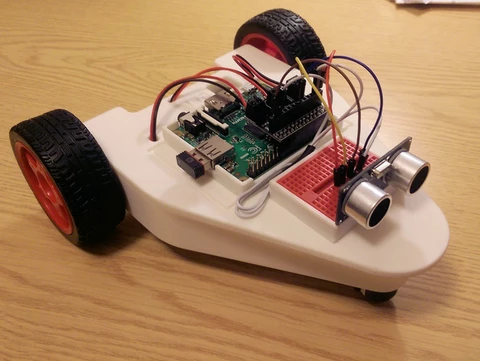
Alex Eames over at Raspi.TV got his hands on a prototype, here's what he did!
https://youtu.be/LJDEV7rGwaM
And here's a fantastic unboxing video from Average Man vs Raspberry Pi!
https://youtu.be/KPYWNXiItwo
And another review! This time from TheRaspberryPiGuy! Thanks Matt!
https://youtu.be/TMjd0UrH2PY

This sensor module is the most suitable to receive the ambient light data for adjusting LCD and other related projects. It is possible to detect wide range at High resolution.
The sensor is a calibrated digital light sensor that measures the intensity of the ambient light and stores it as a 16-bit number.
Specifications
- Type: GY - 302
- Size: 13.9 mm X 18.5 mm
- The original BH1750FVI ROHM chip
- Power supply: 3-5 V
- Data range: 0-65535
- Sensor built-in and bitad converter
- Direct digital output, bypassing the complicated calculation, omit calibration
- Do not distinguish between ambient light
- Close to the visual sensitivity of spectral characteristics
What's in the box?
1 x GY-302 Module

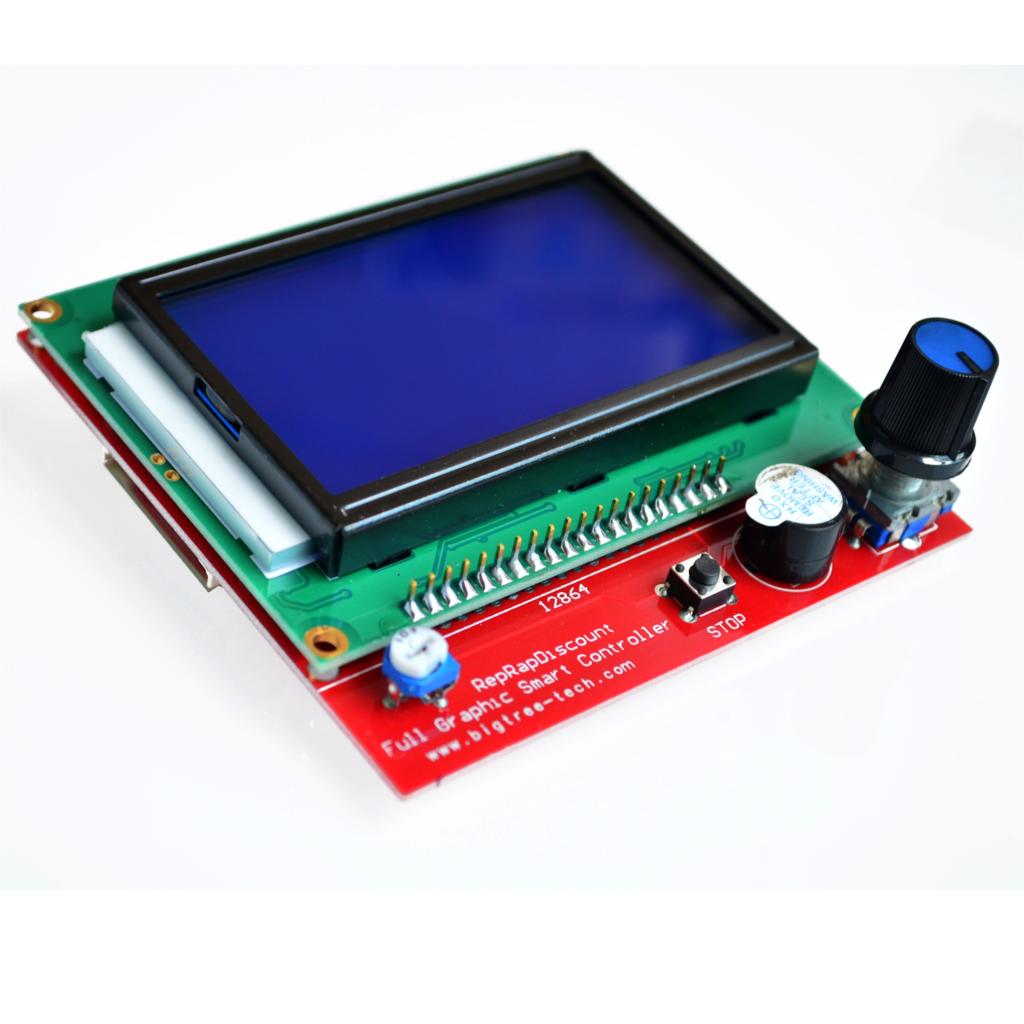
LCD control panel for 3D printers. LCD control panel through which you can achieve spooling as the 3D model Gcode files are copied to the SD card and then print the file via the LCD control panel. This version is an upgraded version of the reprap smart controller.
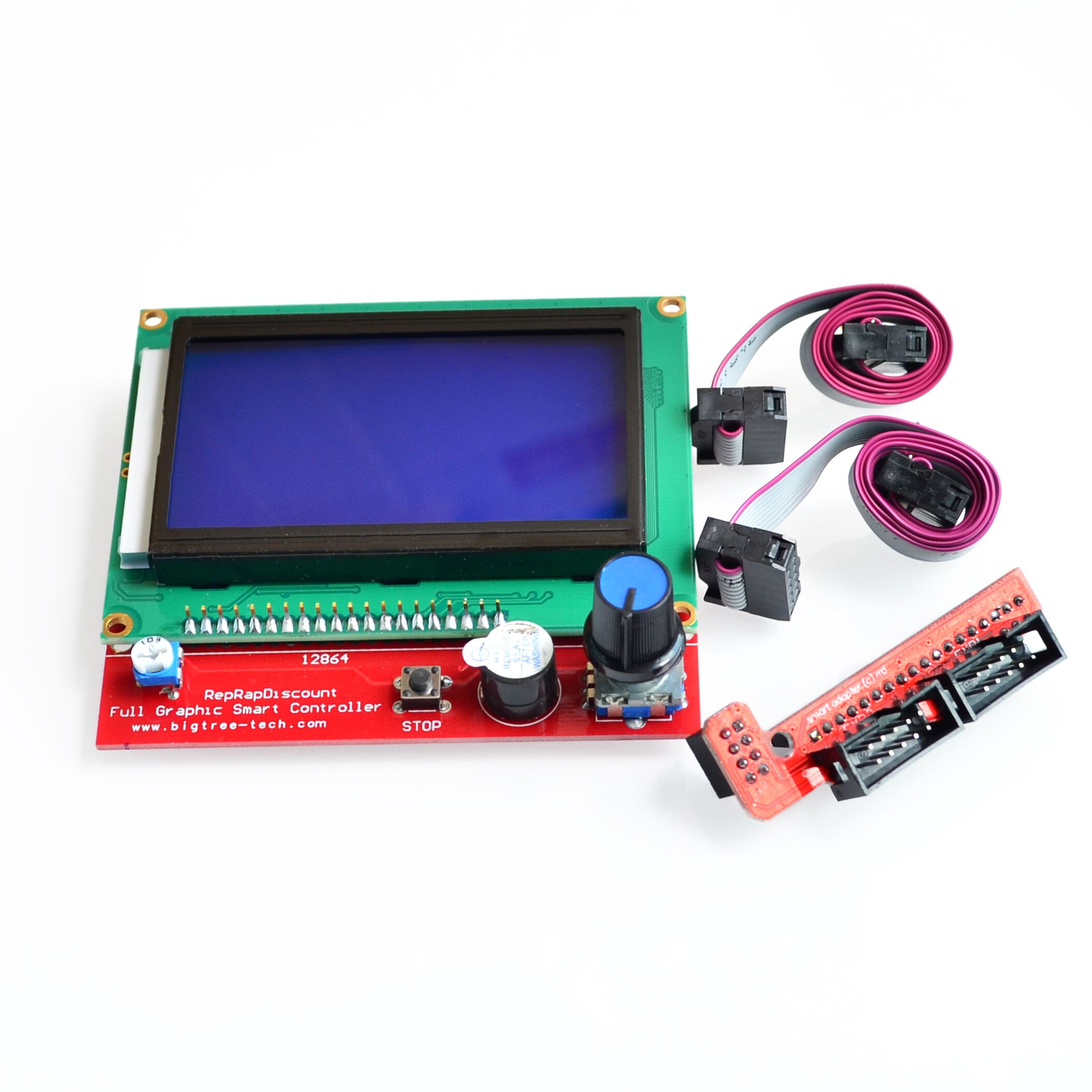
Features:
Using a large screen 12864LCD
With a SD card base on back, put your sliced file onto the SD card and select the file on the LCD. It can then can be printed
Product comes encoder to select the desired file
Plug and play on the RAMPS, but may need to modify the firmware to support
Specifications:
Screen size: 128x64
Cable Length (cm): 30
Input Supply Voltage: (VDC) 5
Length (mm): 93
Width (mm): 87
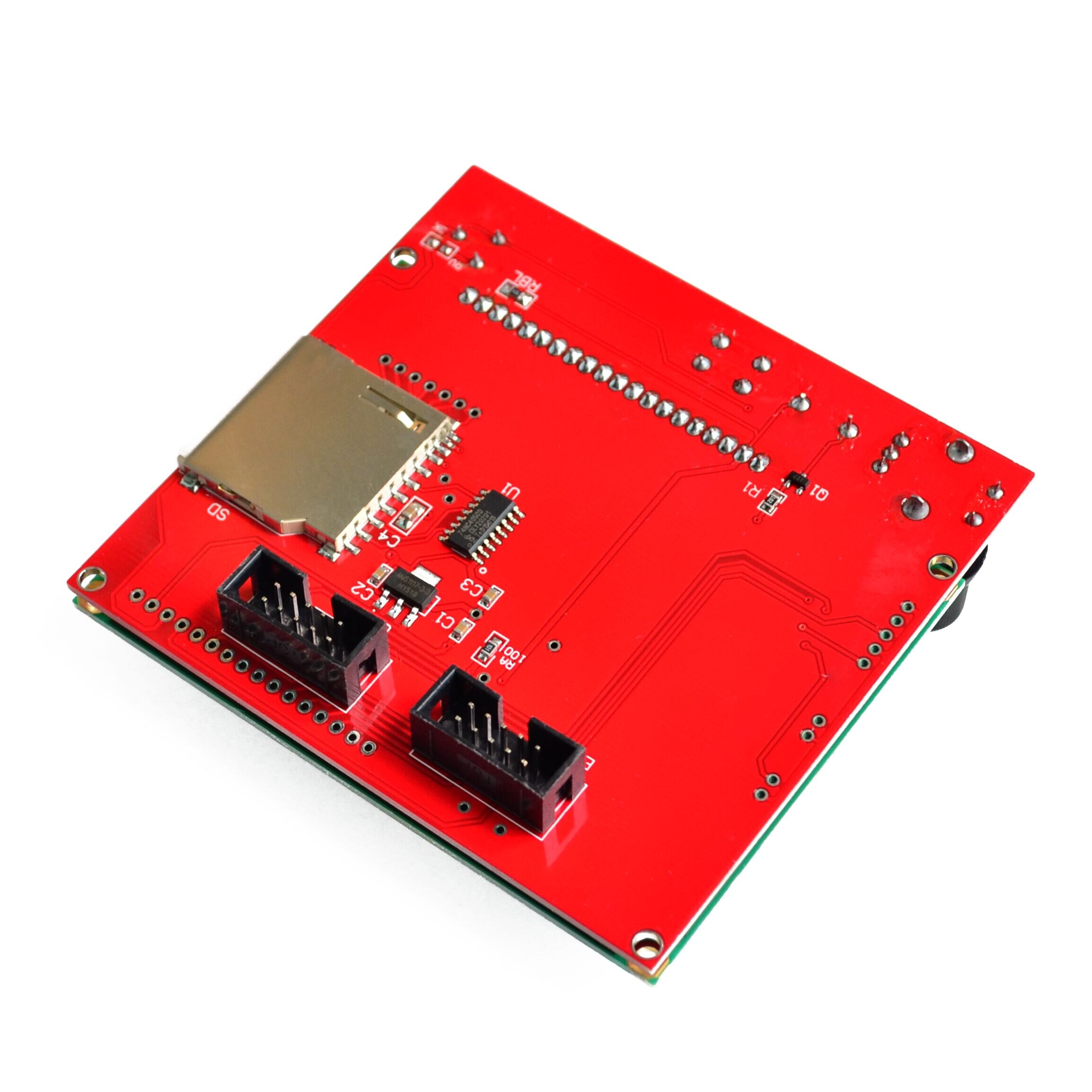
Package Includes:
1x LCD 12864 Smart Controller
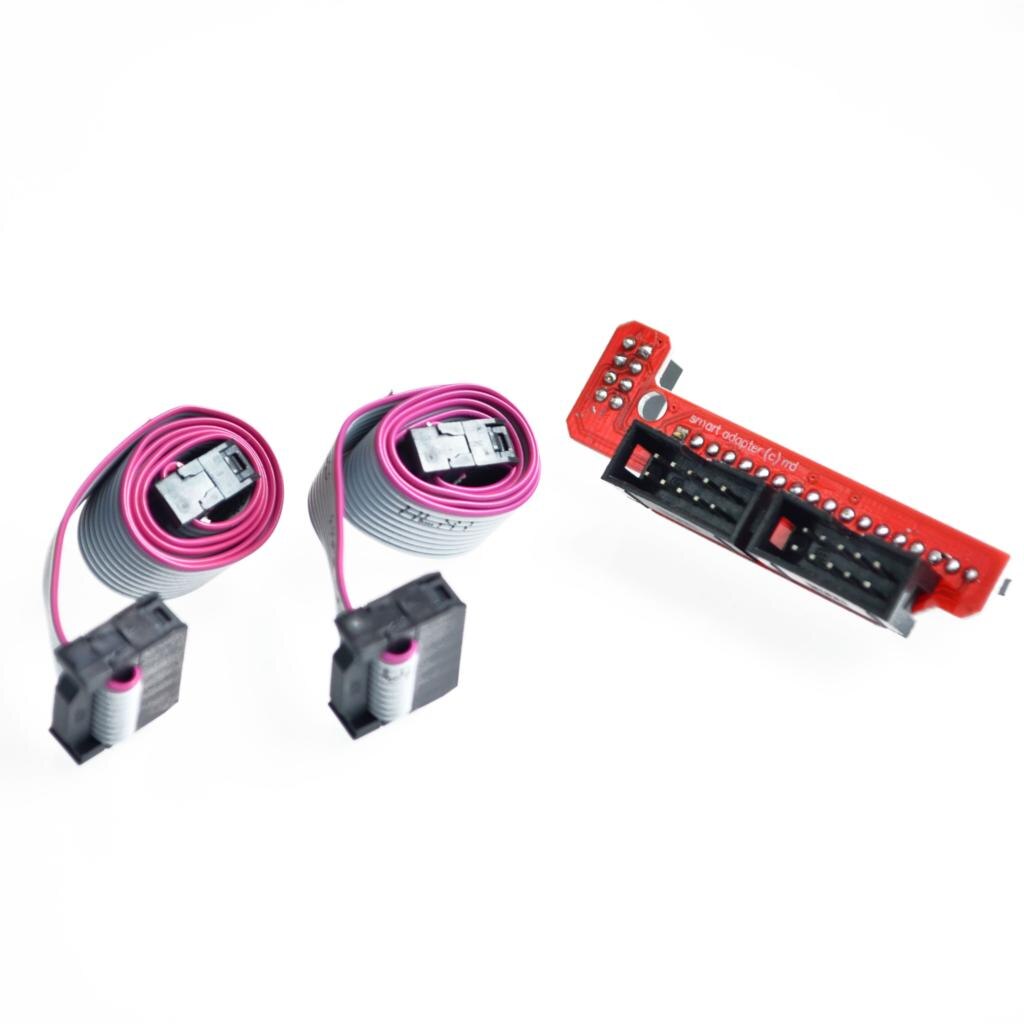
1x Smart Adapter
2x 30cm FC Cable

Turn your Raspberry Pi into a retro games console! Picade X HAT includes joystick and button inputs, a 3W I2S DAC/amplifier, and soft power switch. Nice!
Picade X HAT is now Raspberry Pi 4 compatible, with USB-C power!
This HAT has all the same great features as the original Picade HAT but now has no-fuss female Dupont connectors to hook up your joystick and buttons.
Simply pop Picade X HAT onto your Pi, plug a USB-C power supply into the connector on the HAT (it back-powers your Pi through the GPIO, so no need for a separate power supply), wire up your controls, and install our driver! It's ideal for your own DIY arcade cabinet builds, or for interfaces that need big, colourful buttons and sound.
Features
- I2S audio DAC with 3W amplifier (mono) and push-fit terminals
- Safe power on/off system with tactile power button and LED
- USB-C connector for power (back-powers your Pi)
- 4-way digital joystick inputs
- 6x player button inputs
- 4x utility button inputs
- 1x soft power switch input
- 1x power LED output
- Plasma button connector
- Breakout pins for power, I2C, and 2 additional buttons
- Picade X HAT pinout
- Compatible with all 40-pin Raspberry Pi models
The I2S DAC blends both channels of digital audio from the Raspberry Pi into a single mono output. This is then passed through a 3W amplifier to power a connected speaker.
The board also features a soft power switch that allows you turn your Pi on and off safely without risk of SD card corruption. Tap the connected button to start up, and press and hold it for 3 seconds to fully shutdown and disconnect power.
What's in the box?
1 x Picade X HAT
Resources
Software
We've put together a simple one-line installer that'll get everything set up on your Picade X HAT, the controls, safe shutdown, and audio. Open a terminal and type curl https://get.pimoroni.com/picadehat | bash to run the installer. You'll need to reboot once the installation is complete, if it doesn't prompt you to do so.
Our software does not support Raspbian Wheezy
Notes
With USB-C power connected through Picade X HAT you'll need either to tap the connected power button or the button marked "switch" on the HAT to power on your Pi.

Pump out some mini beats with Pirate Audio Speaker! This diminutive sound system has an I2S DAC, amp, mini mono speaker, high-res display, and playback control buttons.
Pirate Audio Speaker is perfect for making a Lilliputian radio, sound effect player, or even as a teeny-weeny games console! The built-in 1W speaker isn't the loudest but it's great fun for lots of projects. The display and playback buttons let you control your audio or sound effects in a jiffy. Use our Pirate Audio software (more info below) to play local audio files (MP3, FLAC, etc) or stream from services like Spotify.
Pirate Audio is a range of all-in-one audio boards for Raspberry Pi, with high-quality digital audio, beautifully-crisp IPS displays for album art, tactile buttons for playback control, and our custom Pirate Audio software and installer to make setting it all up a breeze.
Features
- MAX98357A DAC / amplifier chip (datasheet)
- Mono audio
- Mini speaker (1W / 8Ω, attached)
- Push-fit speaker terminals
- 1.3" IPS colour LCD (240x240px) (ST7789 driver)
- Four tactile buttons
- Mini HAT-format board
- Fully-assembled
- Compatible with all 40-pin header Raspberry Pi models
- Pirate Audio software
- Dimensions: 65x30.5x9.5mm
Software
Our Pirate Audio software and installer installs the Python library for the LCD, configures the I2S audio and SPI, and then installs Mopidy and our custom Pirate Audio plugins to display album art and track info, and to use the buttons for playback control.
Here's how to get started:
- Set an SD card up with the latest version of Raspbian.
- Connect to Wi-Fi or a wired network.
- Open a terminal and type the following:
git clone https://github.com/pimoroni/pirate-audio
cd pirate-audio/mopidy
sudo ./install.sh - Reboot your Pi
You can find more detailed instructions here: https://github.com/pimoroni/pirate-audio/tree/master/mopidy
Notes
Note that our installer, linked above, does all of the below for you, but if you're an intrepid hacker then you might need to know this stuff!
- The DAC can be configured by adding
dtoverlay=hifiberry-dacto the/boot/config.txtfile. - There is a DAC enable pin—BCM 25— that must be driven high to enable the DAC. You can do this by adding
gpio=25=op,dhto the/boot/config.txtfile. - The buttons are active low, and connected to pins BCM 5, 6, 16, and 20
- The display uses SPI, and you'll need to enable SPI through the Raspberry Pi configuration menu.
- If you want to use these boards with a Pibow Coupé case (either for the Zero / Zero W or Pi 4), then you'll need to use a booster header to raise it up a little.

It can easily cut all kinds of soft material below 1.2mm thickness. Wire under 0.8MM.
Suitable for cutting wires, electronic feet, trimming plastic parts etc.
What's in the box?
1 x electronic parts cutting pliers

Specifications
- Light, small and easy to use
- Double - quick screw down.
- Saved time and manpower for installation.
- Size: 108mm x 30mm x41mm/4.25 x 1.18 x 1.61inch
What's in the box?
2 x MC4 spanners

Ever fancied creating your own first-person shooter game? Now you can with this 140-page bookazine, brought to you by the Wireframe magazine team with tips from expert video game developers!
Making a fast-paced 3D action game needn’t be as daunting as it sounds. Build Your Own First-Person Shooter in Unity will take you step-by-step through the process of making Zombie Panic: a frenetic battle for survival inside a castle heaving with the undead.
Specifications:
- Set up and use the free software you’ll need
- Make enemies that follow and attack the player
- Create and texture 3D character models
- Extend your game further, with tips from experts
- Design a level with locked doors and keys
What's in the box?:
1 x 140-page bookazine
Resources:

Build CNC routers, 3D printers, CNC laser cutters, CNC plasma cutters, robotics projects, 3D carvers, machine guards, workstations, etc.
Compatible with:
80/20 20 Series, Misumi 5 Series, Openbuilds V-Slot, Openbuilds C-Beam, and other standard v-slot/t-slot 20mm aluminum extrusions
Specifications:
Recommend to use M5 x10mm screw and M5 T nut
Material: Mild Steel
Thickness:3mm
These plates are laser cut from 3mm mild steel and still needs to be painted/powder coated.
What's in the box?
1 x bracket

Red T-shirt White Logo Adult Size. Sizing is to a standard UK high-street size, and the shirts fit true to size. We recommend purchasing your usual size. If you fall between two sizes, we advise purchasing the larger size. (Size guide available in product images)
Specifications:
Certified organic cotton 155g/m2
GM free
Not tested on animals
Does not contain animal-derived products
Printed in the UK with low-waste printing tech
Maintaining your tee: wash cool and hang dry to ensure print quality and longevity.

This is a practical, yet elegant Raspberry Pi Ceramic mug from the Raspberry Pi Foundation. Let your Raspberry Pi spirit shines :) Be the envy of everyone in your office with the new Raspberry Pi mug!

- Red color with White Raspberry Pi Logo
- Dishwasher safe
- 80mm diameter x 90mm tall
- 330ml capacity
- Bright and colorful!
The team at Raspberry Pi Foundation has extensively tested these mugs and can confirm that they are tea-, coffee-, and hot chocolate-compatible. They can also be used for cold drinks if that's your preference.
Note: While tested to over 1,000 domestic dishwasher cycles, it is recommended that you hand-wash this mug to keep it in tip-top condition.
Packing List:- 1 x Raspberry Pi Red Ceramic Mug

The DINrPlate 2 (DRP2) is a simple, reliable and cost-effective DIN Rail Mount solution for the Raspberry Pi 5/4/3/2/B .
The plate has easy access for all ports and GPIO pins and features a vertical design using just 32mm of DIN space - held with large secure 10mm DIN clips which will not release without the use of a screwdriver.
Integrated strain relief for the power cable has been included in the design (tie wrap included) and the entire plate is made from high-quality 6/6 Nylon (well suited for industrial environments). The SD card is easily accessible for maintenance.
The plate comes in an industrial grey colour to blend in well with other panel components for a professional finish.
Specifications
- DIN clips size: 10mm
- Material: 6.6 Nylon
- Dimensions: 3.6" x 0.4" x 3.6"
- Weight: 0.8 oz
- Colour: Industrial grey
What's in the box?
1 x DINrPlate 2
4 x mounting screws
1 x tie wrap
Resources
- Attach Raspberry Pi board to the base using included four (4) M2 screws and a small Phillips screwdriver (not included).
- Insert the power cable into the Raspberry Pi. Note: Some speciality USB power cables may have a clearance issue with integrated strain relief. If this is the case, use a standard USB power cable.
- Secure power cable in place with included tie-wrap, and cut off any excess tie wrap.
- Attach the base to 35mm DIN rail using a medium-size flat head screwdriver (not included), using a lever action on the flexible side of the DIN rail clip until there is enough clearance to completely grip the DIN rail edges. Use caution when using screwdriver to not bend clip more than is necessary to be attached.

The ultimate desktop retro arcade machine! Picade is a Raspberry Pi-powered mini arcade that you build yourself, with authentic arcade controls, a high resolution 4:3 display that's ideal for retro gaming, and a punchy speaker to hear those 8-bit game soundtracks at their best
Picade is now Raspberry Pi 4 compatible and includes a new USB-C version of Picade X HAT!
The all-new Picade has been completely redesigned, from the inside out! There's new artwork, a new display and display driver board, dedicated power button, an all-new Picade X HAT (now with USB-C), easier wiring, easier access to the interior of the cabinet, beautiful new packaging, a bunch of extra goodies (stickers and an enamel Picade pin), and a gorgeous Picade poster and assembly instructions.
Picade comes in kit form, and it'll take around two to three hours to build. The cabinet is made from powder-coated MDF, giving it a quality look and feel similar to a full-size arcade. All you'll need to add is a Raspberry Pi, USB-C power supply, and micro-SD card.
Cabinet features
- Black, powder-coated panels
- Acrylic marquee and console with authentic artwork
- Push-fit arcade buttons
- Joystick with black ball top
- 3" speaker (5W, 4Ω)
- Easy access with removable back panel
- Dedicated illuminated power button
- Grippy rubber feet
- Dimensions: 350x230x210mm
10-inch display features
- 1024x768 (4:3 ratio) IPS (wide viewing angle) display
- Pimoroni-designed and manufactured HDMI display driver board and keypad controls
- Powered by micro-USB cable (included) from your Pi
Picade X HAT features
- Easy DuPont connectors for buttons and joystick
- Push-fit speaker terminals
- I2S audio DAC with 3W amplifier (mono)
- Power management, power switch pins, and power button
- 4-way joystick inputs
- 6 player buttons
- 4 utility buttons
- Metal standoffs to hold your Picade X HAT securely
Extras
- Picade enamel pin badge
- Pimoroni Super Sticker Selection
- Picade poster / assembly instructions
What's new!?
The cabinet is more compact, so it fits more neatly on your desk, but has a higher resolution 8" or 10" display (1024x768). The display is driven by a new Pimoroni-designed and manufactured driver board, with keypad controls. It's an IPS panel, so it looks great from any viewing angle!
The all-new Picade X HAT is packed full of useful features. We've moved from more fiddly screw terminals to simple DuPont connectors that just push in, and the speaker terminals are the same easy push-fit connectors that we use on pHAT BEAT.
There's dedicated power management on-board Picade X HAT; just plug your micro-USB power supply into the HAT and it'll power your Pi through its pins. The power button connected to the HAT means that once your Pi is safely shutdown, the power will be cut completely to the Pi. A simple press of the power button will boot your Picade up again.
The new buttons in Picade are lower profile, and the new joystick has a single connector rather than the eight spade connectors on our previous Picade joystick.
A gorgeous new neon-look Picade logo on the marquee, and rainbow stripes on the console and screen-surround, evoke classic consoles, as do the assembly instructions and poster.
Building your Picade
We hope the included assembly instructions have everything you need to build your Picade, but we've also filmed a complete build video of Picade that you can watch as you build and learn some handy tips and tricks. Find it at https://youtu.be/gTgu1fUVsmw
The sections are also available separately in a playlist here.
We've also put together an online tutorial that incorporates the assembly instructions, important tips and amendments, and the videos for each section, so do check that out!
Software setup
We recommend the RetroPie operating system for your Picade. You can download it from the RetroPie website and then burn it to a micro-SD card with Etcher.
Connect a USB keyboard to your Pi, and connect to Wi-Fi in the RetroPie menu. Press F4 to exit to the terminal and then type curl https://get.pimoroni.com/picadehat | bash to run the Picade HAT installer.
Reboot your Pi, if it doesn't prompt you to. Press the "Alt" key on your keyboard and then select "Configure input" to configure your Picade's controls. You'll find that the sound and power button should both be working now too!
Notes
If your Picade display doesn't show anything when you first power it up, then it could be because the HDMI display is not being detected by the Raspberry Pi. This can happen because power isn't supplied to the USB ports on the Raspberry Pi for the first few seconds of booting. The solution is to edit the /boot/config.txt file on your RetroPie SD card, and add hdmi_force_hotplug=1 on a new line at the bottom of the file.
If you'd like to design your own artwork for your Picade, then we've made a handy PDF that has the outlines and dimensions of the marquee, screen shim, and console. You can download it from the Picade HAT GitHub repo here.
Where to find ROMs for RetroPie (free and legally) https://howchoo.com/g/otiwyjhlnzb/where-to-find-roms-for-retropie
and here http://cvaddict.com/article.php?articleid=15
Raspberry Pi 400 is a complete Raspberry Pi 4-based personal computer, fully integrated into a keyboard for ease of setup and use.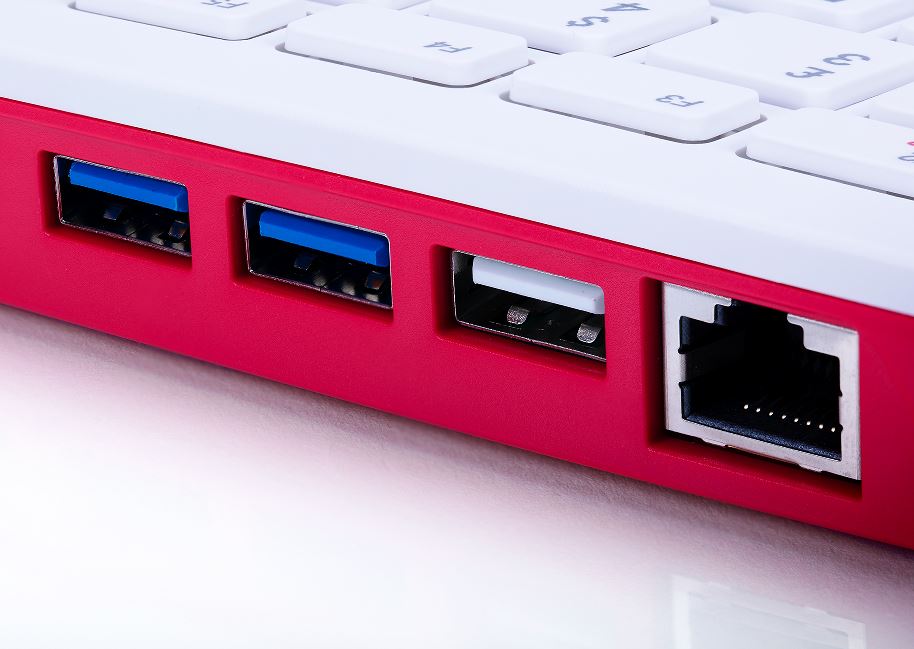
Overview
Featuring a quad-core 64-bit processor, wireless networking, dual-display output and 4K video playback, Raspberry Pi 400 is a complete personal computer, built into a compact keyboard.
Raspberry Pi 400 is ideal for surfing the web, creating and editing documents, watching videos, and learning to program using the Raspberry Pi OS desktop environment.
Raspberry Pi 400 is available in a number of different regional variants and as either a computer kit, containing everything you need to get started (except for a TV or monitor), or a computer unit only.
Raspberry Pi 400 for working and learning at home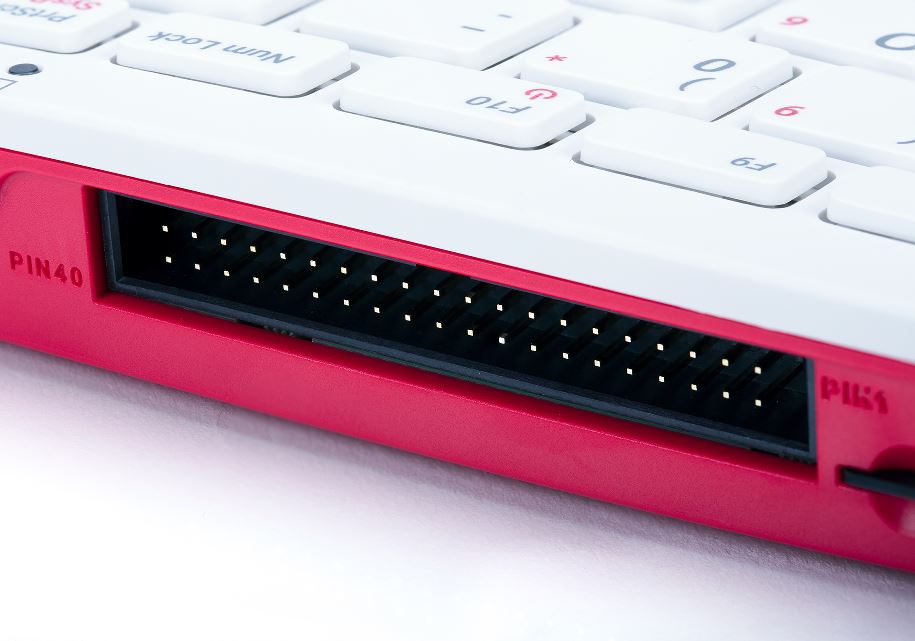
Specifications
Processor: Broadcom BCM2711 quad-core Cortex-A72 (ARM v8) 64-bit SoC @ 1.8GHz
RAM: 4GB LPDDR4-3200
Connectivity: Dual-band (2.4GHz and 5.0GHz) IEEE 802.11b/g/n/ac wireless LAN, Bluetooth 5.0, BLE Gigabit Ethernet
2 × USB 3.0 and 1 × USB 2.0 ports
GPIO Horizontal 40-pin GPIO header
Video & sound: 2 × micro HDMI ports (supports up to 4Kp60)
Multimedia: H.265 (4Kp60 decode);
H.264 (1080p60 decode, 1080p30 encode);
OpenGL ES 3.0 graphics
SD card support: MicroSD card slot for operating system and data storage
Keyboard: 78- or 79-key compact keyboard (depending on
regional variant)
Power: 5V DC via USB connector
Operating temperature: 0°C to 50°C
Dimensions: 286 mm × 122 mm × 23 mm (maximum)
What's in the box?
1 x Raspberry Pi400 unit only(US keyboard)
1 x Raspberry Pi 32GB preloaded with RPi OS micro SD card(Included from 09/12/2024)
You might also need .....
- a display monitor in red/white or black
- a USB type C power supply available in white or black
- a micro HDMI cable or HDMI adapter
- a mouse in red or black
Compliance: For a full list of local and regional product approvals, please visit
www.raspberrypi.org/documentation/hardware/raspberrypi/conformity.md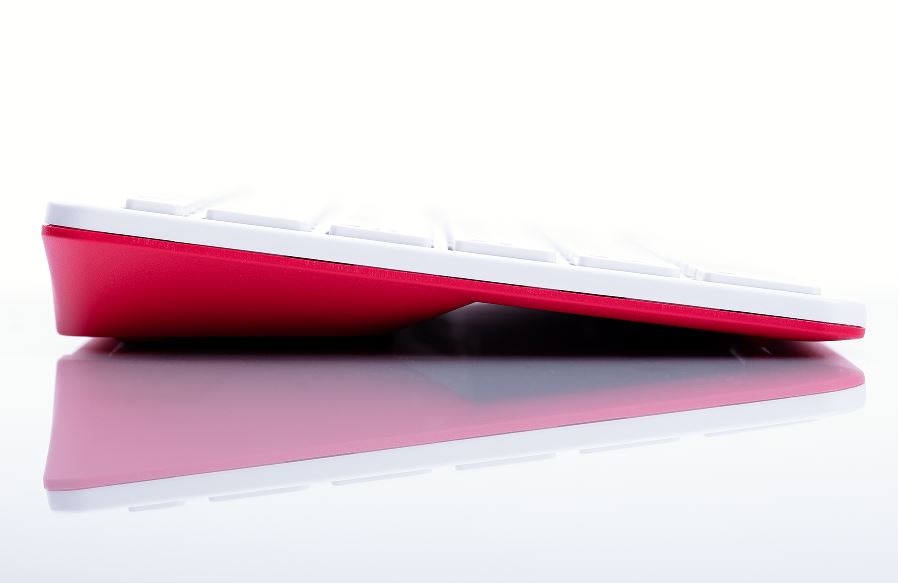
WARNINGS
• Any external power supply used with Raspberry Pi 400 shall comply with relevant regulations and
standards applicable in the country of intended use.
• This product should be operated in a well-ventilated environment and should not be covered when
being operated.
• The connection of incompatible devices to Raspberry Pi 400 may affect compliance, result in damage to the unit, and invalidate the warranty.
• There are no user-serviceable parts inside Raspberry Pi 400, and opening the unit is likely to damage the product and will invalidate the warranty.
• All peripherals used with this product should comply with relevant standards for the country of use
and be marked accordingly to ensure that safety and performance requirements are met. These
articles include, but are not limited to, mice, monitors and cables when used in conjunction with
Raspberry Pi 400.
• The cables and connectors of all peripherals used with this product must have adequate insulation so that relevant safety requirements are met.
• Prolonged exposure to direct sunlight may cause discoloration.
SAFETY INSTRUCTIONS
To avoid malfunction or damage to this product please observe the following:
• Do not expose to water or moisture whilst in operation.
• Do not expose to heat from any source; Raspberry Pi 400 is designed for reliable operation at normal ambient temperatures.
• Take care whilst handling to avoid mechanical or electrical damage to the computer.
Accreditation

The four LEDs on the breakout board are there to illuminate the subject with an even light source, making measurement more reliable.
You can use the TCS230 where you need to take action based on the color of an object. The device does react to infrared so may need an infrared filter or use the device in an enclosed space.
Features
- Chip: TCS230
- Input voltage: DC 3V-5V
- Output frequency voltage: 0 ~ 5V
- Use bright white LED lights
- Can be connected directly with Microcontroller
- Static detection of the measured object color
- Best detection distance: 10mm
What's in the box?
1 x colour recognition sensor

- POE: integrates 802.3af-compliant PoE circuit (5V/2.5A)
- USB: 4x USB 3.2 Gen1 portsMicro USB port
- Ethernet: Gigabit Ethernet RJ45 with PoE support
- Header: Color-coded 40PIN GPIO header
- Fan: 5V / 12V standard fan connector
- Power Input: 7V~36V
- CM4 Socket: suitable for all variants of Compute Module 4
- RTC: Real-time clock with battery socket and ability to wake Compute Module 4
- Video: 2x MIPI DSI display FPC connectors (22-pin 0.5 mm pitch cable)
- Camera: 2x MIPI CSI-2 camera FPC connectors (22-pin 0.5 mm pitch cable)
- SD card slot: MicroSD card socket for Compute Module 4 Lite (without eMMC) variants
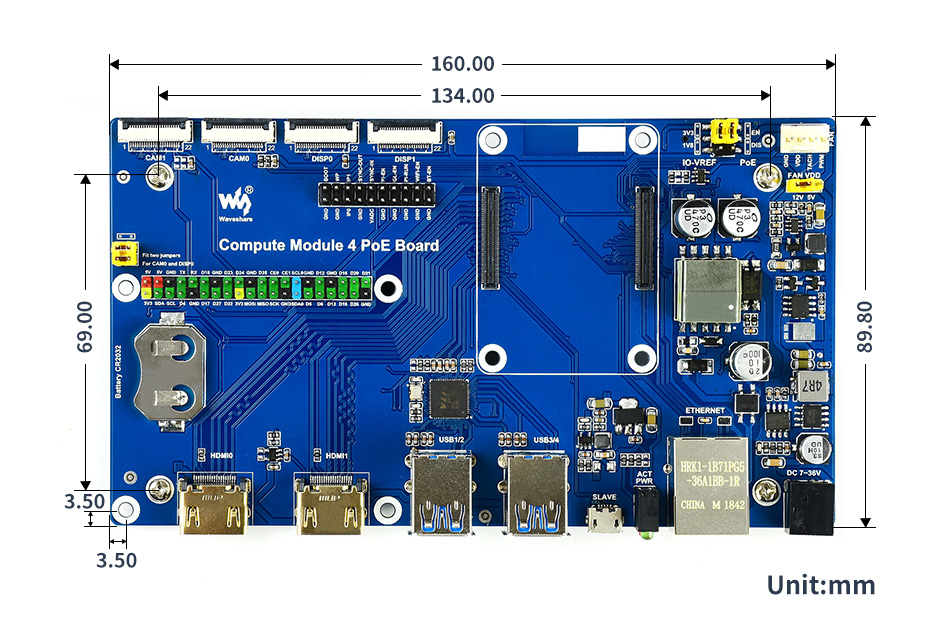
- Dimensions: 160 × 90mm
Standard CM4 socket and color-coded Raspberry Pi 40PIN GPIO header suitable for all variants of Compute Module 4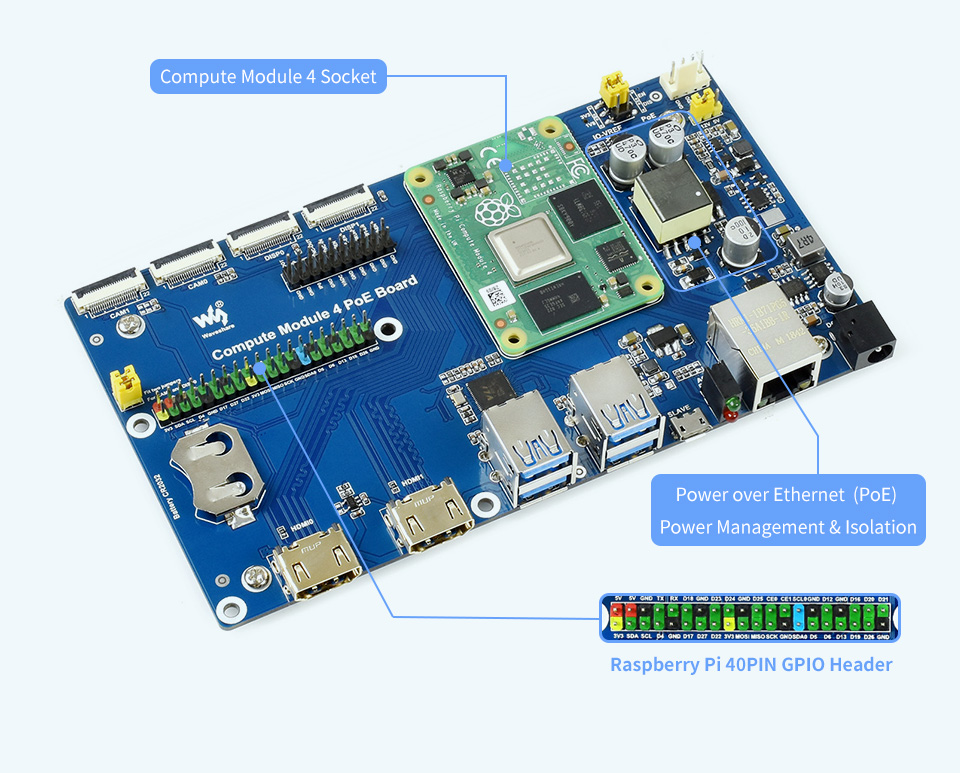
Onboard connectors including CSI/DSI/RTC/HDMI/USB/ETH/TF card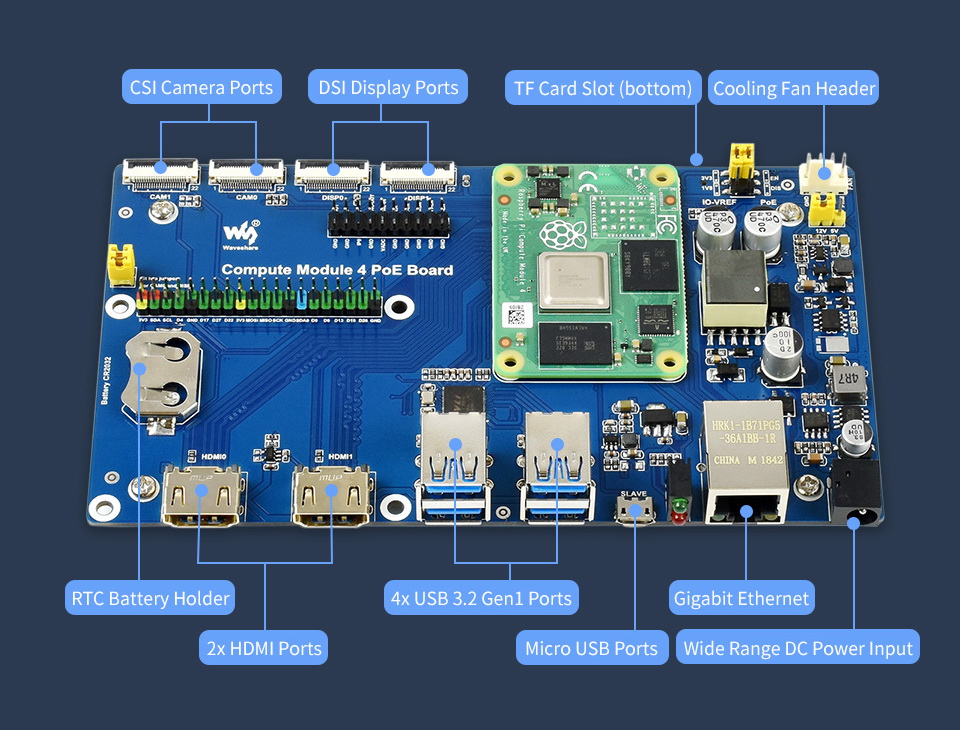
What's On Board?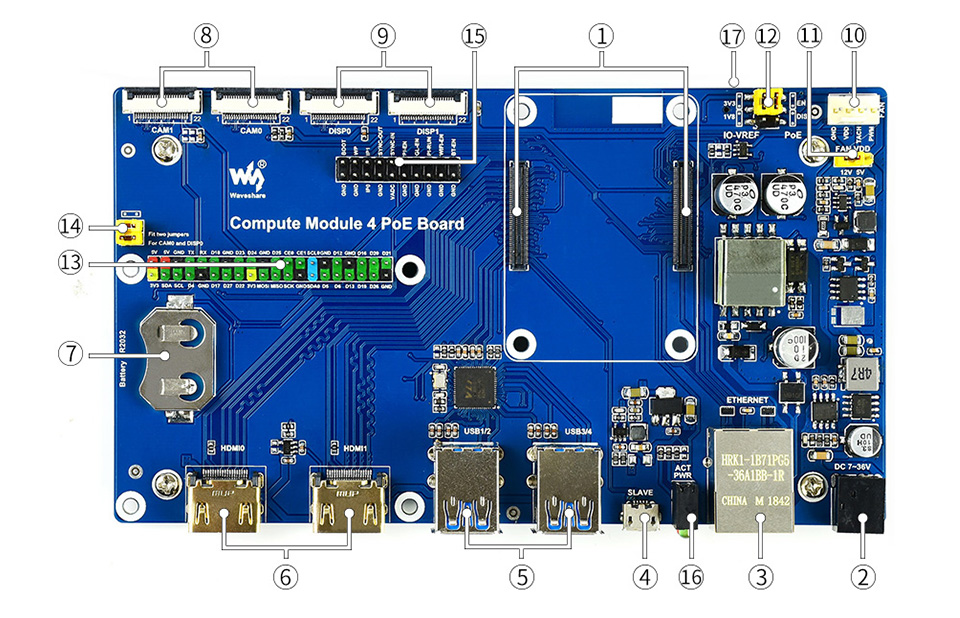
- CM4 socket: suitable for all variants of Compute Module 4
- Power input: 7~36V wide range power supply
- Gigabit Ethernet connector: Gigabit Ethernet RJ45 with PoE support
- USB SLAVE port: allows burning system image into Compute Module 4 eMMC variants
- USB3.2 ports: 4x USB 3.2 Gen1 ports, for connecting sorts of USB devices
- HDMI ports: 2x HDMI ports, supports dual 4K 30fps output
- RTC: RTC battery holder, allows RTC-related functions like wakeup, shutdown, reboot, and more
- CAM: 2x MIPI CSI camera ports
- DISP: 2x MIPI DSI display port
- FAN: for connecting cooling fan, allows speed adjustment and measurement
- FAN power selection: 5V or 12V voltage to drive the fan
- IO-VREF/PoE selection: CM4 IO logic level: 3.3V or 1.8V
PoE: enable (EN) or disable (DIS) - 40PIN GPIO header
- CAM0 and DISP0 I2C bus: fit the jumpers when using CAM0 or DISP0
- Misc configurations
- Dual LED indicators: red: Raspberry Pi power indicator, green: Raspberry Pi operating status indicator
- TF card slot (bottom side): insert a Micro SD card with pre-burnt system, to start up Compute Module 4 Lite
Outline dimensions
What's in the box?
1 x Compute Module 4 PoE Board
Resources
WIKI: Compute_Module_4_PoE_Board

These 0.4mm MK8 Nozzles are Creality Original replacement parts designed to fit the Creality CR-X, and are based on the successful MK8 design. They are the standard nozzle size of 0.4mm, which is the same size that comes equipped on many of the modern models since 3mm filament began phasing out. This size offers impressive accuracy without compromising too much on the rate at which 3D Printers lay down the Plastic Filaments – A good balance of speed and quality that is relatively easy to work with compared to larger or smaller nozzles.
While some people enjoy printing with smaller nozzles to ascertain even better quality and printing accuracy, and others choose to use large nozzles for speed-printing models or objects that don’t need to be perfectly accurate, these nozzles offer the best of both worlds. This is why they come as the stock nozzles on so many different models of printers. However, if you are a veteran in 3D Printing, you will understand that each different size nozzle can offer their own benefits
Package includes:
1 x 0.4mm nozzle for CR-X

Great for short distance extension
Specifications:
Material:PVC
Length:1000mm(approx)
Colour: Black
Package includes:
1 x DC 5.5 x 2.1mm Male To 5.5 x 2.1mm Female Power Cable

This LCD accepts 8-bits/9-bits/16-bits/18-bits parallel interface, that are RGB444, RGB565, RGB666. The color format used in demo codes is RGB565.
This LCD uses a 4-line SPI interface for reducing GPIO and fast speed.LCD
Features at a glance
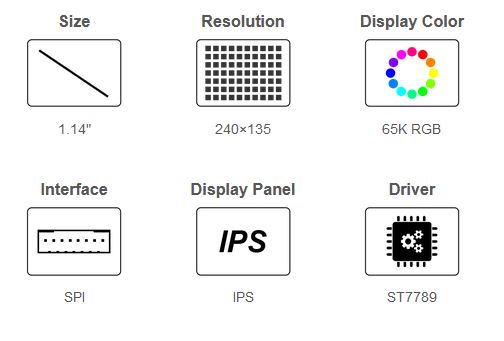
- 240×135 resolution, IPS screen, 65K RGB colors, clear and colorful displaying effect
- SPI interface, requires minimal IO pins
- 1x joystick and 2x user buttons for easy interacting
- Comes with development resources and manual (Raspberry Pi Pico C/C and MicroPython examples)
Specifications
| Operating voltage | 2.6 ~ 5.5V | Resolution | 240×135 pixels |
|---|---|---|---|
| Communication Interface | 4-wire SPI | Display size | 24.91 × 14.86mm |
| Display Panel | IPS | Pixel size | 0.1101 × 0.1035mm |
| Driver | ST7789 | Dimensions | 52.00 × 25.00mm |
Raspberry Pi Pico header compatibility
- Onboard female pin header for direct attaching to Raspberry Pi Pico
- 1x joystick and 2x user buttons for easy interacting
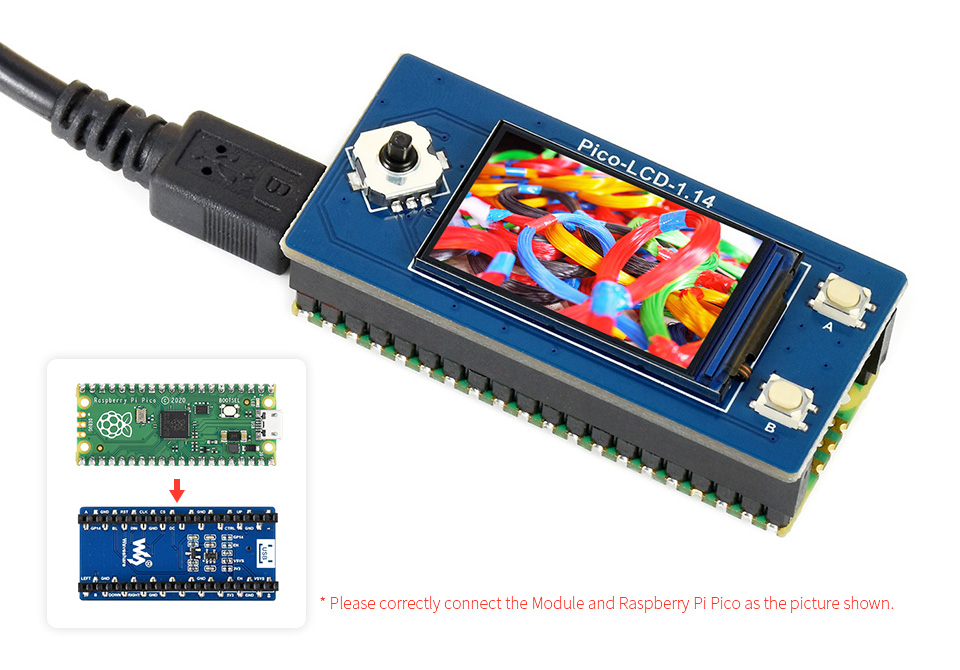
Raspberry Pi Pico is NOT included.
Pinout definition
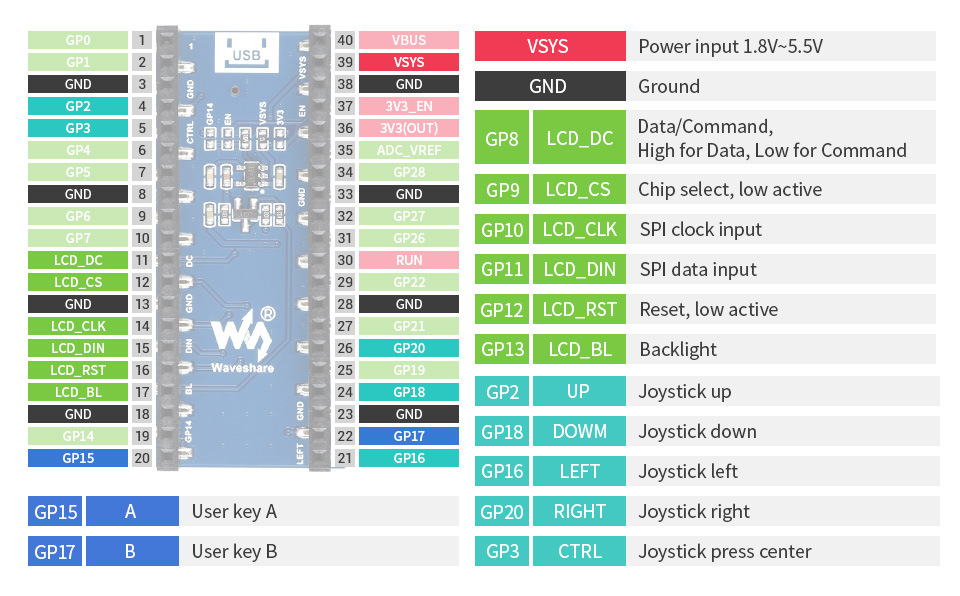
Outline dimensions
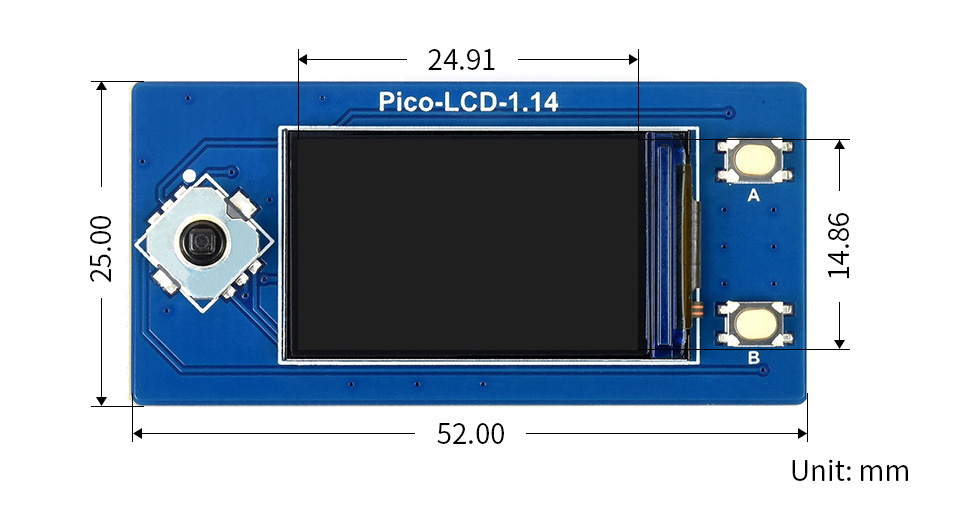
What's in the box?
1 x 1.14inch LCD Display Module for Raspberry Pi Pico
Resources