
Raspberry Pi



Raspberry Pi 4 Model B offers ground-breaking increases in processor speed, multimedia performance, memory, and connectivity compared to the prior-generation Raspberry Pi 3 Model B+, while retaining backwards compatibility and similar power consumption. For the end user, Raspberry Pi 4 Model B provides desktop performance comparable to entry-level x86 PC systems.
This product’s key features include a high-performance 64-bit quad-core processor, dual-display support at resolutions up to 4K via a pair of micro-HDMI ports, hardware video decode at up to 4Kp60, up to 8GB of RAM, dual-band 2.4/5.0 GHz wireless LAN, Bluetooth 5.0, Gigabit Ethernet, USB 3.0, and PoE capability (via a separate PoE HAT add-on).
The dual-band wireless LAN and Bluetooth have modular compliance certification, allowing the board to be designed into end products with significantly reduced compliance testing, improving both cost and time to market.
Specifications
- Processor: Broadcom BCM2711, quad-core Cortex-A72 (ARM v8) 64-bit SoC @ 1.5GHz
- Memory: 2GB, 4GB or 8GB LPDDR4 (depending on model)
- Connectivity: 2.4 GHz and 5.0 GHz IEEE 802.11b/g/n/ac wireless
- LAN, Bluetooth 5.0, BLE Gigabit Ethernet, 2 × USB 3.0 ports, 2 × USB 2.0 ports.
- GPIO: Standard 40-pin GPIO header (fully backwards-compatible with previous boards)
- Video & sound: 2 × micro HDMI ports (up to 4Kp60 supported), 2-lane MIPI DSI display port, 2-lane MIPI CSI camera port, 4-pole stereo audio and composite video port
- Multimedia: H.265 (4Kp60 decode); H.264 (1080p60 decode, 1080p30 encode); OpenGL ES, 3.0 graphics
- SD card support: Micro SD card slot for loading operating system and data storage
- Input power: 5V DC via USB-C connector (minimum 3A1), 5V DC via GPIO header (minimum 3A1)
- Power over Ethernet (PoE)–enabled (requires separate PoE HAT)
- Environment: Operating temperature 0–50oC
- Compliance: For a full list of local and regional product approvals, please visit https://www.raspberrypi.org/documentation/hardware/raspberrypi/conformity.md
- Production lifetime: The Raspberry Pi 4 Model B will remain in production until at least January 2026.
What's in the box?
1 x Raspberry Pi 4 board
You might also need...
The Raspberry Pi board comes without the below items. Have a look at what else you still need to get going.
- download and install Raspberry Pi OS using Raspberry Pi imager or grab a uSD card with Raspberry Pi OS preloaded
- a USB type C power supply available in white or black
- a micro HDMI cable or HDMI adapter
- an enclosure/case for your Pi
- a keyboard and mouse
Resources
Raspberry Pi up to date Product Brief
Take it further
- Learn how to configure, update, and navigate your Raspberry Pi once it's set up
- Discover a whole range of projects for your Raspberry Pi
- Read more detailed documentation on configuring your Raspberry Pi
- Find out about accessing your Raspberry Pi remotely
If your new Raspberry Pi 4 is not displaying anything, but is booting:
Please change the following settings in the /boot/config.txt setting. You can access these settings in a few ways.
1. Using another display to access the file: sudo nano /boot/config.txt
2. Insert the SD card into a computer/laptop and open the boot partition
Uncomment and change or add to the bottom of the file:
hdmi_safe=1
hdmi_force_hotplug=1
hdmi_ignore_edid=0xa5000080
hdmi_group=2
hdmi_mode=81 (or 39 this will depend on the type of display)
config_hdmi_boost=9
dtoverlay=vc4-fkms-v3d
max_framebuffers=2
Not all of these settings may be necessary, this will again depend on your type of display, however adding them all and removing one by one will help find the ones you may need.
WARNINGS
• This product should only be connected to an external power supply rated at 5V/3A DC or 5.1V/ 3A DC minimum. A good quality 2.5A power supply can be used if downstream USB peripherals consume less than 500mA in total. Any external power supply used with the Raspberry Pi 4 Model B shall comply with relevant regulations and standards applicable in the country of intended use.
• This product should be operated in a well-ventilated environment and, if used inside a case, the case should not be covered.
• This product should be placed on a stable, flat, non-conductive surface in use and should not be contacted by conductive items.
• The connection of incompatible devices to the GPIO connection may affect compliance and result in damage to the unit and invalidate the warranty.
• All peripherals used with this product should comply with relevant standards for the country of use and be marked accordingly to ensure that safety and performance requirements are met. These articles include but are not limited to keyboards, monitors and mice when used in conjunction with the Raspberry Pi.
• Where peripherals are connected that do not include the cable or connector, the cable or connector must offer adequate insulation and operation in order that the relevant performance and safety requirements are met.
SAFETY INSTRUCTIONS
To avoid malfunction or damage to this product please observe the following:
• Do not expose to water, moisture or place on a conductive surface whilst in operation.
• Do not expose it to heat from any source; Raspberry Pi 4 Model B is designed for reliable operation at normal ambient room temperatures.
• Take care whilst handling to avoid mechanical or electrical damage to the printed circuit board and connectors.
• Avoid handling the printed circuit board whilst it is powered and only handle by the edges to minimise the risk of electrostatic discharge damage.

The official Raspberry Pi USB-C power supply is designed to power the latest Raspberry Pi 4 Model B computers, which were released in June 2019.
Featuring a captive USB-C cable, the power supply is available in four different models to suit different international power sockets, and in two colours, white and black.
If you need to use the power supply for an earlier model RPi or the zero you'll need a type C to micro B adapter than you will find at https://www.pishop.co.za/store/white-usb-type-c-female-to-micro-usb-male-adapter?keyword=adapter&category_id=0
Specifications
Output
- Output voltage: 5.1V DC
- Minimum load current: 0A
- Nominal load current: 3.0A
- Maximum power: 15.3W
- Load regulation: ±5%
- Line regulation: ±2%
- Ripple & noise: 120mVp-p
- Rise time: 100ms maximum to regulation limits for DC outputs
- Turn-on delay: 3000ms maximum at nominal input AC voltage and full load
- Protection: Short circuit protection, Overcurrent protection, Over temperature protection
- Efficiency: 81% minimum (output current from 100%,75%, 50%, 25%)72% minimum at 10% load
- Output cable: 1.5m 18AWG
- Output connector: USB Type-C
Input
- Voltage range: 100-240Vac (rated)
- 96-264Vac (operating)
- Frequency: 50/60Hz ±3Hz
- Current: 0.5A maximum
- Power consumption (no load): 0.075W maximum
- Inrush current: No damage shall occur and the input fuse shall not blow
Case material
UL94V-1
AC pin material
Brass (NI plated)
What's in the box?
1 x USB-C 15.3W power supply
You will also need a euro plug adapter
WARNINGS
• This product should be operated in a well-ventilated environment.
• The connection of incompatible devices to this power supply may affect compliance, result in damage to the unit and invalidate the warranty.
SAFETY INSTRUCTIONS
To avoid malfunction or damage to this product please observe the following:
• Do not expose to water or moisture, or place on a conductive surface whilst in operation.
• Do not expose to heat from any source; this is designed for reliable operation at normal ambient room temperatures.
• Do not attempt to open or remove the power supply case.

Featuring a captive USB-C cable, the power supply is available in four different models to suit different international power sockets, and in two colours, white and black.
If you need to use the power supply for an earlier model RPi or the zero you'll need a type C to micro B adapter than you will find at https://www.pishop.co.za/store/rpi-power/usb-type-c-female-to-micro-usb-male-adapter
Specifications
Output
- Output voltage: 5.1V DC
- Minimum load current: 0A
- Nominal load current: 3.0A
- Maximum power: 15.3W
- Load regulation: ±5%
- Line regulation: ±2%
- Ripple & noise: 120mVp-p
- Rise time: 100ms maximum to regulation limits for DC outputs
- Turn-on delay: 3000ms maximum at nominal input AC voltage and full load
- Protection: Short circuit protection, Overcurrent protection, Over temperature protection
- Efficiency: 81% minimum (output current from 100%,75%, 50%, 25%)72% minimum at 10% load
- Output cable: 1.5m 18AWG
- Output connector: USB Type-C
Input
- Voltage range: 100-240Vac (rated)
- 96-264Vac (operating)
- Frequency: 50/60Hz ±3Hz
- Current: 0.5A maximum
- Power consumption (no load): 0.075W maximum
- Inrush current: No damage shall occur and the input fuse shall not blow
Case material: UL94V-1
AC pin material: Brass (NI plated)
What's in the box?
1 x USB-C 15.3W power supply
You will also need a euro plug adapter
WARNINGS
• This product should be operated in a well-ventilated environment.
• The connection of incompatible devices to this power supply may affect compliance, result in damage to the unit and invalidate the warranty.
SAFETY INSTRUCTIONS
To avoid malfunction or damage to this product please observe the following:
• Do not expose to water or moisture, or place on a conductive surface whilst in operation.
• Do not expose to heat from any source; this is designed for reliable operation at normal ambient room temperatures.
• Do not attempt to open or remove the power supply case.
Watch Jeff Geerling's Raspberry Pi Zero 2 W Review
Raspberry Pi Zero 2 W is the latest product in our most affordable range of single-board computers. The successor to the breakthrough Raspberry Pi Zero W, Raspberry Pi Zero 2 W is a form factor–compatible drop-in replacement for the original board.
The board incorporates a quad-core 64-bit Arm Cortex-A53 CPU, clocked at 1GHz. At its heart is a Raspberry Pi RP3A0 system-in-package (SiP), integrating a Broadcom BCM2710A1 die with 512MB of LPDDR2 SDRAM. The upgraded processor provides Raspberry Pi Zero 2 W with 40% more single-threaded performance, and five times more multi-threaded performance, than the original single-core Raspberry Pi Zero.
Raspberry Pi Zero 2 W offers 2.4GHz 802.11 b/g/n wireless LAN and Bluetooth 4.2, along with support for Bluetooth Low Energy (BLE), and modular compliance certification.
The board has a microSD card slot, a CSI-2 camera connector, a USB On-The-Go (OTG) port, and an unpopulated footprint for a HAT-compatible 40-pin GPIO header. It is powered via a micro USB socket. Video output is via a mini HDMI port; composite video output can easily be made available via test points if needed.
Sharing the same form factor as the original Raspberry Pi Zero, Raspberry Pi Zero 2 W fits inside most existing Raspberry Pi Zero cases.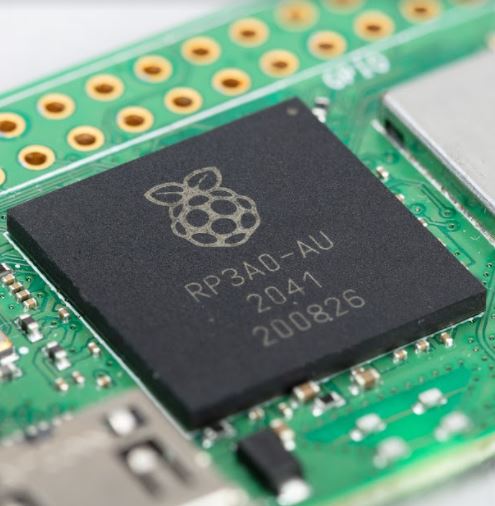
Specifications
Form factor: 65mm × 30mm
Processor: Broadcom BCM2710A1, quad-core 64-bit SoC (Arm Cortex-A53 @ 1GHz)
Memory: 512MB LPDDR2
Connectivity:
• 2.4GHz IEEE 802.11b/g/n wireless LAN, Bluetooth 4.2, BLE, onboard antenna
• 1 × USB 2.0 interface with OTG
• HAT-compatible 40-pin I/O header footprint
• microSD card slot
• Mini HDMI port
• CSI-2 camera connector
Video:
• HDMI interface
• Composite video
Multimedia:
• H.264, MPEG-4 decode (1080p30)
• H.264 encode (1080p30)
• OpenGL ES 1.1, 2.0 graphics
Input power: 5V DC 2.5A
Operating temperature: -20°C to 70°C
What's in the box?
1 x Raspberry Pi Zero 2 W
You might also need...
The Raspberry Pi board comes without the below items. Have a look at what else you still need to get.
- download and install Raspberry Pi OS using Raspberry Pi imager or grab a uSD card with Raspberry Pi OS preloaded
- a USB micro B power supply
- a mini HDMI cable or HDMI mini adapter
- an enclosure/case for your Pi Zero
- a keyboard and mouse
Resources
- Raspberry Pi Operating System Downloads https://www.raspberrypi.org/downloads/
Getting Started with Raspberry Pi - For a step-by-step guide to getting your Pi up and running, check out our online Getting started guide.
- There are loads of projects to get started on with your Raspberry Pi Zero in our learning resources area
Production lifetime: Raspberry Pi Zero 2 W will remain in production until at least January 2028
Compliance: For a full list of local and regional product approvals,
please visit pip.raspberrypi.com
WARNINGS
• Any external power supply used with Raspberry Pi Zero 2 W shall comply with relevant regulations and standards applicable in the country of intended use.
• This product should be operated in a well-ventilated environment, and if used inside a case, the case should not be covered.
• Whilst in use, this product should be placed on a stable, flat, non-conductive surface, and should not be contacted by conductive items.
• The connection of incompatible devices to Raspberry Pi Zero 2 W may affect compliance, result in damage to the unit, and invalidate the warranty.
• All peripherals used with this product should comply with relevant standards for the country of use and be marked accordingly to ensure that safety and performance requirements are met. These articles include but are not limited to
keyboards, monitors, and mice when used in conjunction with Raspberry Pi Zero 2 W.
• The cables and connectors of all peripherals used with this product must have adequate insulation so that relevant safety requirements are met.
SAFETY INSTRUCTIONS
To avoid malfunction or damage to this product, please observe the following:
• Do not expose to water or moisture, or place on a conductive surface whilst in operation.
• Do not expose to heat from any source; Raspberry Pi Zero 2 W is designed for reliable operation at normal ambient temperatures.
• Take care whilst handling to avoid mechanical or electrical damage to the printed circuit board and connectors.
• Whilst it is powered, avoid handling
This Official Raspberry Pi PSU supports up to 2.5A of current, so it won't let you down when powering hungry devices through your Raspberry Pi 3 Model B, Zero and Pico
Output
- Output voltage: 5.1V DC
- Minimum load current: 0.0A
- Nominal load current: 2.5A
- Maximum power: 12.5W
- Load regulation: ±5%
- Line regulation: ±2%
- Ripple & noise: 120mVp-p
- Rise time: 100ms maximum to regulation limits for DC outputs
- Turn-on delay: 3000ms maximum at nominal input AC voltage and full load
- Protection: Short circuit protection
Overcurrent protection
- Efficiency: 80.73% minimum (output current from 100%, 75%, 50%, 25%)
- Output cable: 1.5m 18AWG
- Output connector: micro USB
Input
- Voltage range: 100–240Vac (rated) 96–264Vac (operating)
- Frequency: 50/60Hz ±3Hz
- Current: 0.5A maximum
- Power consumption (no load): 0.075W maximum
- Inrush current: No damage shall occur and the input fuse shall not blow
What's in the box?
1 x Official Power Supply
You will also need a euro plug adapter
WARNINGS
• This product should be operated in a well-ventilated environment.
• The connection of incompatible devices to this power supply may affect compliance, result in damage to the unit and invalidate the warranty.
SAFETY INSTRUCTIONS
To avoid malfunction or damage to this product please observe the following:
• Do not expose to water or moisture, or place on a conductive surface whilst in operation.
• Do not expose to heat from any source; this is designed for reliable operation at normal ambient room temperatures.
• Do not attempt to open or remove the power supply case.
Featuring a 64-bit quad-core Arm Cortex-A76 processor running at 2.4GHz, Raspberry Pi 5 delivers a 2–3× increase in CPU performance relative to Raspberry Pi 4. Alongside a substantial uplift in graphics performance from an 800MHz VideoCore VII GPU; dual 4Kp60 display output over HDMI; and state-of-the-art camera support from a rearchitected Raspberry Pi Image Signal Processor, it provides a smooth desktop experience for consumers, and opens the door to new applications for industrial customers.
For the first time, this is a full-size Raspberry Pi computer using silicon built in-house at Raspberry Pi. The RP1 “southbridge” provides the bulk of the I/O capabilities for Raspberry Pi 5, and delivers a step change in peripheral performance and functionality. Aggregate USB bandwidth is more than doubled, yielding faster transfer speeds to external UAS drives and other high-speed peripherals; the dedicated two-lane 1Gbps MIPI camera and display interfaces present on earlier models have been replaced by a pair of four-lane 1.5Gbps MIPI transceivers, tripling total bandwidth, and supporting any combination of up to two cameras or displays; peak SD card performance is doubled, through support for the SDR104 high-speed mode; and for the first time the platform exposes a single-lane PCI Express 2.0 interface, providing support for high-bandwidth peripherals.
Specifications
Processor
Broadcom BCM2712 2.4GHz quad-core 64-bit Arm Cortex-A76 CPU,
with cryptography extensions, 512KB per-core L2 caches, and a
2MB shared L3 cache
Features
• VideoCore VII GPU, supporting OpenGL ES 3.1, Vulkan 1.2
• Dual 4Kp60 HDMI® display output with HDR support
• 4Kp60 HEVC decoder
• LPDDR4X-4267 SDRAM
(4GB and 8GB SKUs available at launch)
• Dual-band 802.11ac Wi-Fi®
• Bluetooth 5.0 / Bluetooth Low Energy (BLE)
• microSD card slot, with support for high-speed SDR104 mode
• 2 × USB 3.0 ports, supporting simultaneous 5Gbps operation
• 2 × USB 2.0 ports
• Gigabit Ethernet, with PoE+ support
(requires separate PoE+ HAT)
• 2 × 4-lane MIPI camera/display transceivers
• PCIe 2.0 x1 interface for fast peripherals
(requires separate M.2 HAT or other adapter)
• 5V/5A DC power via USB-C, with Power Delivery support
• Raspberry Pi standard 40-pin header
• Real-time clock (RTC), powered from external battery
• Power button
Production lifetime
Raspberry Pi 5 will remain in production until at least January 2035
Compliance: For a full list of local and regional product approvals, please visit pip.raspberrypi.com
What's in the box?
1 x Raspberry Pi 5 board
You might also need...
The Raspberry Pi board comes without the below items. Have a look at what else you still need to get going.
- download and install Raspberry Pi OS using Raspberry Pi imager or grab a uSD card with Raspberry Pi OS preloaded
- a USB type C power supply available in white or black
- a micro HDMI cable or HDMI adapter
- an enclosure/case for your Pi
- a battery for your RTC
- an active cooler for RPi5
- a keyboard and mouse
- a display monitor in red/white or black
Resources
This is an official Raspberry Pi Zero 2 W with a factory pre-soldered header.
Raspberry Pi Zero 2 W is the latest product in our most affordable range of single-board computers. The successor to the breakthrough Raspberry Pi Zero W, Raspberry Pi Zero 2 W is a form factor–compatible drop-in replacement for the original board.
The board incorporates a quad-core 64-bit Arm Cortex-A53 CPU, clocked at 1GHz. At its heart is a Raspberry Pi RP3A0 system-in-package (SiP), integrating a Broadcom BCM2710A1 die with 512MB of LPDDR2 SDRAM. The upgraded processor provides Raspberry Pi Zero 2 W with 40% more single-threaded performance, and five times more multi-threaded performance, than the original single-core Raspberry Pi Zero.
Raspberry Pi Zero 2 W offers 2.4GHz 802.11 b/g/n wireless LAN and Bluetooth 4.2, along with support for Bluetooth Low Energy (BLE), and modular compliance certification.
The board has a microSD card slot, a CSI-2 camera connector, a USB On-The-Go (OTG) port, and an unpopulated footprint for a HAT-compatible 40-pin GPIO header. It is powered via a micro USB socket. Video output is via a mini HDMI port; composite video output can easily be made available via test points if needed.
Sharing the same form factor as the original Raspberry Pi Zero, Raspberry Pi Zero 2 W fits inside most existing Raspberry Pi Zero cases.
Specifications
Form factor: 65mm × 30mm
Processor: Broadcom BCM2710A1, quad-core 64-bit SoC (Arm Cortex-A53 @ 1GHz)
Memory: 512MB LPDDR2
Connectivity:
• 2.4GHz IEEE 802.11b/g/n wireless LAN, Bluetooth 4.2, BLE, onboard antenna
• 1 × USB 2.0 interface with OTG
• HAT-compatible 40-pin I/O header footprint
• microSD card slot
• Mini HDMI port
• CSI-2 camera connector
Video:
• HDMI interface
• Composite video
Multimedia:
• H.264, MPEG-4 decode (1080p30)
• H.264 encode (1080p30)
• OpenGL ES 1.1, 2.0 graphics
Input power: 5V DC 2.5A
Operating temperature: -20°C to 70°C
What's in the box?
1 x Raspberry Pi Zero 2 W with presoldered header
You might also need...
The Raspberry Pi board comes without the below items. Have a look at what else you still need to get.
- download install Raspberry Pi OS using Raspberry Pi imager or grab a uSD card with Raspberry Pi OS preloaded
- a USB micro B power supply
- a mini HDMI cable or HDMI mini adapter
- an enclosure/case for your Pi Zero
- a keyboard and mouse
Resources
- Raspberry Pi Operating System Downloads https://www.raspberrypi.org/downloads/
- Getting Started with Raspberry Pi
- For a step-by-step guide to getting your Pi up and running, check out our online Getting started guide.
- There are loads of projects to get started on with your Raspberry Pi Zero in our learning resources area
Production lifetime: Raspberry Pi Zero 2 W will remain in production until at least January 2028
Compliance: For a full list of local and regional product approvals,
please visit pip.raspberrypi.com
WARNINGS
• Any external power supply used with Raspberry Pi Zero 2 W shall comply with relevant regulations and standards applicable in the country of intended use.
• This product should be operated in a well-ventilated environment, and if used inside a case, the case should not be covered.
• Whilst in use, this product should be placed on a stable, flat, non-conductive surface, and should not be contacted by conductive items.
• The connection of incompatible devices to Raspberry Pi Zero 2 W may affect compliance, result in damage to the unit, and invalidate the warranty.
• All peripherals used with this product should comply with relevant standards for the country of use and be marked accordingly to ensure that safety and performance requirements are met. These articles include but are not limited to
keyboards, monitors, and mice when used in conjunction with Raspberry Pi Zero 2 W.
• The cables and connectors of all peripherals used with this product must have adequate insulation so that relevant safety requirements are met.
SAFETY INSTRUCTIONS
To avoid malfunction or damage to this product, please observe the following:
• Do not expose to water or moisture, or place on a conductive surface whilst in operation.
• Do not expose to heat from any source; Raspberry Pi Zero 2 W is designed for reliable operation at normal ambient temperatures.
• Take care whilst handling to avoid mechanical or electrical damage to the printed circuit board and connectors.
• Whilst it is powered, avoid handling
Featuring a 64-bit quad-core Arm Cortex-A76 processor running at 2.4GHz, Raspberry Pi 5 delivers a 2–3× increase in CPU performance relative to Raspberry Pi 4. Alongside a substantial uplift in graphics performance from an 800MHz VideoCore VII GPU; dual 4Kp60 display output over HDMI; and state-of-the-art camera support from a rearchitected Raspberry Pi Image Signal Processor, it provides a smooth desktop experience for consumers, and opens the door to new applications for industrial customers.
For the first time, this is a full-size Raspberry Pi computer using silicon built in-house at Raspberry Pi. The RP1 “southbridge” provides the bulk of the I/O capabilities for Raspberry Pi 5, and delivers a step change in peripheral performance and functionality. Aggregate USB bandwidth is more than doubled, yielding faster transfer speeds to external UAS drives and other high-speed peripherals; the dedicated two-lane 1Gbps MIPI camera and display interfaces present on earlier models have been replaced by a pair of four-lane 1.5Gbps MIPI transceivers, tripling total bandwidth, and supporting any combination of up to two cameras or displays; peak SD card performance is doubled, through support for the SDR104 high-speed mode; and for the first time the platform exposes a single-lane PCI Express 2.0 interface, providing support for high-bandwidth peripherals.
Specifications
Processor
Broadcom BCM2712 2.4GHz quad-core 64-bit Arm Cortex-A76 CPU,
with cryptography extensions, 512KB per-core L2 caches, and a
2MB shared L3 cache
Features
• VideoCore VII GPU, supporting OpenGL ES 3.1, Vulkan 1.2
• Dual 4Kp60 HDMI® display output with HDR support
• 4Kp60 HEVC decoder
• LPDDR4X-4267 SDRAM
(2GB, 4GB and 8GB)
• Dual-band 802.11ac Wi-Fi®
• Bluetooth 5.0 / Bluetooth Low Energy (BLE)
• microSD card slot, with support for high-speed SDR104 mode
• 2 × USB 3.0 ports, supporting simultaneous 5Gbps operation
• 2 × USB 2.0 ports
• Gigabit Ethernet, with PoE+ support
(requires separate PoE+ HAT)
• 2 × 4-lane MIPI camera/display transceivers
• PCIe 2.0 x1 interface for fast peripherals
(requires separate M.2 HAT or other adapter)
• 5V/5A DC power via USB-C, with Power Delivery support
• Raspberry Pi standard 40-pin header
• Real-time clock (RTC), powered from external battery
• Power button
Production lifetime
Raspberry Pi 5 will remain in production until at least January 2035
Compliance: For a full list of local and regional product approvals, please visit pip.raspberrypi.com
What's in the box?
1 x Raspberry Pi 5 board
You might also need...
The Raspberry Pi board comes without the below items. Have a look at what else you still need to get going.
- download and install Raspberry Pi OS using Raspberry Pi imager or grab a uSD card with Raspberry Pi OS preloaded
- a USB type C power supply available in white or black
- a micro HDMI cable or HDMI adapter
- an enclosure/case for your Pi
- a battery for your RTC
- an active cooler for RPi5
- a keyboard and mouse
- a display monitor in red/white or black
Resources
Please note: cases and enclosures designed for the original Raspberry Pi 7" Touchscreen display will not fit the new Touch Display 2. The frame size and mounting holes are different.
Raspberry Pi Touch Display 2 is the long-awaited successor to our popular 7” Touch Display. It is a portrait-native display offering:
- 7” diagonal display size
- 85-degree viewing angle
- 24-bit RGB
- 720x1280-pixel resolution
- True multi-touch capacitive panel with five-finger touch
What's in the box?
1 x Raspberry Pi Touch Display 2
1 x 22-way to 15-way FFC DSI ribbon cable (for use with Raspberry Pi 5)
1 x 15-way to 15-way FFC DSI ribbon cable (for use with Raspberry Pi 4B/3B+/3/3A+/2/B+)
1 x GPIO connection cable
8 x M2.5 Fixing screws
You might also need the Display 2 frame and stand in black acrylic or a black protective enclosure (also available in white) that can house your Raspberry Pi 5 as well.
Use this handy little USB thingymajig allows you to power your Raspberry Pi Touch Display 2 from a USB port, keeping your GPIO pins free for HATs or jumper wires.
We found this snazzy case from lain White you can 3D print that hosts your Raspberry Pi 5" display and Raspberry Pi 5 at printables.com
Resources
Featuring a 64-bit quad-core Arm Cortex-A76 processor running at 2.4GHz, Raspberry Pi 5 delivers a 2–3× increase in CPU performance relative to Raspberry Pi 4. Alongside a substantial uplift in graphics performance from an 800MHz VideoCore VII GPU; dual 4Kp60 display output over HDMI; and state-of-the-art camera support from a rearchitected Raspberry Pi Image Signal Processor, it provides a smooth desktop experience for consumers, and opens the door to new applications for industrial customers.
For the first time, this is a full-size Raspberry Pi computer using silicon built in-house at Raspberry Pi. The RP1 “southbridge” provides the bulk of the I/O capabilities for Raspberry Pi 5, and delivers a step change in peripheral performance and functionality. Aggregate USB bandwidth is more than doubled, yielding faster transfer speeds to external UAS drives and other high-speed peripherals; the dedicated two-lane 1Gbps MIPI camera and display interfaces present on earlier models have been replaced by a pair of four-lane 1.5Gbps MIPI transceivers, tripling total bandwidth, and supporting any combination of up to two cameras or displays; peak SD card performance is doubled, through support for the SDR104 high-speed mode; and for the first time the platform exposes a single-lane PCI Express 2.0 interface, providing support for high-bandwidth peripherals.
Specifications
Processor
Broadcom BCM2712 2.4GHz quad-core 64-bit Arm Cortex-A76 CPU,
with cryptography extensions, 512KB per-core L2 caches, and a
2MB shared L3 cache
Features
• VideoCore VII GPU, supporting OpenGL ES 3.1, Vulkan 1.2
• Dual 4Kp60 HDMI® display output with HDR support
• 4Kp60 HEVC decoder
• LPDDR4X-4267 SDRAM
(2GB, 4GB, 8GB and 16GB available)
• Dual-band 802.11ac Wi-Fi®
• Bluetooth 5.0 / Bluetooth Low Energy (BLE)
• microSD card slot, with support for high-speed SDR104 mode
• 2 × USB 3.0 ports, supporting simultaneous 5Gbps operation
• 2 × USB 2.0 ports
• Gigabit Ethernet, with PoE+ support
(requires separate PoE+ HAT)
• 2 × 4-lane MIPI camera/display transceivers
• PCIe 2.0 x1 interface for fast peripherals
(requires separate M.2 HAT or other adapter)
• 5V/5A DC power via USB-C, with Power Delivery support
• Raspberry Pi standard 40-pin header
• Real-time clock (RTC), powered from external battery
• Power button
Production lifetime
Raspberry Pi 5 will remain in production until at least January 2035
Compliance: For a full list of local and regional product approvals, please visit pip.raspberrypi.com
What's in the box?
1 x Raspberry Pi 5 board
You might also need...
The Raspberry Pi board comes without the below items. Have a look at what else you still need to get going.
- download and install Raspberry Pi OS using Raspberry Pi imager or grab a uSD card with Raspberry Pi OS preloaded
- a USB type C power supply available in white or black
- a micro HDMI cable or HDMI adapter
- an enclosure/case for your Pi
- a battery for your RTC
- an active cooler for RPi5
- a keyboard and mouse
- a display monitor in red/white or black
Resources
The Raspberry Pi AI HAT+ features a built-in neural network accelerator, turning your Raspberry Pi 5 into a high-performance, accessible, and power-efficient AI machine.
Available with 13 or 26 TOPS performance, it’s suited to everything from entry-level applications to more complex neural processing, with the ability to process multiple concurrent models and AI tasks.
Build a model world
With support for common frameworks like TensorFlow and PyTorch, the Raspberry Pi AI HAT+ allows you to build a wide range of AI-powered applications for process control, home automation, research, and more.
Camera stacked
The Raspberry Pi AI HAT+ is fully integrated into Raspberry Pi’s camera software stack, taking advantage of the neural network accelerator to run post-processing tasks such as object detection, image segmentation, and pose estimation.
What's in the box?
1 x AI HAT+ board
1x Tall GPIO header
1x Nylon standoff/screws pack
We have recently released a book about Raspberry Pi AI.
Resources
Please note: Compute Module 5 not included
The Compute Module 5 Programming Jig is a single-head provisioning system built to take Compute Module 5 straight from bare board to production-ready device without needing a separate IO board during the process.
Developers can automate the provisioning workflow using rpi-sb-provisioner, enabling the jig to handle all of the usual configuration steps, including secure boot implementation, full disk encryption, and bare operating system installation. The jig connects to the provisioning network via Ethernet or Wi-Fi® and features a second Ethernet port for accelerated software transfer.
Pogo pins interface directly with the module, eliminating the need for a separate carrier board.
Features
- Single-head design provisions one Compute Module 5 at a time.
- Mechanical clamping secures the Compute Module 5 in place
during programming. - Pogo pin interface connects directly to Compute Module 5 without
a carrier board. - LED status indicators communicate the current state of the jig and
provisioning progress. - Dual network connectivity connects the jig to the provisioning network by Ethernet (JIG ETH) or Wi-Fi, with a second Ethernet port (DUT ETH) for accelerated software transfer to the Compute Module 5 being programmed.
- Automated provisioning supports secure boot, full-disk encryption, and bare operating system installation.
- Compatible with Compute Module 5 (CM5) only
What's in the box?
1 x Raspberry Pi Compute Module 5 Programming Jig
1 x 12V 2A multi-head power supply (UK, US, EU and AUS)
1 x RJ45 cables
1 x Antenna
5 x Spare pogo pins
1 x Tweezers
Resources
Featuring a 64-bit quad-core Arm Cortex-A76 processor running at 2.4GHz, Raspberry Pi 5 delivers a 2–3× increase in CPU performance relative to Raspberry Pi 4. Alongside a substantial uplift in graphics performance from an 800MHz VideoCore VII GPU; dual 4Kp60 display output over HDMI; and state-of-the-art camera support from a rearchitected Raspberry Pi Image Signal Processor, it provides a smooth desktop experience for consumers, and opens the door to new applications for industrial customers.
For the first time, this is a full-size Raspberry Pi computer using silicon built in-house at Raspberry Pi. The RP1 “southbridge” provides the bulk of the I/O capabilities for Raspberry Pi 5, and delivers a step change in peripheral performance and functionality. Aggregate USB bandwidth is more than doubled, yielding faster transfer speeds to external UAS drives and other high-speed peripherals; the dedicated two-lane 1Gbps MIPI camera and display interfaces present on earlier models have been replaced by a pair of four-lane 1.5Gbps MIPI transceivers, tripling total bandwidth, and supporting any combination of up to two cameras or displays; peak SD card performance is doubled, through support for the SDR104 high-speed mode; and for the first time the platform exposes a single-lane PCI Express 2.0 interface, providing support for high-bandwidth peripherals.
Specifications
Processor
Broadcom BCM2712 2.4GHz quad-core 64-bit Arm Cortex-A76 CPU,
with cryptography extensions, 512KB per-core L2 caches, and a
2MB shared L3 cache
Features
• VideoCore VII GPU, supporting OpenGL ES 3.1, Vulkan 1.2
• Dual 4Kp60 HDMI® display output with HDR support
• 4Kp60 HEVC decoder
• LPDDR4X-4267 SDRAM
(1GB, 2GB, 4GB and 8GB)
• Dual-band 802.11ac Wi-Fi®
• Bluetooth 5.0 / Bluetooth Low Energy (BLE)
• microSD card slot, with support for high-speed SDR104 mode
• 2 × USB 3.0 ports, supporting simultaneous 5Gbps operation
• 2 × USB 2.0 ports
• Gigabit Ethernet, with PoE+ support
(requires separate PoE+ HAT)
• 2 × 4-lane MIPI camera/display transceivers
• PCIe 2.0 x1 interface for fast peripherals
(requires separate M.2 HAT or other adapter)
• 5V/5A DC power via USB-C, with Power Delivery support
• Raspberry Pi standard 40-pin header
• Real-time clock (RTC), powered from external battery
• Power button
Production lifetime
Raspberry Pi 5 will remain in production until at least January 2035
Compliance: For a full list of local and regional product approvals, please visit pip.raspberrypi.com
What's in the box?
1 x Raspberry Pi 5 board
You might also need...
The Raspberry Pi board comes without the below items. Have a look at what else you still need to get going.
- download and install Raspberry Pi OS using Raspberry Pi imager or grab a uSD card with Raspberry Pi OS preloaded
- a USB type C power supply available in white or black
- a micro HDMI cable or HDMI adapter
- an enclosure/case for your Pi
- a battery for your RTC
- an active cooler for RPi5
- a keyboard and mouse
- a display monitor in red/white or black
Resources